 +
+
Elite Trader Funding
Trade Journal
Auto-sync your Elite Trader Funding trades. Track P&L, grade execution, and find the patterns that actually pay.
Know Where You Stand
P&L Calendar & Equity Curve
See your whole month at a glance. Green days, red days, patterns revealed. Click any day to see the trades behind the number.
Grade Trades & Tag Setups
Rate every trade A through F. Tag it by strategy. Document what you saw, what you did, and what you learned. Find the setups that pay.
All Your Accounts, One View
Track evaluations and funded accounts separately or roll them up together. Each gets its own commission settings and stats.
Trading Heatmap
See your performance by hour and day of week. Find your highest-expectancy windows and stop trading the time slots that cost you.
Structured Day Journal
Write pre-market plans, track forecast vs. actual for each instrument, and review with economic events already loaded.
Commission-Adjusted P&L
Set per-order or per-contract rates on each account. Every stat in Tanto reflects what you actually keep after fees.
All Your Elite Accounts
- Trades sync from Tradovate, NinjaTrader, or Rithmic.
- Journal days and individual trades.
- Economic events built in.
- P&L calendar with day and week summaries.
- Grade trades and tag setups.
Your Elite Trades, Analyzed
Link your Tradovate, NinjaTrader, or Rithmic account and Tanto pulls in every trade from your Elite Trader Funding evaluation or funded account. Fills arrive with timestamps, execution details, and commission-adjusted P&L. Run one eval or twenty at once. Each account gets its own stats, its own calendar, and its own commission settings.
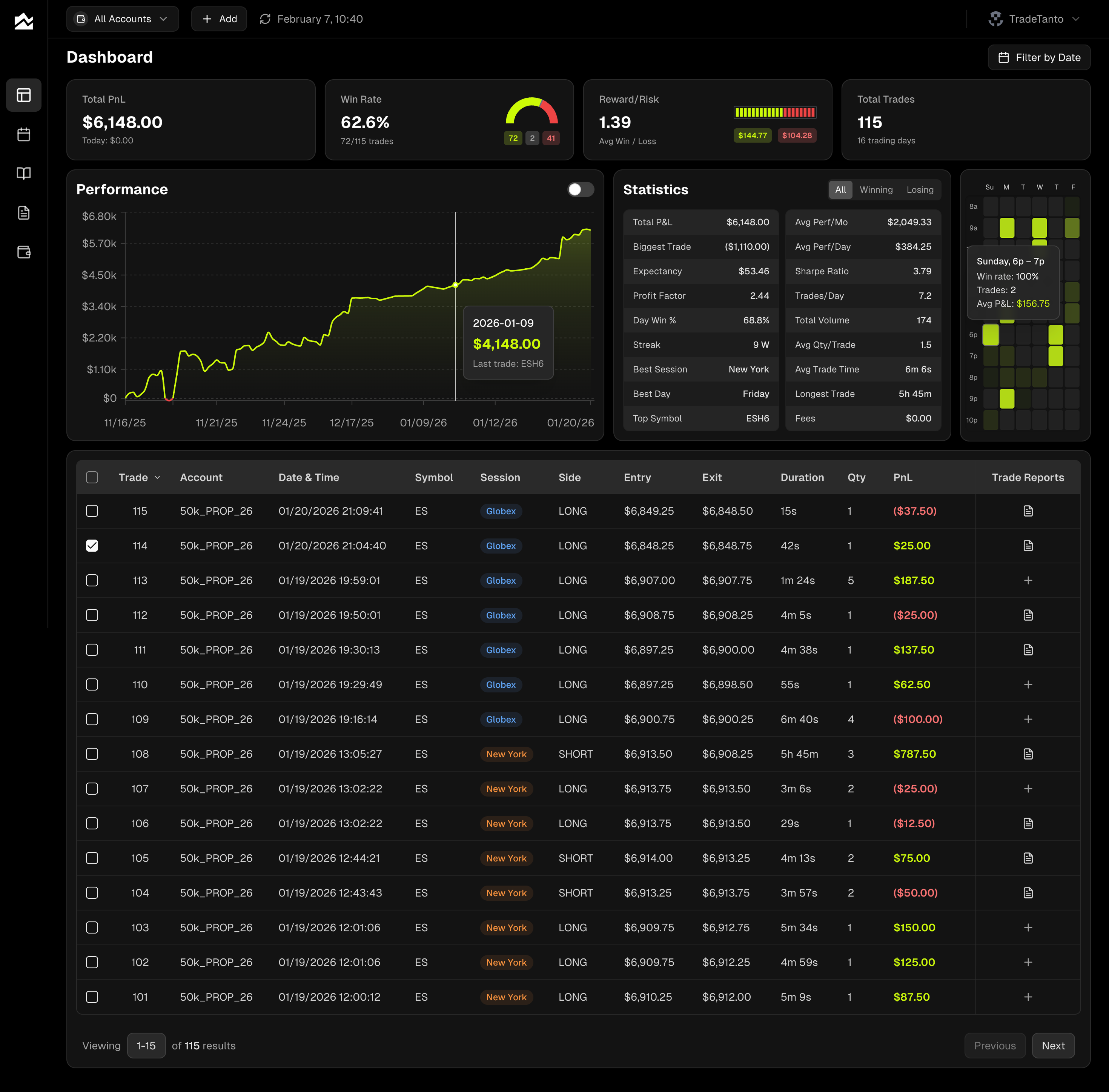
The dashboard gives you cumulative P&L, win rate, profit factor, expectancy, and reward-to-risk in one view. A color-coded P&L calendar lays out your month with green days, red days, and weekly totals. Click into any day to see individual trades, a session equity chart, and your journal notes. The trading heatmap breaks your results down by hour and day of week so you know exactly which sessions are paying and which ones are not.
Every trade can be graded A through F and tagged by setup. The Day Journal gives you a place to write pre-market plans, compare forecast to actual for each instrument, and review with economic events already loaded. Filter Trade Reports by grade, tag, or side to isolate the patterns that make money in your Elite account from the ones that drain it.
Passing an evaluation takes consistency, and consistency requires data. Tanto gives you the structured workflow to track every session, measure what matters, and stop repeating the mistakes you cannot see without a journal. That is how you go from trading on feel to trading on evidence.
Elite Trader Funding + Tanto FAQ
Through the platform your Elite account runs on: Tradovate, NinjaTrader, or Rithmic. For Tradovate and NinjaTrader, authorize read-only access. For Rithmic, select "Rithmic Paper Trading" from the system dropdown and enter your credentials. Trades sync from that point forward.
Every fill with full details: symbol, side, entry, exit, quantity, timestamps, and P&L. Tanto calculates commission-adjusted stats on top of that.
Yes. Create a separate account for each eval or funded account. Each gets its own stats, calendar, and commission settings. View them individually or combined.
Your month at a glance, color-coded by daily P&L. Click any day to see individual trades, a session P&L chart, and your journal notes.
Click any trade to grade it A through F, rate execution quality, tag your setup, and write notes. Then filter Trade Reports by grade, tag, or side to see what is working.
A grid showing your performance by hour and day of week. Brighter cells mean higher expectancy. It shows you when to trade and when to sit out.
Yes. Set per-order or per-contract rates on each account. Every P&L number across the app adjusts automatically.
Yes. Upload trades via CSV or add them manually. All analytics and journaling features work the same.
For Tradovate and NinjaTrader, Tanto uses OAuth so your password never touches our servers. For Rithmic, credentials are encrypted at rest before being stored. All connections are read-only.
Everything stays. All trades, journal entries, grades, and tags are stored permanently. Review past evals anytime.