 +
+
FTMO
Trade Journal
Auto-sync your FTMO Challenge trades from cTrader or MetaTrader 5. Every trade charted, graded, and tagged, so you know which setups are carrying the Challenge and which are quietly costing it.
Know Where You Stand
P&L Calendar & Equity Curve
See your whole Challenge at a glance, with daily and weekly totals stacked beside it. Click any day to open the trades behind the number.
Grade Trades & Tag Setups
Grade every trade A through F and tag it by setup, entry, exit, market conditions, and emotional state. Five vocabularies, not one.
Challenge, Verification & Funded
Track each phase separately with its own stats, calendar, and commission settings. View them individually or combined.
Trading Heatmap
See your performance by hour and day of week. Find your highest-expectancy windows and stop trading the time slots that cost you.
Structured Day Journal
Write pre-market plans, track forecast vs. actual for each pair, and review with economic events already loaded.
MFE, MAE & Captured %
See how far each trade ran your way, how far it went against you, and how much of the move you actually kept.
Your FTMO Challenges, All in One Place
- Trades sync automatically from cTrader or MetaTrader 5.
- Track Challenge, Verification, and funded accounts separately.
- Your data stays forever, even if a Challenge fails.
- P&L calendar with daily and weekly breakdowns.
- Grade trades and tag setups to find what pays.
- Pre-market journal with economic events built in.
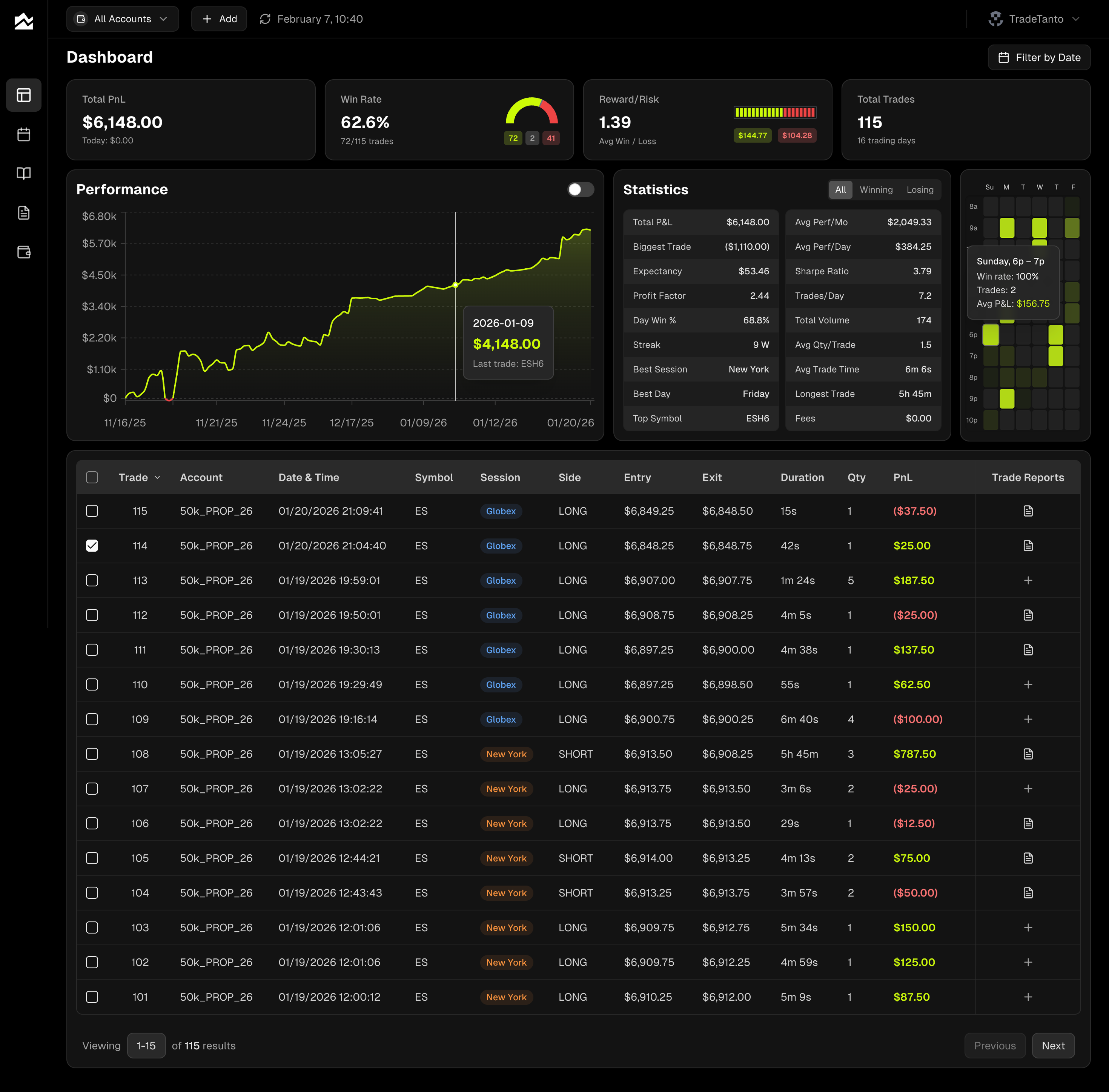
Journal Your Way Through the FTMO Challenge
Connect your cTrader or MetaTrader 5 account once and Tanto pulls in every FTMO trade automatically. Challenge, Verification, or funded account. Each trade arrives charted against price with your fills marked, alongside the MFE, MAE, and Captured % that show how you managed it. No end-of-day spreadsheet exports. No forgetting to log a trade.
Mid-Challenge, the numbers that matter sit on your dashboard: cumulative P&L, daily drawdown, win rate, and reward-to-risk. Open any trade for a chart of that session with every fill marked, plus the MFE, MAE, and Captured % behind it. Tag your trades by setup, entry, exit, conditions, and emotion, then use Cross Analysis to put any two against each other. Setup by time of day tells you whether an edge is real or just a morning you keep trading past.
After each session, grade your trades A through F and tag them by setup. Write your pre-market plan in the Day Journal with economic events already loaded. Then filter Trade Reports by grade or tag to separate the setups building your account from the ones bleeding it. That review process is where the real edge gets built.
Failed challenges teach more than passing ones, but only if you keep the data. Every trade, journal entry, grade, and tag in Tanto is stored permanently. Start your next FTMO Challenge with a complete record of what went wrong and a plan for what to fix. That compounding knowledge is how traders stop retaking challenges and start collecting payouts.
FTMO + Tanto FAQ
Two ways, depending on which platform your FTMO account uses. For cTrader, authorize read-only access via OAuth. For MetaTrader 5, connect your terminal, which takes a few minutes and needs no investor password. Either way the connection is read-only and Tanto can never place trades.
Yes. Create a separate account in Tanto for each phase. Each gets its own stats, calendar, and commission settings. View them individually or switch to a combined view.
Everything stays. All trades, journal entries, grades, and tags are stored permanently. When you start a new Challenge, your entire history from past attempts is there to review.
Symbol, side, entry, exit, quantity, timestamps, and P&L on every trade. Tanto adds the chart, your MFE, MAE, and Captured %, and commission-adjusted stats on top.
Click any trade to grade it A through F, rate execution quality, and tag it by setup, entry, exit, conditions, and emotion. Then filter Trade Reports by grade or tag, or cross-analyze any two to see which combinations actually pay.
Yes. The trading heatmap shows your performance by hour and day of week. It helps you find your highest-expectancy windows and avoid the sessions that quietly drain your account.
Yes. Set per-lot rates on each account. Every P&L number across the app adjusts automatically.
Yes. Upload trades via CSV or add them manually. All analytics and journaling features work the same.
Read-only access only. Tanto cannot place trades or modify your account. Your password never touches our servers.
Yes. Add as many accounts as your plan supports. Track FTMO alongside other firms, personal accounts, or different strategies, all from one dashboard.