 +

Vest Markets
Trade Journal
Track all your Vest Markets prop accounts with Tanto. Every trade syncs minutes after you close it, so you can dive deep: the hour the account bleeds, the setup that actually pays, and why the last evaluation ended.
Journal Every Vest Trade
Your Journal Fills Itself
Close a trade on any Vest account and it is in Tanto minutes later. Nothing to export after the session, nothing to upload.
Are Your Losses Bigger Than Your Wins?
Set a stop and target, switch to R, and every trade reads in risk instead of dollars. The answer shows up fast.
A Good Loss Is Not a Bad Trade
Grade the outcome A through F and the execution on its own, so a disciplined loss and a lucky win stop looking alike.
All Your Accounts at Once
Vest shows one account at a time. Tanto syncs them all, so you can see if the funded account gets traded differently from the evaluation.
Which Markets Actually Pay
One Vest account trades crypto, stocks, FX, and index perps. Reports splits them apart so you know which ones to stop touching.
Was It You, or Was It CPI?
The Day Journal puts central bank decisions, CPI, jobs data, and earnings beside every day, so you can see which red days lined up with the news.
Trade Like a Pro
- Every trade syncs on its own. No exports, no uploads.
- Real PnL with fees and funding included, so it matches your balance and loss limits.
- Spot the hour, setup, or habit that keeps blowing your account.
- See every trade in R, so you know if your losses outsize your wins.
- Every evaluation and funded account synced, side by side.
- Vest next to your futures, forex, and MT5 accounts in one journal.
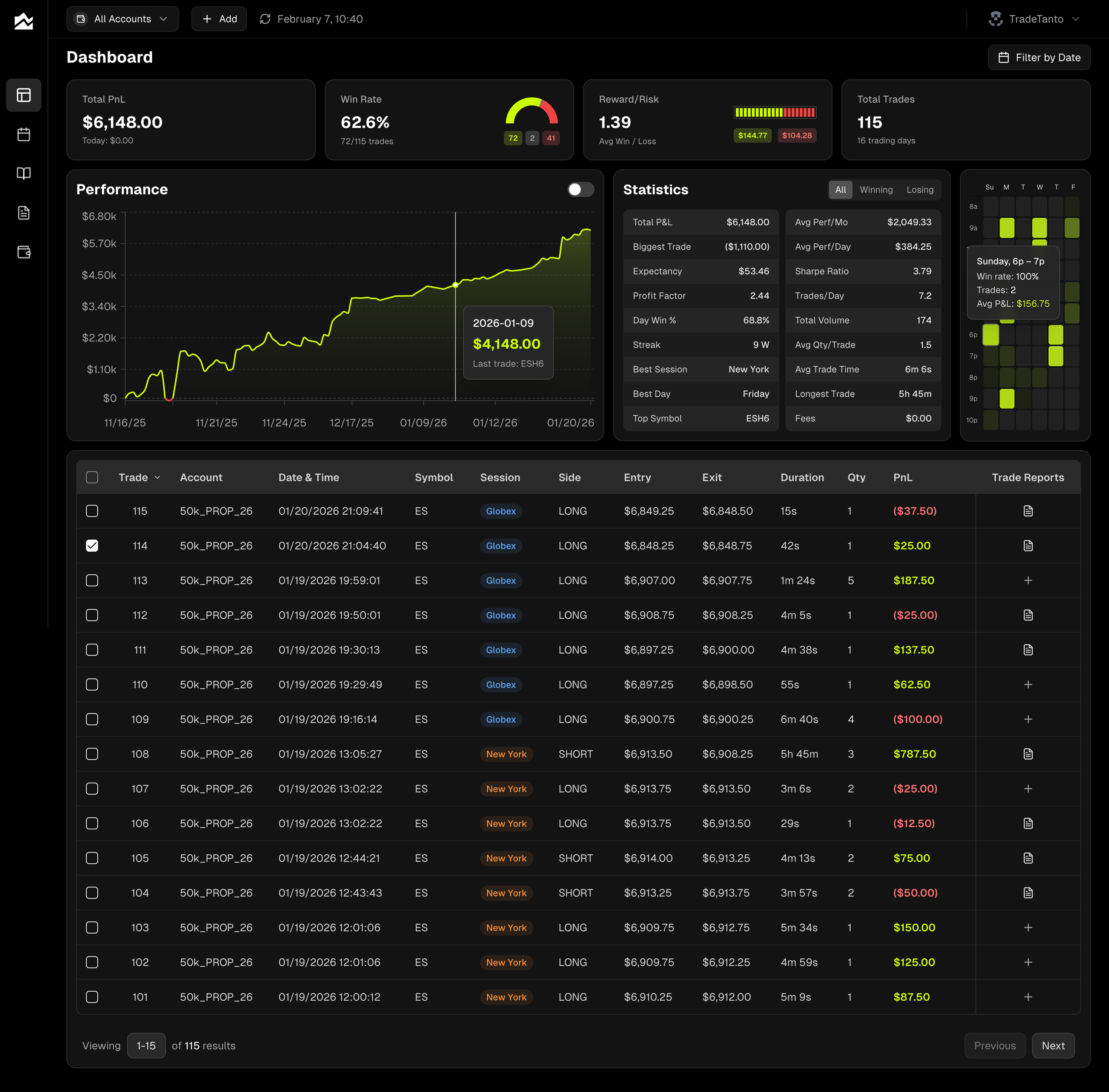
Every Vest Account, One Journal
Most Vest traders are on Vest Capital: paying for an evaluation, chasing a profit target under a daily loss limit and a fixed max drawdown, and either passing or losing the account. Vest gives you a clean trading screen and a Positions History table. It does not tell you why the last evaluation closed, or what your winning days have in common. Tanto does.
Connecting takes a couple of minutes, one time. The first sync brings in your full Positions History, so the evaluation you are halfway through arrives complete, and from then on Tanto keeps up while you trade. Scale-ins, partial exits, and flips from long to short all line up with Vest's own history, and PnL includes Vest's fees and funding, so the number matches your balance and your loss limits, not a gross figure that hides the cost of overtrading.
Then you have a journal. Every trade gets a card for notes, screenshots, a grade, setups, and tags. Set a stop and target, switch to R, and you see at a glance whether your losses run bigger than your wins. The PnL calendar, day and week views, Reports by setup and time of day, and the trade scatter turn a pile of trades into patterns: the hour where the account bleeds, the setup that actually pays, the revenge trades after the first loss. That is the difference between buying another evaluation and fixing what keeps failing.
Each Vest account, evaluation, funded, or primary, syncs into its own Tanto account. Vest shows you one at a time, but Tanto keeps them all current, so you can see whether the funded account is being traded differently from the evaluation that got you there. When an account closes, archive it and every trade stays. And if Vest is not the only place you trade, your futures prop accounts, Tradovate, NinjaTrader, and MT5 accounts sit beside it in one journal, with one calendar and one set of reports. Our breakdown of the Vest Markets rules compares every account type on targets, drawdown, and payouts.
Vest Markets + Tanto FAQ
It shows you what is costing you. Grade and tag your trades, and Reports, the heatmap, and the PnL calendar point at the pattern: the hour the account bleeds, the setup that loses, the revenge trades after the first red one. Archived evaluations keep every trade, so you can line the failed ones up against the ones that passed.
Yes. Connect once, which takes a couple of minutes, and new trades reach Tanto within about a minute of closing. Prefer files? A Positions History CSV export still works.
Trades sync while you have Vest open on your computer. Close it, or trade from your phone, and nothing is lost: everything catches up the next time you open Vest there.
The first sync brings in your full Positions History for each account. If you already uploaded Vest CSVs, connect the Vest account to that same Tanto account. The sync matches the trades you imported and takes them over in place, so your notes and tags stay on them and nothing lands twice.
No. Tanto never sees your Vest password. The connection is read-only: it reads your trade history and nothing else, and it can never place, change, or cancel an order.
Yes. Evaluation, funded, and primary accounts each sync into their own Tanto account, with their own stats and calendar. View them one at a time or together.
Crypto, stock, forex, and index perps. Sizes match what Vest shows: fractions of a coin for crypto and units of the base currency for forex. Vest's NQ and ES index perps show in Tanto as NDX and SPX.
Yes. Synced trades include Vest's trading fees and funding payments, so PnL matches your account balance and your evaluation's loss limits. If you upload a CSV instead, fees are included but funding is not, because Vest's export leaves it out. For intraday trades that is usually a matter of cents.
Every order comes through, so scale-ins, partial closes, and flips match Vest's own Positions History. Turn on Group trades by position and each position reads as one trade.
Two grades per trade. Performance is A through F for how it turned out. Execution is Perfect, Decent, or Needs Work for how closely you followed the plan. Tag the setup, entry, exit, conditions, and emotion, then filter Reports by any of them or cross two against each other.
Yes. The Day Journal gives each day general notes plus plan and actual columns for up to three markets, with the economic calendar for that day beside them: central bank decisions, inflation and jobs releases, and earnings.
Yes. Switch the app to R multiples and every stat, chart, and calendar shows R instead of dollars. A small account and a large evaluation read on the same scale, so the stats describe your process rather than your account size.
Archive it. The account stops counting toward your plan limit, leaves your All Accounts totals, and keeps every trade, grade, tag, and journal entry as it was. When you start the next one, the old account is a click away for comparison.
Yes. Add as many accounts as your plan supports and view them one at a time or together. Vest beside a futures prop firm, a forex prop firm, or a personal account, all on one dashboard.