Best Trading Journal for Prop Firm Traders in 2026
9 min read
If you trade with a modern futures prop firm, your journal has a job most journals weren't built for: pull trades from Rithmic-based firms like Apex, Bulenox, and Lucid, pull from TopstepX through ProjectX, keep your combine attempts separate from your funded performance, and roll a stack of accounts up into one view of your edge.
That's a different problem from journaling a single equities account. And it's the reason traders keep ending up on Reddit asking why TradeZella, Tradervue, or TraderSync make them export CSVs every night just to see yesterday's trades.
This article walks through what prop firm traders actually need from a journal, why most tools fall short on at least one piece of that, and why Tanto is built around exactly this workflow.
What Prop Firm Traders Need from a Journal
Before naming any tool, here's the checklist a prop firm trading journal has to pass.
Real-time sync to the rails your firm actually uses. Modern futures prop firms run on three main pipes. Tradovate covers Apex, Tradeify, Take Profit Trader, My Funded Futures, and Lucid, among others. Rithmic is the low-latency rail underneath Apex, Bulenox, Earn2Trade, Lucid, and most other Rithmic-based firms, each as a different system inside the same Rithmic API. ProjectX is the API behind TopstepX, Topstep's dedicated trading app. A journal that only handles one of those rails leaves you doing CSV uploads for the other two.
Per-account stats with a roll-up view. Most prop firm traders aren't running one account. They're running three combine attempts, two funded accounts, and a personal account at the same time. The numbers you care about live at two levels: how each account is doing on its own, and how the whole stack is performing together. Without that split, you can't tell whether a bad week is a strategy problem or a single account dragging the average down.
Per-contract round-turn commission tracking. Prop firm fees aren't trivial. A 5-lot MES round turn at a typical per-contract rate runs you double-digit dollars off your P&L, and that's before exchange fees. If your journal only supports a flat per-trade commission, your funded P&L is a guess. You need the per-contract math, set per account, because firms charge different rates.
A clean way to separate combine attempts from funded performance. Combines are not your real trading record. They're auditions. Mixing them into your career stats poisons the data: the rules are different, the position sizing is different, and many combines blow up by design. A real prop firm trading journal needs a way to keep combines visible but excluded from your "this is how I actually trade" numbers.
Multi-account workflows that don't require duplicate work. Daily journal entries, setup tags, trade grades, screenshots, market notes. None of that should have to be re-entered for each account. Your reflection on this morning's NQ session applies whether you traded it on Apex or Bulenox.
That's the real bar. Now here's how Tanto stacks up against it.
Tanto: The Trading Journal Built for Funded Traders
Tanto auto-syncs from Tradovate, NinjaTrader, cTrader, Rithmic, Interactive Brokers, and ProjectX (TopstepX). Trades show up on their own, in real time, for everything.
For prop firm traders, that broker list is the point. The Rithmic dropdown alone covers Apex, Bulenox, Earn2Trade, Lucid, Topstep, and most other Rithmic-based prop firms. ProjectX covers TopstepX. Tradovate covers Apex (when you select it as your platform during signup), Tradeify, Take Profit Trader, My Funded Futures, and Lucid's Tradovate-based accounts. Once you connect, you stop thinking about how trades get into your journal.
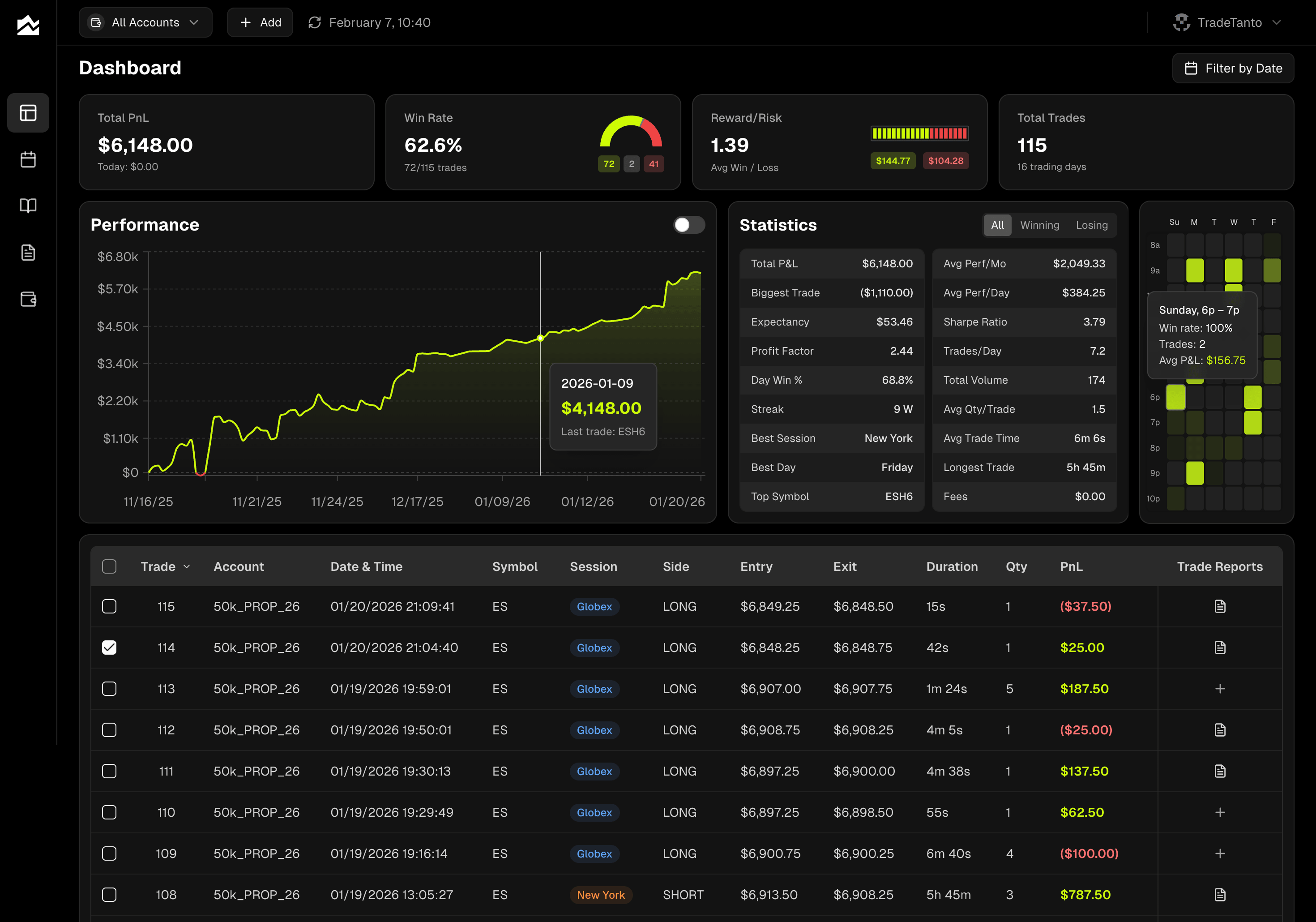
The dashboard treats accounts as a first-class concept. Pick a single funded account from the selector to see just that one's numbers, or pick "All Accounts" to see your combined edge across the whole stack. Win rate, profit factor, expectancy, reward-to-risk, and the trading heatmap all respect that filter. So do the calendar and the trade reports.
Per-account commission settings are where the funded P&L gets honest. On each account, you set whether you're paying per order or per contract, and the dollar amount. Tanto then adjusts every P&L number in the app, on every trade, on every chart, on every stat card. You see the Fees row in your dashboard stats, so you know exactly how much is going to round turns. If you trade Apex MES at one rate and Bulenox NQ at another, you create two accounts and set each one's commissions separately.
Combine attempts versus funded performance gets handled with the hide feature. Trades you hide stay visible in the trade grid, dimmed, but they're pulled out of every stat, chart, and report. The standard prop firm workflow looks like this: keep combine attempts on their own account, leave their P&L visible for review, and use "All Accounts (excluding hidden)" as your real career view. Funded accounts roll into your edge stats; combines stay tagged as combines.
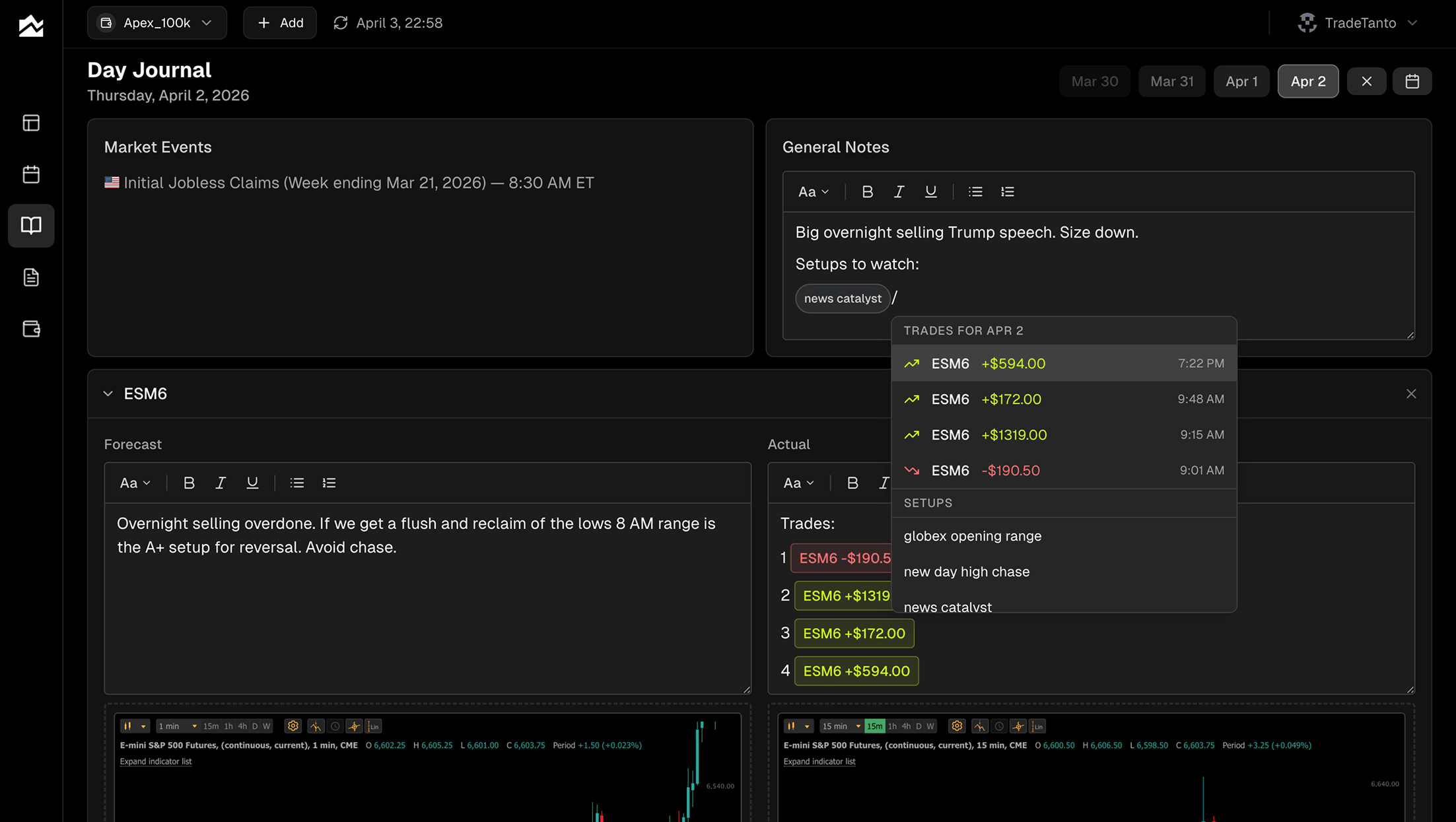
The Day Journal is account-agnostic in the right way. Your forecast for ES this morning, the economic events on your calendar, your screenshots, your post-session debrief, and your slash-command mentions of specific trades all live at the day level. They apply across every account that traded that morning. You write the journal once, and it sits next to whichever account you're filtering on.
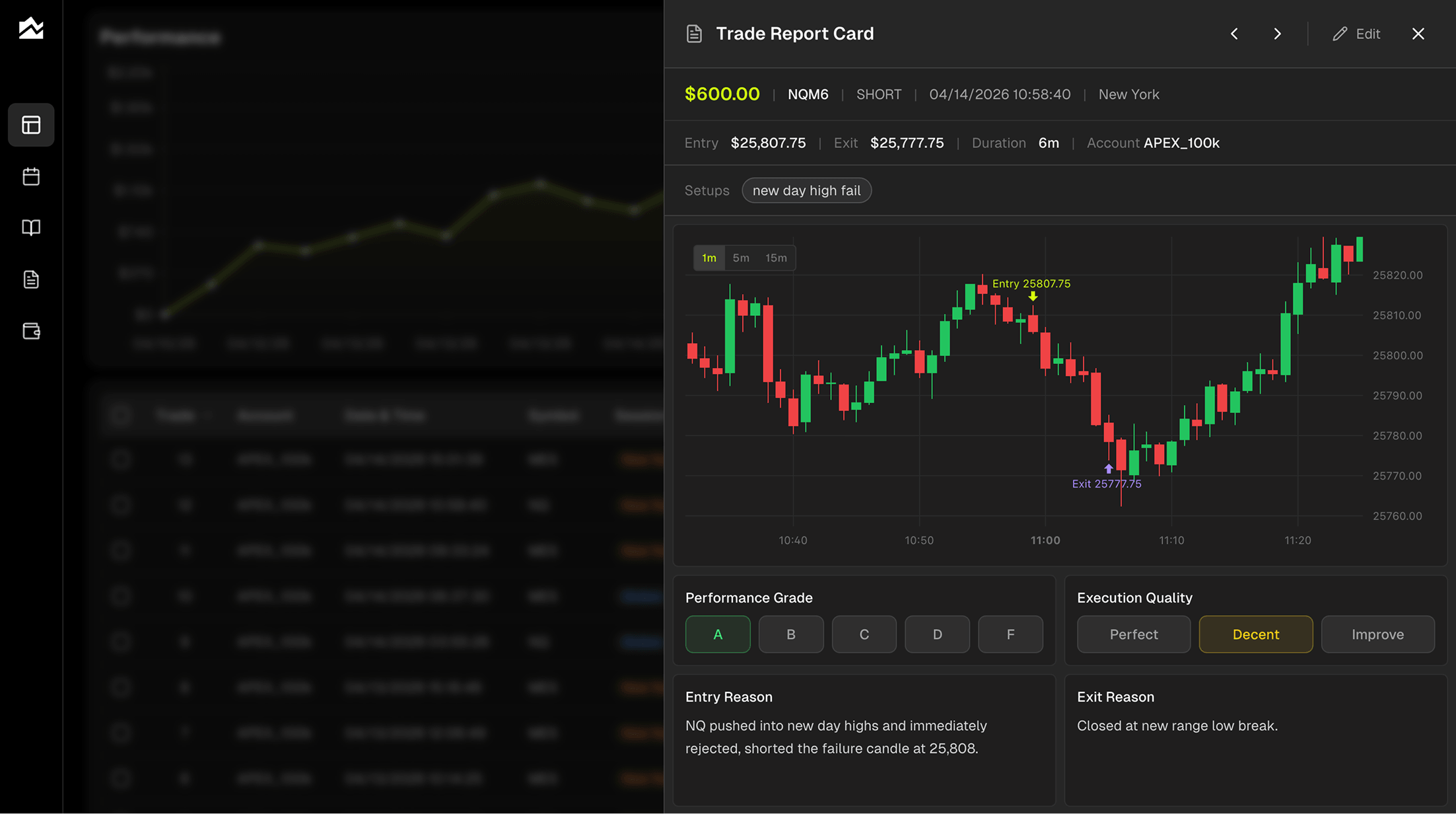
Trade reports give you the per-trade detail layer. Entry and exit plotted on a candlestick chart, an A through F performance grade, execution quality rated separately on a Perfect/Decent/Improve scale, tags by setup, and a notes editor with five fields covering entry reason, exit reason, emotional state, market conditions, and what to do differently next time. The two grading scales let you separate outcome from process. An A-setup that lost money is still a good trade. Filter by tag to see how your "first pullback" trades are doing across accounts, or filter by grade to find the A-setup losers worth studying.
Pricing starts at $13.99/month on Starter, with Professional at $24.99/month covering up to five accounts, which fits most traders running multiple funded accounts. See the pricing page for the current breakdown, and the full integration list for every supported broker.
Other Options Worth Knowing About
A complete picture means naming the alternatives that fit narrower cases.
TraderSync makes sense if your trading isn't only futures. The broker list is broad on the equities side, with wide coverage of US stock and options brokers, and that breadth matters if you trade SPX options on Schwab in the morning and NQ on Apex in the afternoon. For the prop firm rails specifically, you're generally on CSV uploads or limited connections, so weigh whether the equities coverage offsets the manual work on your funded accounts.
Trademetria appeals to multi-asset traders who want the back-office accounting features layered on top of journaling. Deposits, withdrawals, dividends, and cost tracking show up as first-class concepts, which is useful if you're treating trading as a business and want one place that ties everything together. Like TraderSync, the prop firm side leans on file imports rather than native real-time sync to the major rails.
If you only trade with a single Rithmic-based prop firm or only on TopstepX, and you're fine with daily CSV exports, the difference between these tools and Tanto is mostly about how much of your week you want to spend on data plumbing.
Getting Started: Connecting Your Prop Firm Account to Tanto
Setup is short. The exact steps depend on which firm you trade with.
For Apex, Bulenox, Lucid, and other Rithmic-based firms: Click the + button in the top bar, choose AutoSync, select Rithmic, and pick your firm's system from the Rithmic System dropdown. The labels match the firm names you'd recognize, though some firms appear under slightly different naming conventions. Enter the Rithmic username and password your firm gave you when you opened the account, the same ones you use in R Trader Pro, NinjaTrader, or Sierra Chart.
For TopstepX: Log in to TopstepX, go to Settings, open the API tab, and generate an API key. Save it somewhere safe, it's only shown once. In Tanto, choose ProjectX as the platform, enter your TopstepX username and the API key, and pick which trading account to sync. Combines and funded accounts show up as separate selectable accounts.
For Tradovate accounts on Topstep, Apex, or Bulenox: Pick Tradovate in the AutoSync flow, sign in with your broker credentials on Tradovate's own login page, and select Demo as the environment for combine accounts or Live for funded.
Setting commissions for accurate funded P&L: On the Accounts page, edit each account, check Enable commission tracking, choose Per Contract (Round Turn), and enter your firm's per-contract rate. Rates vary by firm and product, so check your firm's fee schedule for the exact number. Tanto recalculates every P&L number in the app the moment you save.
For step-by-step setup with screenshots and troubleshooting, see the help center. For a broader look at the journal market, the general pillar on best trading journal software compares categories beyond prop firm needs.
The Bottom Line
The best trading journal for prop firm traders is the one that doesn't make you do CSV gymnastics every night. Real-time sync to the rails your firm actually runs on, per-account stats that respect a multi-account stack, per-contract round-turn commissions that match what your firm actually charges, and a clean way to separate combines from funded performance.
Tanto is built around that workflow. If you're juggling Apex evaluations, a Bulenox PA account, a Lucid funded account, and a TopstepX combine, you connect them once and stop thinking about how trades get into your journal. The data plumbing goes away, and what's left is the part that actually makes you a better trader: looking at your edge, finding the leaks, and showing up tomorrow with a clearer plan.
Create your account and connect your first prop firm account in under five minutes.
By Team Tanto · Last updated: May, 2026