TradeZella Alternative with Prop Firm Auto-Sync
9 min read
If you searched for a TradeZella alternative, you probably hit one of two walls. TradeZella's Auto Sync runs every 3 hours by default, and the prop firm gateways you actually trade through, Rithmic, ProjectX, and TopstepX, only support file upload. This guide is for futures and prop firm traders who want their fills in a journal in real time, not on a polling schedule, and not after a CSV export.
What TradeZella Offers (and Where It Stops)
TradeZella is a web-based journal built around a Basic plan ($29/month) and a Premium plan ($49/month). Annual billing drops those to $24/month and about $33/month.
Trade Replay and Backtesting
Trade Replay scrubs through fills tick-by-tick after the close. Backtesting runs historical sessions against your playbook. Both are TradeZella's flagship features, but the full versions are Premium-only — custom replay speed, time of sales, Level II depth, and seconds-level data all live behind the upgrade. Basic also caps playbooks at 3 and mentor invites at 5.
Broker Coverage Outside the Prop Firm Stack
For brokers like Tradovate, NinjaTrader, cTrader, Interactive Brokers, ThinkorSwim, and TradeStation, TradeZella offers Auto Sync. Per TradeZella's help center, sync runs automatically every 3 hours, with a manual refresh available every 30 minutes. The advertised 500+ broker count is mostly MetaTrader 4 and 5 forex brokers running on the same MT engine.
Where It Stops for Prop Firm Traders
On TradeZella's own broker support page, Rithmic R Trader, TopstepX, and Project X are listed as File Upload only. No Auto Sync. If you trade Apex, Topstep, Earn2Trade, Bulenox, or any Rithmic-based prop firm, your fills reach TradeZella through CSV export. PropFirm Sync, the dashboard TradeZella launched, doesn't fix this. It uses Plaid to scan your bank for evaluation fees, resets, and payouts at the account level, not trade-level sync.
Here's how the futures and prop firm rails actually compare:
Connection | TradeZella | Tanto |
|---|---|---|
Tradovate | Auto Sync (every 3 hours) | Real-time |
Rithmic (Apex, Bulenox, Earn2Trade) | File upload only | Real-time |
TopstepX / ProjectX | File upload only | Real-time |
Interactive Brokers | Auto Sync | ~10 min via Flex Queries |
NinjaTrader | Auto Sync (every 3 hours) | Real-time |
What a Strong TradeZella Alternative Looks Like
If you're a futures or prop firm trader, these are the criteria worth checking before you sign up for anything that claims to be better than TradeZella:
Auto-sync that includes the prop firm rails. Rithmic for Apex, Earn2Trade, and Bulenox. ProjectX for TopstepX. Tradovate for Topstep's standard combines. If a journal can't sync these directly, you'll be uploading CSVs forever.
Per-account stats with multi-account roll-up. You should be able to view a single combine in isolation, then switch to All Accounts for the big picture. Mixing a $50K combine into your live account's metrics defeats the point of journaling.
A way to hide trades without deleting them. Practice trades, fat fingers, accidental fills on the wrong account: you want them out of stats but still on record.
Commission tracking that actually adjusts P&L. Per-contract round turn for futures, configurable per account, applied across every chart and report.
Pricing that holds up over a multi-year journaling habit. A journal you'll keep for three years should cost what three years of journaling is worth, not what three years of subscription compounding produces.
Why Tanto Works for Futures and Prop Firm Traders
Tanto is built around the brokers and prop firms futures traders actually use. It's the part of the workflow where TradeZella's coverage map has gaps.
Trades Sync the Moment They Fill
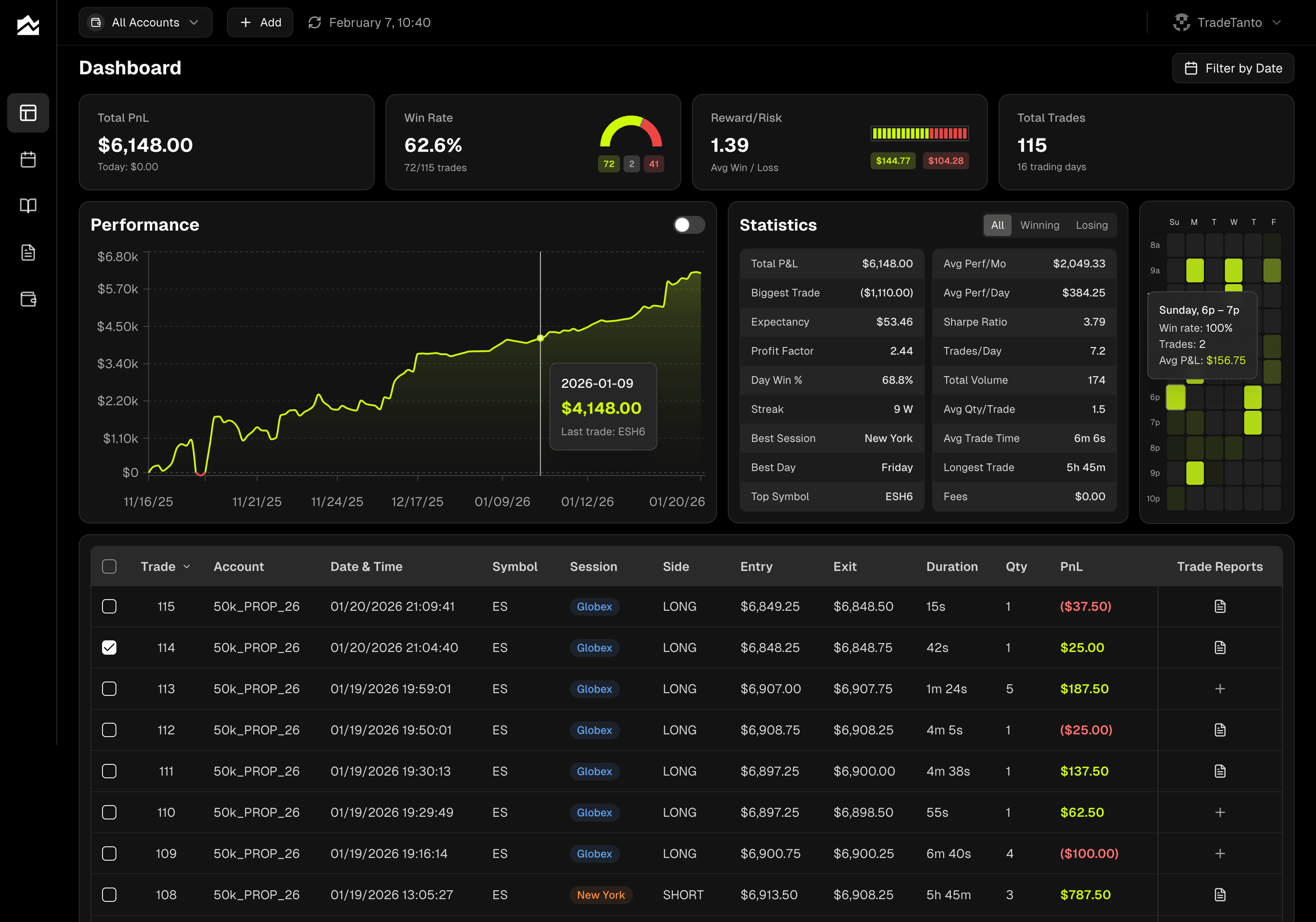
No 3-hour wait, no manual refresh. Connect Tradovate, NinjaTrader, cTrader, or Rithmic once and your fills show up on their own, in real time. That includes Rithmic-based prop firms. When you connect Rithmic, you pick your firm from the dropdown (Apex, TopstepTrader, Earn2Trade, Bulenox, and others) and use the credentials your firm provided. Interactive Brokers syncs through Flex Queries roughly every 10 minutes, the fastest IBKR sync available among trading journals. For TopstepX, there's a direct ProjectX connection, no CSV uploads. The dashboard updates as those trades arrive, so the equity curve and stat cards reflect what just happened, not what your last sync window happened to catch.
Grade Every Trade, Not Just Every Result
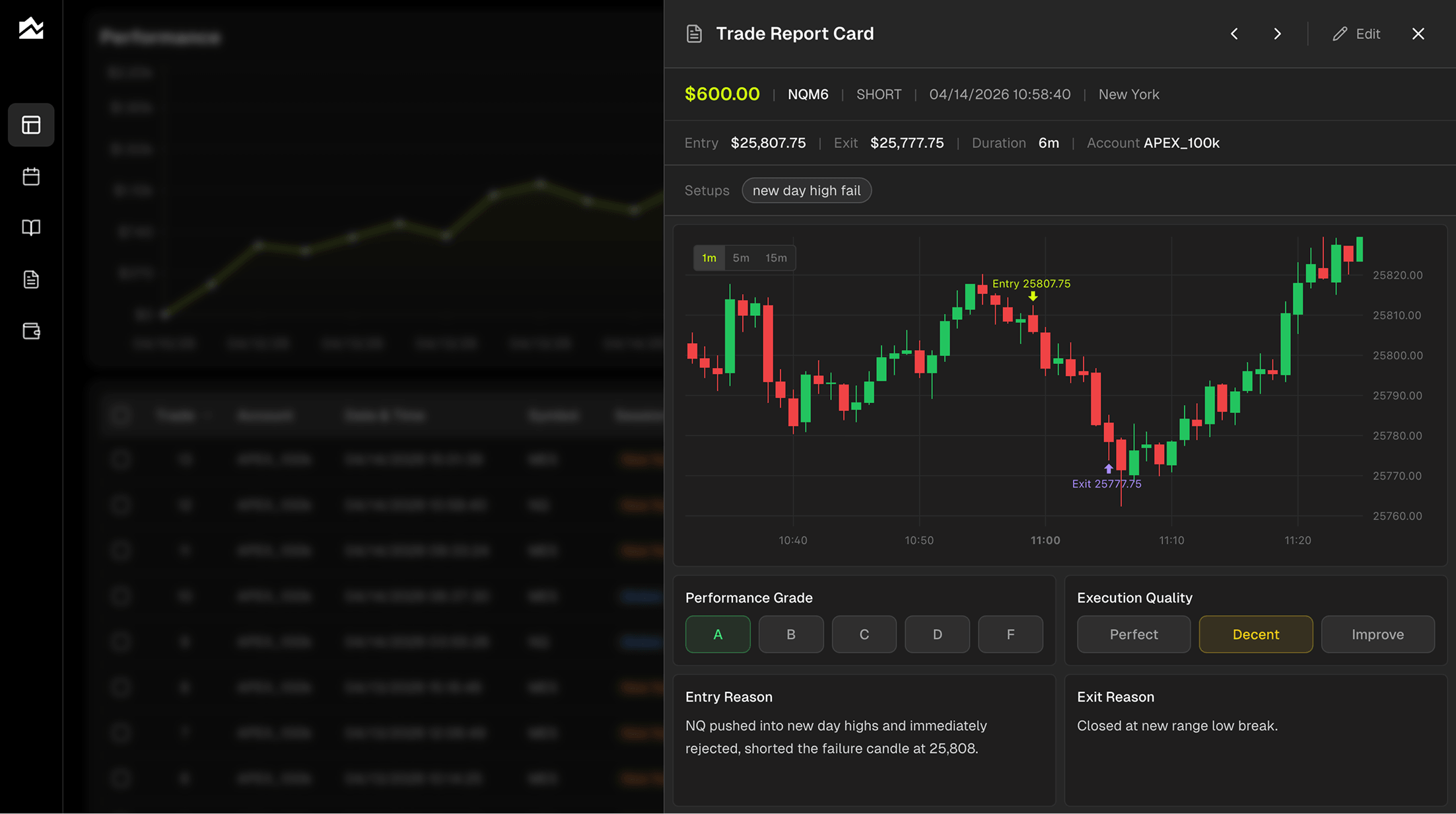
Every trade gets two scores. A performance grade (A through F) for the outcome, and an execution rating (Perfect, Decent, Needs Work) for whether you actually followed your plan. An A-grade losing trade is more useful than a D-grade winner, and separating the two is how you stop confusing process with luck. Tag setups, log emotional state, write what you'd do differently. Filter Trade Reports by grade or tag to find the patterns hiding in 200 trades.
Plan the Day, Then Review What Actually Happened
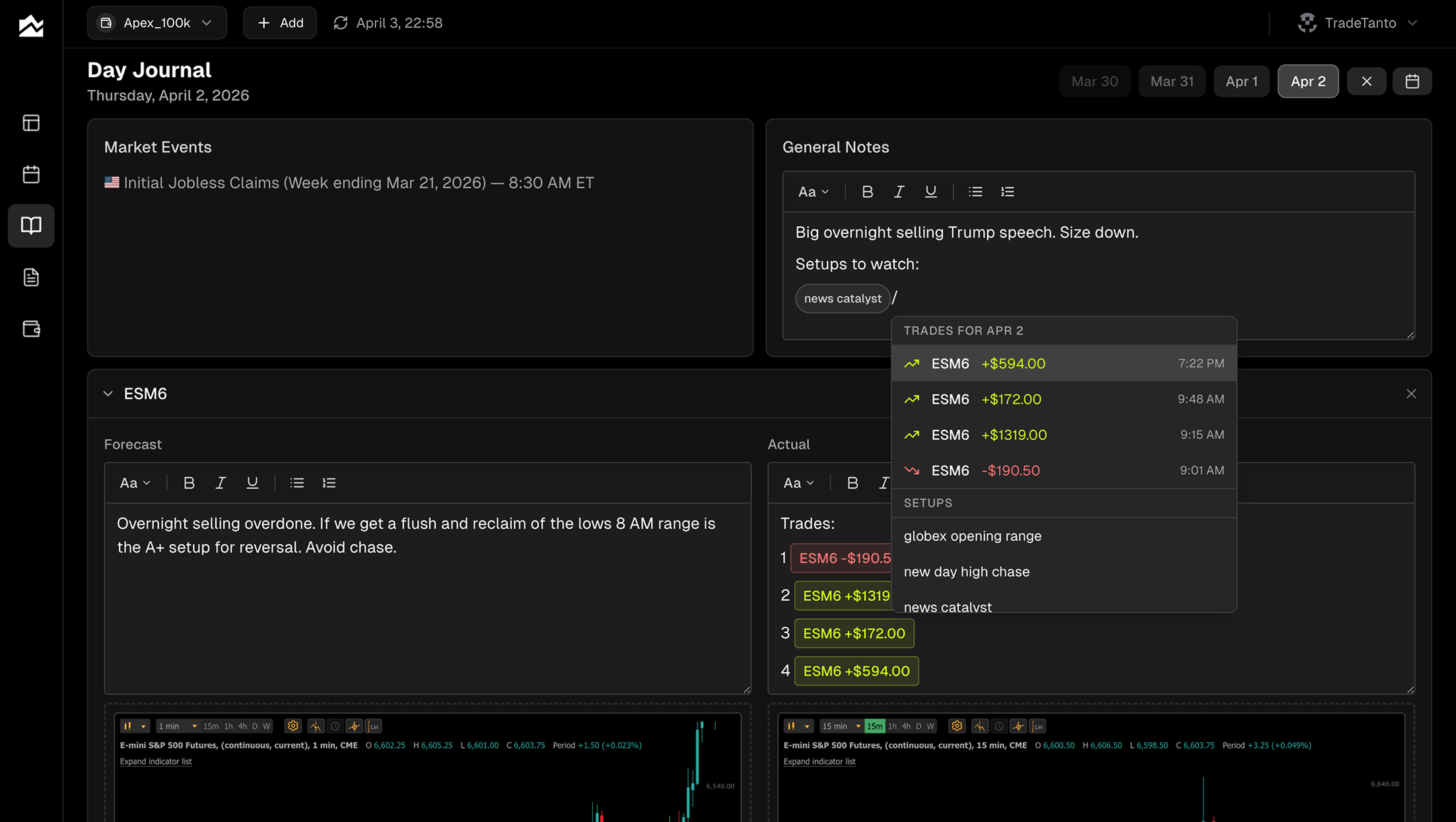
The Day Journal pairs a forecast column with an actual column for each instrument you watch. Write your read before the open, then come back after the close and compare. Economic events for the day are listed alongside your notes, so you remember what was moving the market. Slash commands pull specific trades and setup tags into the entry. Paste charts inline. The forecast/actual split is one of the fastest ways to find the gap between what you planned and what you traded.
See the Month at a Glance
The PnL calendar shows your whole month in a grid, color-coded green and red by day. Click any day to see trades, notes, and the intraday equity curve. Click any week's summary to see the cumulative P&L for the week with a stats breakdown. The point isn't the visualization, it's the recognition: most traders find their best and worst days fall into patterns they hadn't noticed until the calendar made them obvious.
Multi-Account Workflows for Combines and Funded Accounts
The account selector in the top bar filters the entire app, dashboard, calendar, journal, reports, by a single account or All Accounts. Run three combines and a funded account at the same time? Each one gets its own stat cards, its own equity curve, its own win rate. Hidden trades stay out of stats without being deleted, useful when you want a clean view of your funded account separate from your evaluation noise. Per-account commission tracking means a $1.40 round turn on one prop firm and a $0.85 round turn on another both compute correctly.
Other Options Worth Knowing About
A few alternatives that solve different versions of the problem, depending on what you actually need:
TraderSync. Closest to TradeZella in shape, with broker auto-sync, AI-driven pattern reports, and trade simulation. Stocks and options traders who want a TradeZella replacement with broader forex broker coverage and a free tier worth trying often land here.
TradesViz. Built for futures and multi-asset traders who want depth over speed. The pivot grid analytics, the AI Q&A on your trade history, and 400+ dashboard widgets do things most journals don't. Auto-sync is limited and many futures imports are file-upload, but if you live inside the analytics rather than during the session, TradesViz earns its place.
Chartlog. A US equity day trading journal with TradingView charts on every trade. No futures, no forex, no crypto. If you trade stocks through a supported broker and you want clean visual review more than anything else, Chartlog is cheaper than TradeZella and built around that exact use case.
Who Should Stay on TradeZella
A TradeZella alternative isn't the right call for everyone. If most of these describe you, the switch isn't worth it:
You trade primarily stocks or options through TD Ameritrade, ThinkorSwim, Webull, TradeStation, or Schwab, where TradeZella's auto-sync already works.
Tick-by-tick trade replay with Level II depth is your main learning tool, and you're on the Premium plan to get it.
You use Zella University and the trading community as part of your routine.
You run formal mentor relationships and need unlimited mentor invites.
You backtest more than you live-trade and rely on TradeZella's seconds-level historical data and playbook simulation.
Your prop firm spending is the thing you wanted to understand, and PropFirm Sync's Plaid-powered expense tracker actually solves that problem for you.
If TradeZella is doing what you bought it for and the price feels fair for the value you're getting, switching is friction without payoff. The case for an alternative is strongest when the prop firm broker gap or the subscription math actively hurts; if neither does, stay put.
Migrating Away from TradeZella
A clean migration takes about 30 to 45 minutes. The process is straightforward but a few things won't transfer perfectly.
Export your historical trades from TradeZella through your broker's export rather than from inside the app, since TradeZella's own data export isn't fully self-serve. From Tradovate, NinjaTrader, cTrader, or Rithmic, pull a CSV or XLSX covering the date range you want to preserve. In Tanto, click the + button and select Upload CSV; the importer accepts Tradovate, NinjaTrader, and cTrader CSVs natively, plus Excel files through the same flow. Map the columns once and the importer remembers it.
What might not transfer cleanly: trade tags and grading. Those live inside TradeZella's database and don't come out in a typical broker export. If grading specific historical trades matters, plan to spend an evening going through your top 50 most-traded setups and re-tagging in Tanto. After that, connect AutoSync for your live brokers and prop firms and the manual exports stop.
Bottom Line
If your trades land through a Rithmic-based prop firm, TopstepX, or any of the futures rails, a journal that treats those connections as first-class is going to feel like a different tool. Tanto fits the futures and prop firm trader who wants real-time sync and per-account stats without the CSV hand-off. TradeZella still fits the stock and options trader who values trade replay and Zella University, and who trades through brokers where TradeZella's auto-sync already works. Pick the one where the auto-sync map and your broker map actually overlap. Start with Tanto's pricing page or browse the full integrations list to see if your broker is covered.
By Team Tanto · Last updated: April, 2026