Journalytix Alternative for Prop Firm Traders in 2026
9 min read
If you're looking for a Journalytix alternative, you probably hit one of three walls: it doesn't connect to your prop firm, the $47/month price feels steep for what you're using, or the review workflow stops short of what you need. This guide walks through where Journalytix shines, where it falls short, and what a stronger option looks like in 2026.
What Journalytix Does Well (and Where It Stops)
Journalytix was built by the Jigsaw Trading team, and that heritage shapes everything about the product. It's a specialist tool for active futures traders, with a real-time dashboard that streams trades in seconds and overlays a live audio news feed from 75+ sources on top. For a NinjaTrader 8 trader who wants in-the-moment context during a live session, Journalytix genuinely delivers.
Outside that target, the gaps start to show.
Narrow Platform Support
Journalytix supports roughly 8 platforms: Jigsaw daytradr, MT4, MT5, NinjaTrader 8, Stellar, TSTTrader, Tradovate, and XTrader, plus data feeds from BitFinex, CQG, GAIN, Rithmic, and TT REST. Interactive Brokers is supported via TWS integration, added back in 2020. That covers a lot of the established futures ecosystem.
The gap is newer infrastructure. Modern prop firms that run on their own APIs, TopstepX on ProjectX being the clearest example, aren't supported. If you trade at one of those firms, or you want auto-sync from a broker outside Journalytix's supported list, you're either looking at manual imports or a different tool.
Pricing Near the Top of the Market
At $47/month or $399/year, Journalytix sits near the top of the trading journal pricing range. For traders using every feature (the news feed, the live session dashboard, the NinjaTrader integration), that's defensible. For traders who only use the journaling side, it's expensive compared to modern options in the $20-35 range.
Free-Form Journaling Without Structured Review
Journalytix's journaling is built around a WYSIWYG editor with voice dictation. It's a capable writing tool. What it doesn't include is a structured grading system, forecast-vs-actual comparison, or tag-based analytics filtering. If that kind of structure is how you like to review trades, you'll either add it yourself in a spreadsheet or look for a tool that builds it in.
No Automated Analysis, Trade Replay, or Backtesting
Journalytix gives you raw stats and a news feed. It doesn't surface patterns in your trading automatically, replay your fills against price action, or let you test a strategy against historical data. Newer journals have started building these features in, and their absence in Journalytix is a real gap if that's how you like to review.
What a Strong Journalytix Replacement Looks Like
Before picking anything, get clear on what matters. Your trading journal has one job: turn your trade history into decisions that make you a better trader. To find something better than Journalytix for your setup, the right replacement depends on which of those jobs it's falling short on for you.
Here's what to check:
Broker and prop firm coverage. Your journal can't help you if it can't see your trades. List every account you trade now and plan to open in the next six months, then filter candidates to ones that auto-sync all of them.
Automation quality. "Supports your broker" and "auto-syncs your broker" are different things. Real-time API sync beats weekly CSV uploads every time.
Analytics depth. Can it answer questions like "what's my win rate on long setups vs. short setups" or "how does my P&L change when I take more than three trades in a day"? If you risk $200 per trade and your win rate is 55% on one setup but 42% on another, that 13-point gap is worth knowing about.
Review workflow. Grading, tagging, forecast/actual splits, structured note fields. If you're going to review trades weekly, this matters more than the stats dashboard.
Price relative to usage. Cheaper isn't always better. Paying for features you don't use isn't either.
Tanto: A Journalytix Replacement Built for Modern Prop Firm Traders
For traders running futures accounts at prop firms like Topstep, Apex, TopstepX, Bulenox, and Earn2Trade, Tanto (tradetanto.com) is built for the specific workflows Journalytix doesn't cover.
Trades Sync the Moment They Fill
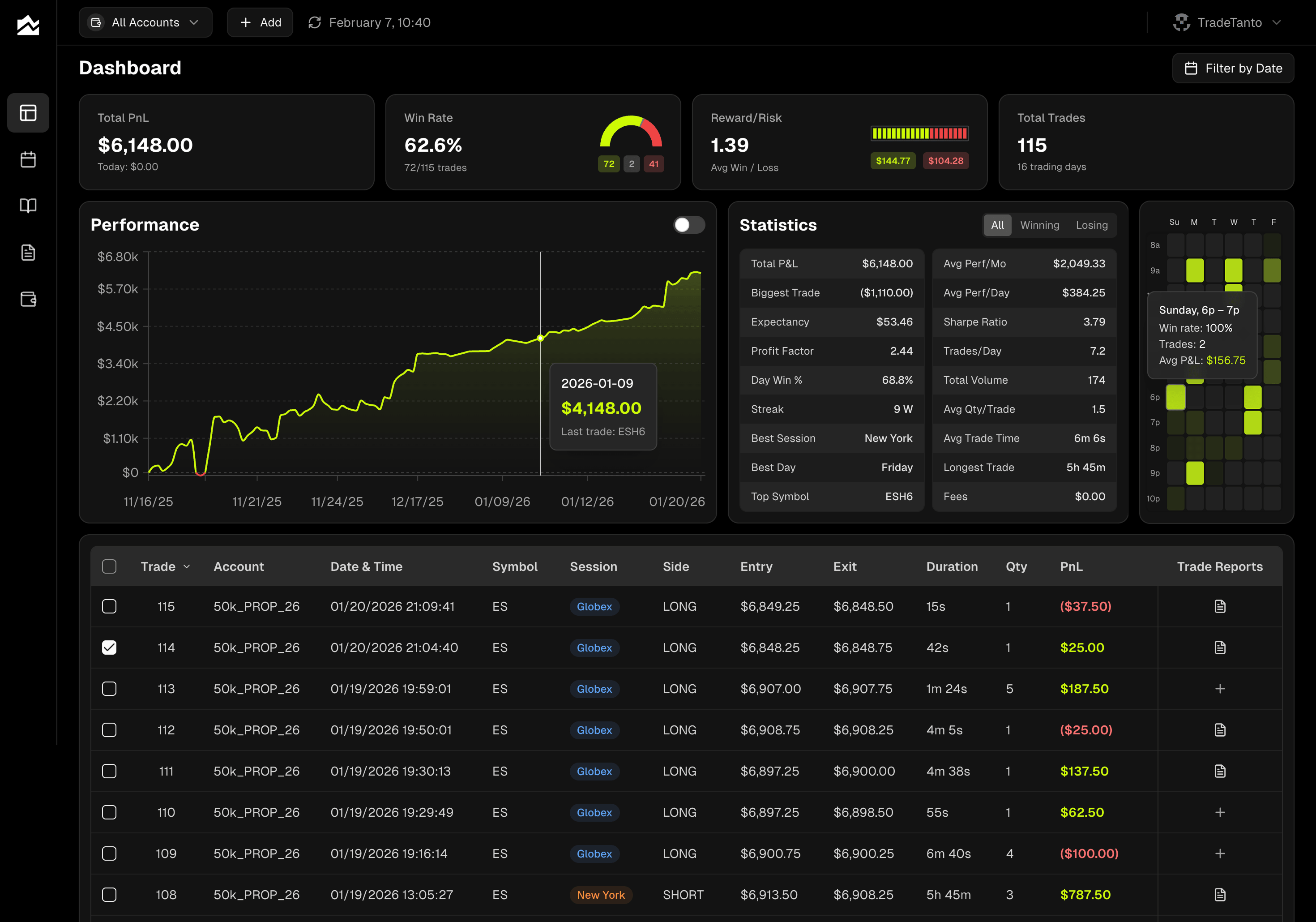
Tanto connects to Tradovate, NinjaTrader, cTrader, Rithmic, Interactive Brokers, and ProjectX (TopstepX). Through Rithmic alone, that reaches the major Rithmic-based prop firms (Apex, Topstep, Earn2Trade, Bulenox, and more). ProjectX covers TopstepX directly. 35+ brokers and prop firms in total, including the newer ones Journalytix can't reach.
Sync is real-time on Tradovate, NinjaTrader, cTrader, and Rithmic. Fills show up in seconds. TopstepX polls every 5 seconds. Interactive Brokers syncs every 10 minutes via Flex Queries, fast enough that you don't have to think about it during the session.
Grade Every Trade
P&L tells you what. Notes tell you why. Tanto separates the two:
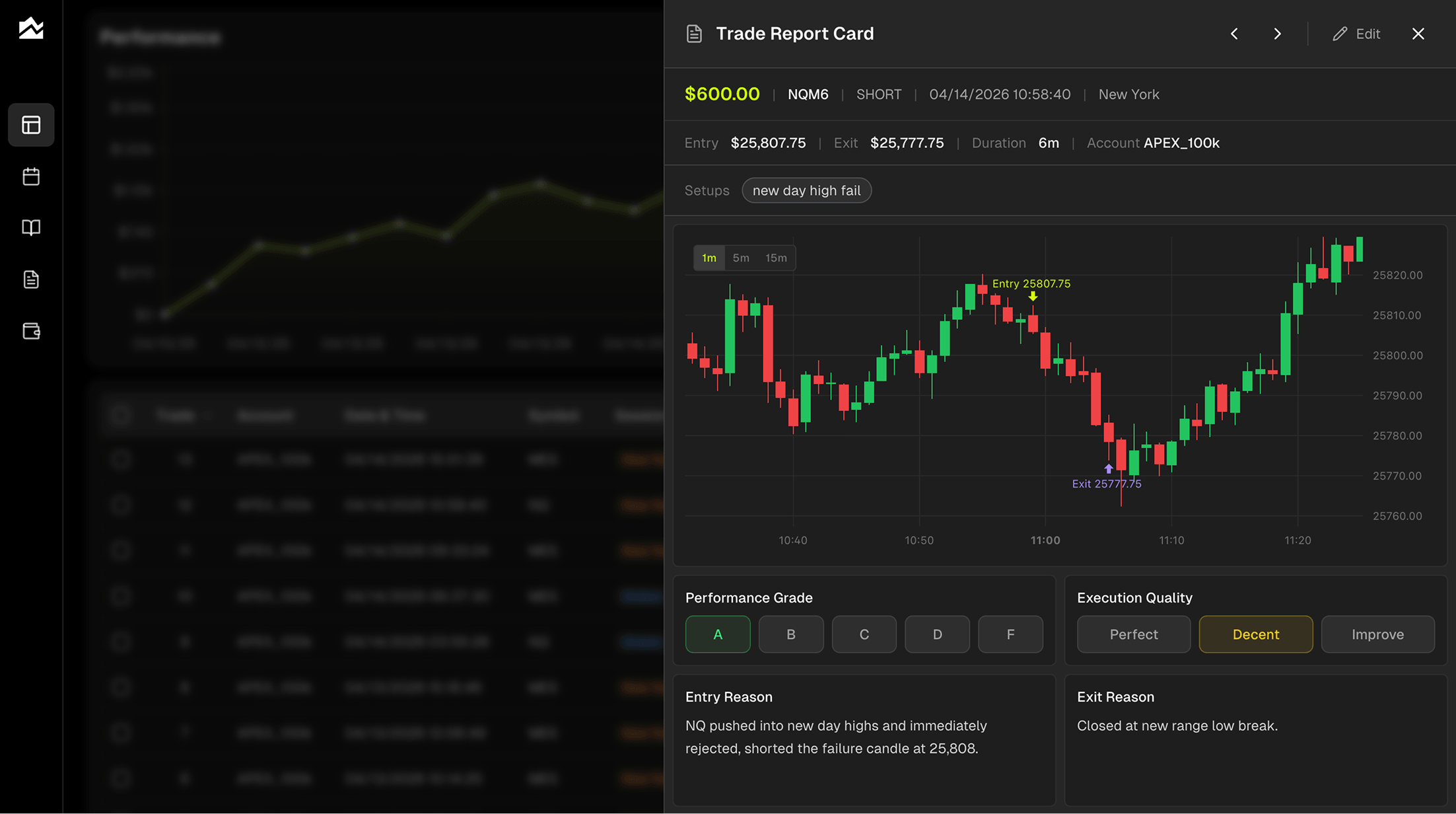
A-F performance grading and execution quality rating (perfect, decent, needs work). An A-setup that lost money is still a good trade. A D-grade winner isn't.
Structured note fields for entry reason, exit reason, emotional state, market conditions, and next-time improvements
Tags by setup ("breakout," "news play," "mean reversion") with filtering across every stat so you can see which strategies make you money
The Day Journal adds a forecast/actual split: write your pre-market plan, record what happened, compare weekly. One of the fastest ways to catch where your analysis diverges from the market.
Spot Patterns You'd Never See
A trading heatmap by hour and day of week shows your Monday 10-11am trades at a 62% win rate while your Thursday afternoon trades are bleeding money, at a glance. Profit factor, Sharpe ratio, expectancy, win/loss streaks. Session breakdowns for New York vs. Globex. Best and worst symbols.
Commission tracking is per-account (flat per-order or per-contract), and every P&L number across the app adjusts automatically for fees. No gap between your journal and your actual account.
Built Around Prop Firm Accounts
Prop firm trading has its own quirks, and Tanto is set up for them. Each account is tracked separately, so your Topstep 50K and your Apex 100K don't mix into one blended P&L. Commissions are set per-account, which matters because prop firm fees often differ from your personal account. You can hide trades that shouldn't count toward your stats (test fills, errors, trades from a different strategy) without deleting them, useful when you're working through a combine and want to keep your evaluation numbers clean. And if you're running an evaluation alongside funded accounts, the account selector filters every view by which account you're looking at, so you can switch between "combine performance" and "funded performance" in one click.
Pricing
Tanto starts as low as $11/month on annual billing, well below Journalytix's $47/month or $399/year. Current plans are on tradetanto.com.
Other Options Worth Knowing About
Two other named alternatives come up enough as Journalytix competitors that they're worth a mention, depending on what you're optimizing for:
TradeZella is the broad-coverage option. If you trade stocks, options, crypto, or forex alongside your futures, TradeZella covers those asset classes where Tanto is focused on futures. The tradeoff is a more general-purpose tool with less depth on prop firm workflows specifically.
Tradervue has been around since 2011 and has built a strong community around trade sharing and mentorship. It supports 80+ brokers and platforms (mostly via CSV import, with some direct integrations), and its reporting and social features are genuinely useful, especially if you value learning alongside other traders. A good fit if community and post-trade analysis matter more to you than real-time prop firm sync.
Pick based on whether your bottleneck is broker coverage, analysis depth, community, or review structure.
Who Should Stay on Journalytix
Not everyone searching for a Journalytix alternative actually needs one. If most of the following are true, Journalytix is probably still the right tool for you:
You trade futures exclusively, primarily on NinjaTrader 8 or one of Journalytix's supported platforms
The real-time news feed from Bloomberg, CNBC, Reuters, and 70+ other sources is something you use during live sessions
You value the live P&L and risk dashboard during the trading day, not just post-session review
You're not at a prop firm that requires ProjectX/TopstepX or other newer API integrations
You don't need trade grading, forecast/actual journaling, or tag-filtered analytics
Journalytix's real strength is live session context for futures traders. If that matches your workflow, you're paying for something you actually use. Switching tools mid-stride isn't worth it just to save $30/month if you'll miss the news feed by 10am on Monday.
Migrating Away from Journalytix
If you're switching, the process is straightforward. Journalytix lets you export your full trade history to Excel from the trades section of the dashboard.
Tanto makes the switch simple: export your trades from Journalytix as an Excel file and drop it directly into Tanto's CSV mapper, which handles the column matching for you. From there, connect your broker or prop firm and new trades sync automatically going forward.
A typical migration:
Export your Journalytix history to Excel from the trades section
Save as CSV if your new tool requires it (Tanto accepts Excel directly through the CSV mapper)
Upload and map columns (symbol, side, entry time, entry price, exit time, exit price, quantity, P&L)
Connect your broker or prop firm for ongoing auto-sync
Spot-check a week of trades to confirm numbers match
Budget 30-45 minutes. Most of the time is the spot-check, not the upload itself.
One heads-up: voice-dictated notes from Journalytix typically export as plain text without formatting. The content survives, but visual structure may not. Attached screenshots may or may not transfer depending on the import format of your new tool. Check the docs before assuming.
Bottom Line
Journalytix is a solid tool for NinjaTrader futures traders who want a real-time session dashboard and don't mind $47/month. If that's your setup, it still works.
If you're at a newer prop firm like Topstep, Apex, or TopstepX, or you want structured grading and forecast/actual journaling instead of free-form notes, Tanto is built for that. 35+ brokers and prop firms. Real-time sync. Plans starting at $11/month on annual billing.
By Team Tanto · Last updated: April, 2026