Trademetria Alternative for Traders Who Want Auto-Sync
10 min read
If you've been searching for a Trademetria alternative, you've probably hit the same wall a lot of active traders do: the journal is capable, but auto-sync coverage for the brokers you actually use is narrow, and reviewing your day always seems to start with a CSV export. This guide is for traders who want their fills, their P&L, and their review loop in one place, in real time. If you trade stocks on IBKR, options through your broker of choice, futures on Tradovate or Rithmic, or a prop firm account on Topstep or Apex, it's worth looking harder.
What Trademetria Does Well (and Where It Stops)
Trademetria has built a loyal base across multi-asset traders. Credit where it's due.
Broad Asset Class Coverage
Trademetria covers stocks, options, futures, forex, CFDs, and crypto in one journal. That's a wider net than most competitors. If you trade equities in the morning and forex at night, having one journal hold all of it is a real benefit.
Strong Options Handling
One of Trademetria's genuine differentiators. It merges option legs into spreads (iron condors, verticals, butterflies) and tracks cost basis, credits, debits, and roll P&L as a single position. For options traders, this is harder to replicate than it looks.
A Usable Free Tier
The free plan gives you 30 order imports per month, one account, and three open positions. It's limited, but it's a real product you can use to build the journaling habit before paying anything. The Basic plan is $19.95/month (500 orders, one account) and Pro is $29.95/month (unlimited orders, 50 accounts), with roughly 30% off annual billing.
Where It Falls Short for Active Traders
Here's the gap. Trademetria lists 140+ brokers, but most are file-upload only. On their public integrations table, the auto-sync list skews toward a specific set of equity and crypto brokers: Schwab, Fidelity, Webull, Robinhood, Moomoo, Tastytrade, Interactive Brokers, Tradestation (Client Center), and Tradovate. Everything else, Rithmic, NinjaTrader, cTrader, TopstepX, ProjectX, and dozens of other platforms, is file-upload only.
If your broker isn't on the short auto-sync list, reviewing your day starts with a CSV export. For an active trader, that friction adds up fast. And even on the brokers that are covered, the review loop itself (grading trades, separating outcome from execution, spotting patterns by hour of day) doesn't have dedicated product surface.
What a Strong Trademetria Replacement Looks Like
Before naming names, here's the framework to evaluate any Trademetria alternative. Five things actually matter for an active trader:
Real-time auto-sync for your actual broker. Whether you trade stocks through IBKR, futures on Tradovate or Rithmic, or a prop firm account on TopstepX, trades should stream in automatically, no CSV step.
Per-account tracking with a fast account switcher. You need separate P&L, stats, and journals per account, and you need to flip between them or view all at once in one click.
Honest commission math. Per-share, per-contract, and per-order (round-turn) all need to be first-class. Your net P&L has to reflect what you actually keep.
A grading and review loop. Tagging strategies is the minimum. Separating trade outcome from execution quality is where the real feedback loop lives.
Patterns you can actually see. Performance by hour of day and day of week surfaces habits a list of trades never will.
With that list in mind, let's talk about Tanto.
Tanto: A Trademetria Alternative for Traders Who Want the Full Loop
Tanto is the journal that actually keeps up. Most of your brokers sync in seconds, your trades drop into your Day Journal through slash commands, Trade Report Cards plot your entries and exits right on the price chart with timeframe toggles, and hiding a trade is one click. Stocks and options through IBKR, futures on Tradovate or Rithmic, prop firm accounts on TopstepX, one journal holds all of it, and your review loop starts the moment you close the position, not after a CSV export.
Trades Sync the Moment They Fill
AutoSync connects Tanto directly to your broker and streams fills in real time. New trades appear within seconds of execution, not minutes, and not after a manual export.
Supported brokers include Tradovate, NinjaTrader, cTrader, Rithmic, Interactive Brokers, and ProjectX / TopstepX. Tradovate, NinjaTrader, cTrader, and Rithmic all stream live. ProjectX (TopstepX) polls every five seconds via REST API, so fills still show up within seconds. Interactive Brokers syncs every ten minutes during market hours via Flex Queries, the fastest IBKR sync in any journal today.
Broker credentials are encrypted at rest with AES-256-GCM, and connections are read-only. Tanto cannot place trades or move funds.
Per-Account Tracking That Matches How You Actually Trade
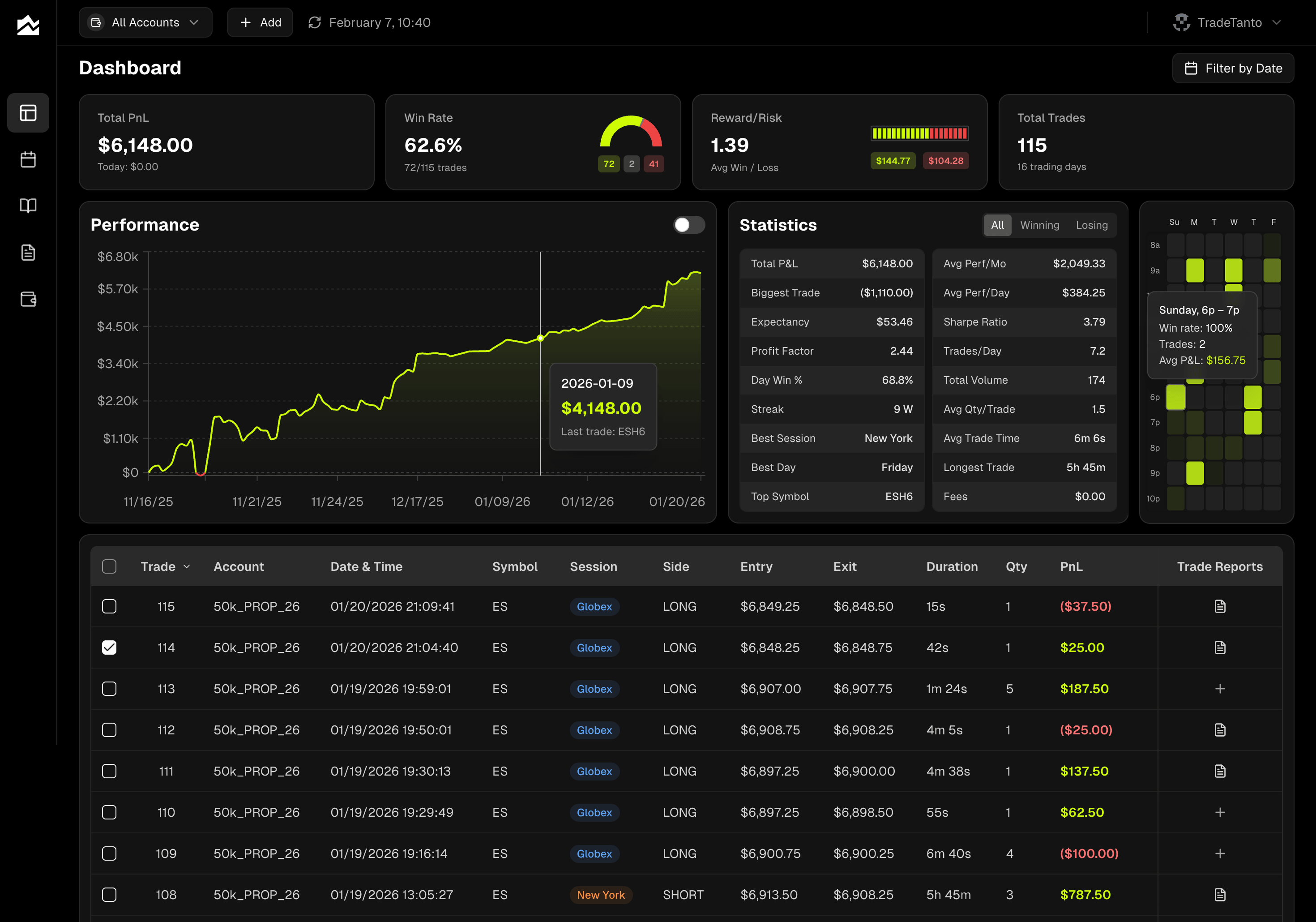
If you run more than one account, and most serious traders do, Tanto's structure matches how you already think about your P&L. One account for your IBKR stock swing trades, another for your Tradovate day trading, another for a Topstep combine. Each is tracked separately with its own commission settings, broker connection, and stats.
The account selector in the top bar filters the whole app to a single account or shows all accounts combined. Dashboard, Calendar, Day Journal, Trade Reports, everything respects it. Want to see how your swing book is doing this month without noise from your scalping? One click.
The prop firm workflow is a natural fit here too. For Rithmic-based prop firms (Apex, TopstepTrader, Bulenox, Earn2Trade, and others), select your firm's name from the Rithmic System dropdown and paste in the credentials your firm issued. For TopstepX, generate an API key in the TopstepX settings and paste it into Tanto. When you blow a combine and start fresh, add a new account, connect it, and keep your history clean.
One more thing that matters across any trading style: hidden trades. If you want to exclude a test trade, a mistake fill, or a trade from a different strategy, hide it. Hidden trades stay in the grid (dimmed) but are excluded from every stat, chart, and calendar view. Unhide any time.
Grade Every Trade, on Two Axes
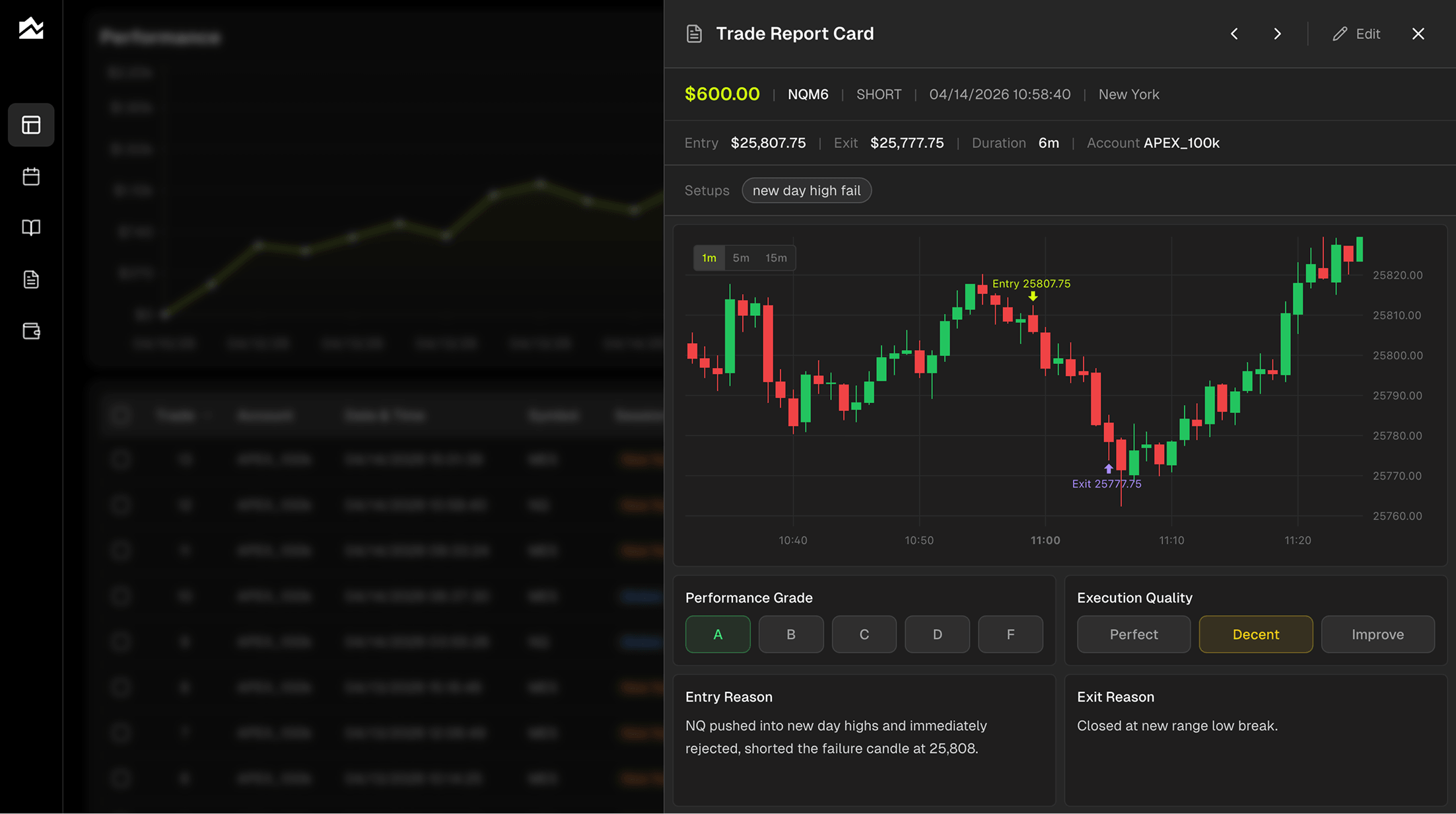
This is where the review loop actually works. On every trade, you can add a Performance Grade (A through F) for the outcome and an Execution Quality rating (Perfect, Decent, or Needs Work) for how well you followed your plan.
That split is the point. An A-grade losing trade, one you executed perfectly that just didn't work out, is more valuable to your process than a D-grade winner that printed because you got lucky. Most journals collapse those into one number and lose the distinction.
Each trade opens into a Trade Report Card with your entry and exit plotted right on the price chart (1-minute, 5-minute, or 15-minute toggle), so you're reviewing the actual bar-by-bar action you traded, not a row in a spreadsheet. Underneath, you tag your setup, grade the trade, rate your execution, and write Entry Reason, Exit Reason, Emotional State, Market Conditions, and what you'd do differently. Filter Trade Reports by grade, setup, and type later to see which of your patterns are actually earning their place.
Spot Patterns You'd Never See in a Trade List
Two things in Tanto surface patterns a trade list hides.
First, the Day Journal with a forecast/actual split. Before the session, you write your plan for up to three assets, whatever you're watching that day. Could be SPY, TSLA, and NVDA. Could be ES and NQ. Could be an options spread you're eyeing. After the session, you fill in what actually happened. Side by side. Over a few weeks, you can see exactly where your read was right and where it wasn't, one of the fastest ways to improve that exists.
Second, the trading heatmap, which shows performance by hour of day and day of week. Each cell shows expectancy (win rate times average P&L) for that slot. Bright cells are your best times; dim cells are your worst. If you're giving back money every Friday afternoon, or if your first hour of NY session is doing all the work, the heatmap makes it obvious.
Add per-account commissions (per order or per contract, round-turn), and every P&L number you see, in stats cards, the calendar, the trade grid, Trade Reports, is your actual net, not gross.
Other Options Worth Knowing About
No single journal is right for everyone. A few alternatives worth considering depending on your needs.
Tradervue is one of the oldest names in the space with a strong following among equity and options day traders. Its social and community features (sharing trades with mentors, commenting) are genuinely good, and it handles equities well. Futures coverage exists but isn't the product's center of gravity.
TradeZella has invested heavily in backtesting, trade replay, and education content. If you want those adjacent tools bundled with your journal, it's a reasonable fit. Pricing starts at $29/month, comparable to Trademetria Pro.
Edgewonk takes a different approach, a deeply customizable journal focused on trader psychology and custom metrics. It has a learning curve, but traders who commit to it tend to stick. Pricing is a one-time annual fee rather than a monthly subscription.
Who Should Stay on Trademetria
Not everyone needs to switch. Trademetria is genuinely the right answer for some traders. You should probably stay if:
You trade stocks primarily on Schwab, Fidelity, Webull, Robinhood, Moomoo, or Tastytrade, all of which have Trademetria auto-sync.
You trade multi-leg options spreads and need the automatic leg-merging that Trademetria does well.
You run your own trading education or mentorship setup and use the sharing and challenge features.
You're cost-sensitive and the free tier genuinely covers your volume (under 30 orders per month).
Honest take: if you're in any of those buckets, switching probably costs you more than it earns you. Trademetria's breadth is a real strength, and the options spread handling in particular is hard to find elsewhere. Stay put, get your money's worth.
Migrating Away from Trademetria
If you're ready to make the move, plan on 30 to 45 minutes.
Export your trade history from Trademetria. In the app, use the export function to download trades as CSV or Excel. If you have multiple accounts, export each separately so the mapping stays clean.
Create accounts in Tanto that match your Trademetria setup. One Tanto account per trading account. Set commissions on each one now so historical P&L calculates correctly.
Connect live brokers via AutoSync. For every account with a supported broker (Tradovate, NinjaTrader, cTrader, Rithmic, IBKR, TopstepX), connect through the + button. AutoSync pulls in recent history automatically.
Upload historical CSVs or Excel files for older data. Tanto accepts CSVs from Tradovate, NinjaTrader Web, and NinjaTrader Desktop, and Excel files (.xlsx) from cTrader directly. For other formats, reach out at hello@tradetanto.com.
Bring over journal notes manually if you want them. This part doesn't transfer cleanly between any two journals, schemas differ. Copy notes that matter for your best and worst trades; let the rest go.
A few things to expect: tag names may not line up one-to-one, and grading systems differ, so you'll re-grade trades in Tanto's A-F + execution format as you review them. Pricing is straightforward, with no long-term commitment if you want to test first.
Bottom Line
If you've ever sat down at 5pm to review your day and it started with exporting a CSV, you already know which of these is built for you. Tanto is the better than Trademetria choice if you trade stocks on IBKR, futures on Tradovate or Rithmic, options, or a prop firm account, and you want your fills, your P&L, and your review loop in one place in real time. Trademetria is the right call if you trade crypto, CFDs, multi-leg options spreads, or stocks on a broker Tanto doesn't yet auto-sync, or if you live inside the workflows (API access, community sharing, multi-language support) it does well. Buy the journal for the trader you already are.
By Team Tanto · Last updated: April, 2026