Chartlog Alternative for Futures and Prop Firm Traders
9 min read
If you've been searching for a Chartlog alternative, the reason is usually the same: you've moved from stocks into futures, picked up a prop firm account, or you trade both, and Chartlog only covers one side. This guide is for traders who liked Chartlog's clean equity journaling but need a tool that handles Tradovate, NinjaTrader, Rithmic-based prop firms, and TopstepX without falling back to spreadsheets.
If you're a US equity day trader on DAS Trader or Thinkorswim with no futures plans, Chartlog probably still fits. This article is for everyone else.
What Chartlog Offers (and Where It Stops)
Chartlog launched in 2019 and built its reputation on visual trade review for active US stock traders. Here's what's inside before you compare.
TradingView Charts on Every Trade
Each imported trade renders on a TradingView chart with entries and exits plotted on the price action, plus the TradingView indicator library and drawing tools. For an equity trader who already lives in TradingView, this is the most natural part of the platform.
The catch is that this only matters if your asset class is supported. Chartlog's data covers the 16 US stock exchanges. Futures, forex, and crypto are not in the system.
A Structured Strategy System
Chartlog's strategy feature lets you define setups by market condition (e.g., price above VWAP), entry trigger, and exit rule, then tag every trade to a strategy. Performance metrics roll up by strategy over time, and a sample-set testing tool filters your historical trades against a strategy's criteria.
This feature is locked to the Standard plan ($29.99/month) and above, so the $14.99 Lite tier doesn't include it.
Insights Reports and Equity Graph
The Insights tab generates performance reports filtered by symbol, tag, strategy, and time frame. The Pro plan ($39.99/month) adds custom report building, pre/post-market data, and performance by day-of-week and strategy combinations.
The reports are well-organized but standard-depth. You won't find MFE/MAE, exit efficiency analysis, or trade replay here.
Broker Coverage Limited to US Equities
Chartlog's help center confirms 10 supported brokers, all US stocks and options: DAS Trader Pro, E*TRADE, Interactive Brokers, Merrill Edge, Tastytrade, TD Ameritrade, Thinkorswim, TradeStation, TradeZero, and Webull. The DAS Trader integration runs through a local Windows importer that requires your computer to stay on and awake during the session.
For anyone trading futures on Tradovate, NinjaTrader, or Rithmic, or running a Topstep, Apex, or Bulenox account, Chartlog has no path. That's what changes when your trading expands beyond US equities.
Pricing and Trial
Three tiers, all with a 7-day free trial and no credit card required:
Lite: $14.99/month (no strategy analytics)
Standard: $29.99/month (adds strategy tracking and basic Insights)
Pro: $39.99/month (adds custom reports and advanced Insights)
Annual billing knocks 10–20% off depending on tier.
What a Strong Chartlog Alternative Looks Like
If you're shopping for something better than Chartlog, here's what to evaluate before signing up for anything:
Native broker coverage for your actual platform. Tradovate, NinjaTrader, cTrader, Rithmic, Interactive Brokers, and TopstepX should be first-class integrations.
Real prop firm support. If you trade Topstep, Apex, TopstepX, Bulenox, or Earn2Trade, the journal needs to handle those accounts cleanly, including separate combine and funded views.
Sync that doesn't require your computer to be on. Cloud-based broker connections beat local importers that depend on your machine staying awake.
Multi-account workflows. Most prop firm traders run two to ten accounts in parallel. The journal should handle per-account stats and an account selector that filters everything.
Per-account commission tracking. Futures commissions vary by broker and instrument. Stats that don't reflect actual fees are misleading.
Tanto Is the Chartlog Replacement for Futures and Prop Firm Traders
Tanto is a trading journal built around the brokers and prop firms futures traders actually use. If Chartlog is the answer for the US equity day trader on Thinkorswim, Tanto is the answer for the Topstep trader on Tradovate, the Apex trader on Rithmic, or the trader running a personal IBKR account next to two funded accounts on TopstepX.
Trades Sync the Moment They Fill
Connect Tradovate, NinjaTrader, cTrader, Rithmic, or TopstepX once, and your fills show up in Tanto on their own. No CSV exports, no local importer running on your desktop, no "make sure your computer is awake" workflow. Interactive Brokers is the one platform that runs slightly differently: trades come in about every 10 minutes, the fastest IBKR sync available among trade journals.
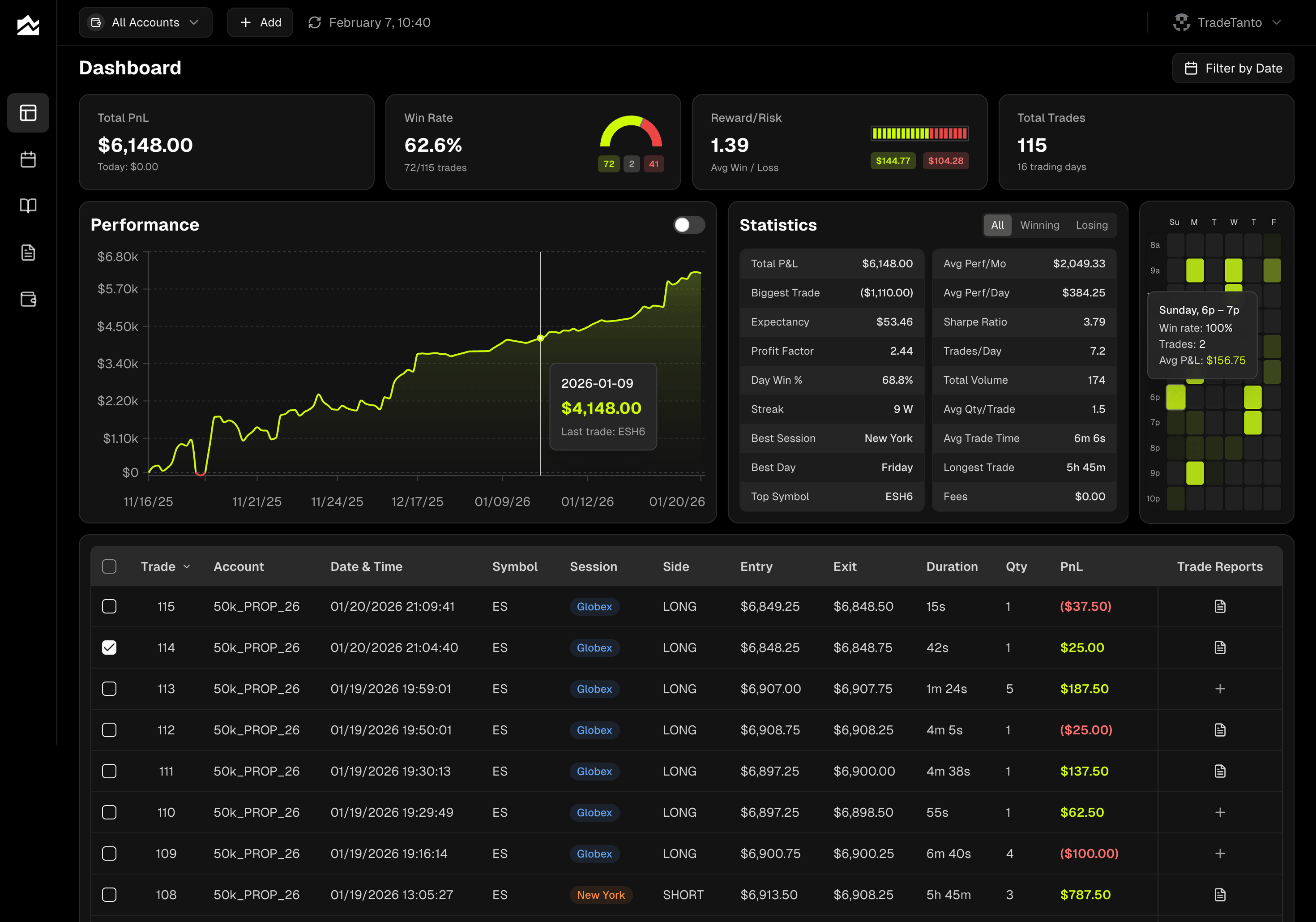
Your dashboard reflects whatever you just did. P&L, win rate, reward-to-risk, and equity curve update without a refresh. When you sit down at the end of the session, the trades are already there.
Grade Every Trade and Separate Process from Outcome
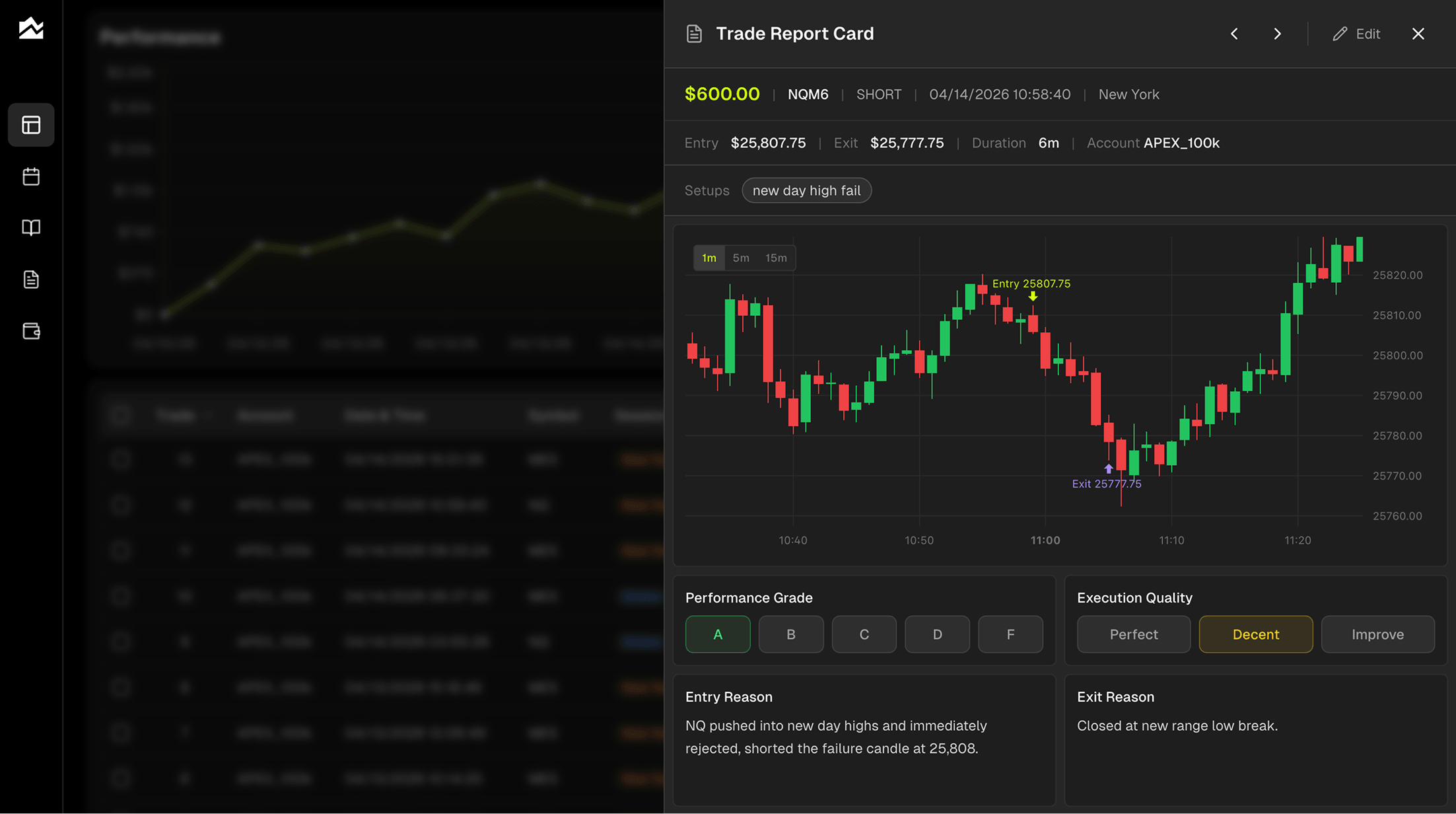
Every trade gets a Trade Report Card with your entry and exit plotted on a candlestick chart. Add the context, an entry reason, exit reason, emotional state, market conditions, and what you'd change next time. Then grade it: A through F for outcome, plus Perfect, Decent, or Needs Work for execution quality.
The grading split matters. An A-setup that lost money is still a good trade. A D-setup that won is still a problem. Filter your reports by grade or by setup tag and you stop confusing process with luck.
Plan the Day, Then Review What Actually Happened
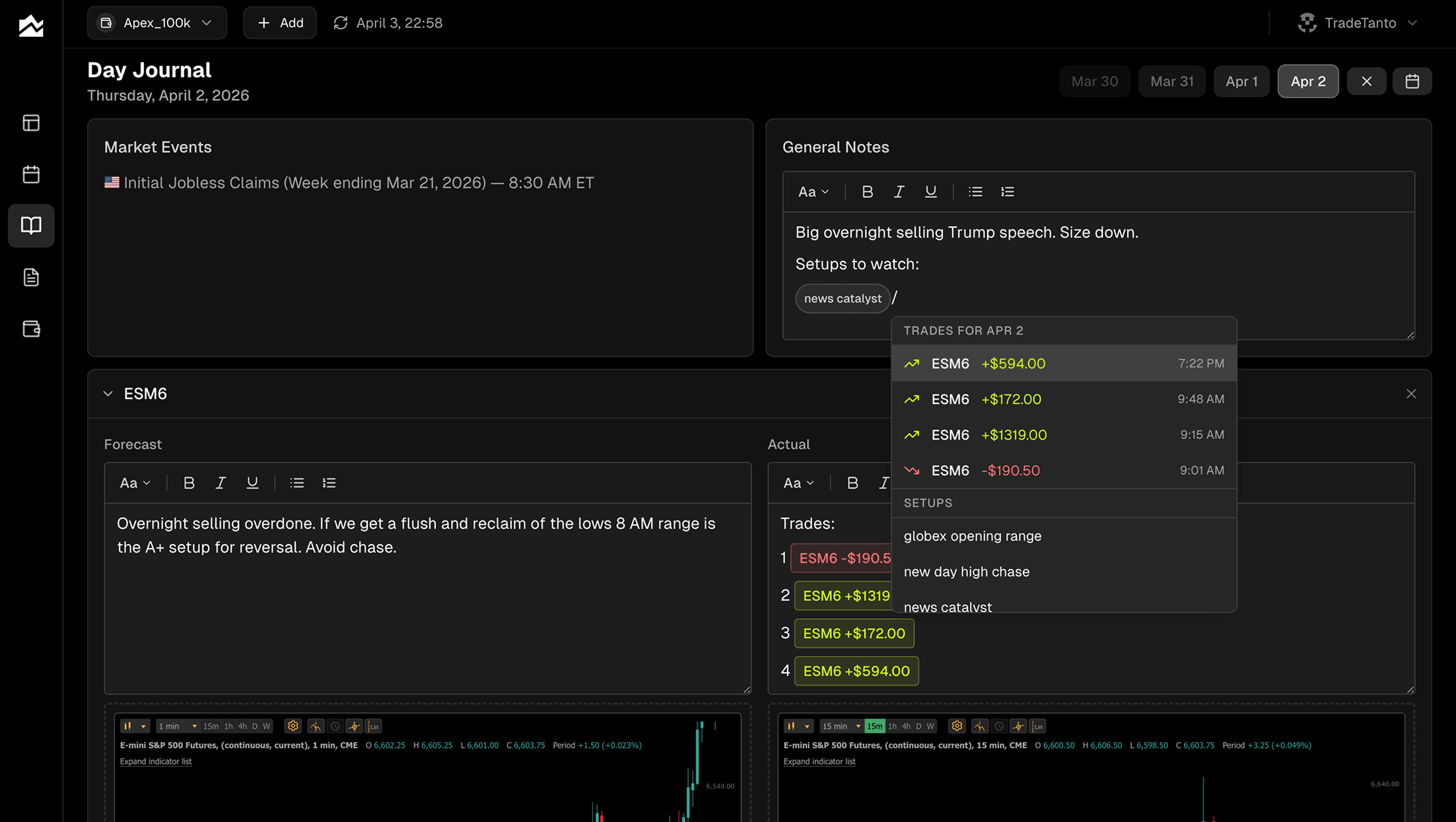
The Day Journal splits each session into Forecast and Actual columns for up to three instruments (ES, NQ, CL, whatever you trade). Type your pre-market plan in the Forecast side. Drop in chart screenshots, review your bias, note where you're wrong. After the close, fill in Actual. Did the level hold? Did you take the trade you planned? Where did you deviate?
Economic events for the day load on the left automatically (FOMC, CPI, NFP), so you remember what was moving the market when you look back next month. Slash commands let you embed specific trades and tags directly in your notes.
Built for Prop Firm Traders Running Multiple Accounts
If you trade two combine accounts and one funded account, you don't want them lumped together. Tanto's account selector filters the entire app, dashboard, calendar, journal, reports, by individual account or all accounts combined. Each account has its own commission settings (per-order or per-contract round-turn), so your P&L reflects what you actually keep.
Trades you want to exclude from stats without deleting (test trades, evaluation runs, blown combines) can be hidden. They stay visible in the grid at lower opacity but drop out of every calculation. That's how you keep a clean view of your funded performance without losing the historical record. Tanto supports Topstep, Apex, Bulenox, and Earn2Trade through the Rithmic integration, plus TopstepX through ProjectX.
Other Options Worth Knowing About
Chartlog isn't the only journal in the category. A few others fit specific traders better than Tanto would.
Tradervue is the long-running journal for US equity and options traders who want exhaustive reporting and a community/mentor layer. If you trade stocks heavily and want hundreds of report variations, anonymous trade sharing, and mentor mode for working with a coach, Tradervue is built for that. It's not a futures-first tool.
TradeZella offers trade replay, backtesting, playbooks, and a Discord community. If you want to scrub through past sessions tick-by-tick or build structured strategy playbooks with a community around them, TradeZella is in that lane.
Edgewonk sits in the trading-psychology corner of the category. Its Edge Finder generates a weekly summary of your strengths and weaknesses, and the platform supports forex and MetaTrader natively. If you trade FX or want a one-time annual fee instead of a monthly subscription, it's worth a look.
Who Should Stay on Chartlog
Switching journals is friction. If Chartlog already fits, don't force a move. You should stay on Chartlog if:
You trade US stocks or options exclusively and have no plans to add futures, forex, or crypto
Your broker is one of the 10 Chartlog supports (DAS Trader, E*TRADE, IBKR, Merrill Edge, Tastytrade, TD Ameritrade, Thinkorswim, TradeStation, TradeZero, or Webull)
You value TradingView charts on every trade above all other features
You like the structured strategy system and sample-set testing
You don't need trade replay or behavioral analysis
You run one or two trading accounts, not a stack of prop firm accounts
Chartlog has a focused product. If you fit that profile, the Lite plan at $14.99/month is one of the cheapest ways to get auto-import plus TradingView charts. Don't switch tools just because a comparison article exists.
Why Not Use Both?
Some traders keep Chartlog for their equity activity and add Tanto for futures and prop firms. That works, especially if you're already on Lite ($14.99) and want to keep TradingView review for your stock trades. The math gets harder once you're maintaining two subscriptions, particularly if your futures volume becomes your primary trading. Most traders who try the dual-tool approach end up consolidating after a few months once one side stops being primary. Worth being honest with yourself about which way your trading is actually heading before you decide.
Migrating Away from Chartlog
Chartlog doesn't appear to offer a self-service export inside the app. Check with their support team if you need historical data before switching, otherwise the practical path is to start fresh in your new tool with broker-side data.
Plan on 30 to 45 minutes for the move:
Pull your trade history from each broker (Tradovate, NinjaTrader, cTrader, Rithmic-based prop firms, IBKR, TopstepX)
For brokers Tanto auto-syncs, just connect them and recent trades come in automatically
For older history, export to CSV or XLSX from your broker and use Tanto's CSV mapper (Excel files are accepted directly for cTrader)
Re-create your most-used setup tags
Set per-account commissions to match your broker's round-turn rate
What probably won't transfer cleanly: your Chartlog journal entries (you'll be rewriting those in Tanto's Day Journal anyway), strategy definitions (different system), and tag taxonomy (rebuild it from your top setups).
Bottom Line
Most traders who arrive at a Chartlog comparison article are at a transition point. The trader who set up a Chartlog account two years ago to journal Thinkorswim trades has, somewhere along the way, become a different trader. Maybe they're running an Apex combine. Maybe they picked up TopstepX after seeing prop firms on Twitter. Maybe they trade ES at the open and small caps in the afternoon. The honest question isn't whether Chartlog is good, it is, for what it does, but whether the trader you're becoming is the trader Chartlog was built for. If yes, stay. If not, Tanto's integrations page is the fastest way to see if your next setup is covered, and pricing is one click further.
By Team Tanto · Last updated: May, 2026