Stonk Journal Alternative for Active Traders in 2026
11 min read
If you've been using Stonk Journal and your trading volume has outgrown manual entry, you already know the problem: every fill has to be typed in by hand. This guide is for active traders who want a real Stonk Journal alternative. That includes IBKR traders running stocks and options, futures traders on Tradovate or NinjaTrader, and prop firm traders with accounts at Topstep, Apex, Bulenox, Earn2Trade, or TopstepX.
Stonk Journal is a solid free tool. It isn't the right tool for everyone. Let's walk through where it fits, where it doesn't, and what to look for when you outgrow it.
What Stonk Journal Does Well (and Where It Stops)
It's genuinely free, with no ads and no data sales
Stonk Journal has been free since launch, and according to their FAQ, the product started as a personal project. Their FAQ also states they don't sell user data and don't require email verification to sign up, so you can stay anonymous if you want to. For traders who care about privacy or who just don't want another subscription, that's a real reason to choose it. The pricing discussion ends at zero.
The trade entry form is fast
The product is built around one core idea: get a trade in quickly. Per their site, the entry screen "comes equipped with a memory of previous trades" and uses defaults that automatically fill in when you enter new trades, cutting down on repeat typing. If you take two or three trades a day and you want to log them in under a minute each, it works.
You get a calendar, tags, notes, and a confidence meter
Every trade supports notes, tags, image attachments, and a confidence score. You also get a PnL calendar, multi-currency support, hold time tracking, and multiple accounts or portfolios inside one login. That's a respectable set of features for a free tool.
It works across asset classes
Stonk Journal doesn't care what you trade, because everything is entered manually anyway. Stocks, options, futures, forex, crypto, they all fit into the same form. For traders who work across markets and want one place to record it all, that flexibility matters.
Where it stops: no broker sync, no CSV import
This is the wall most active traders hit. Stonk Journal has no broker integrations and no CSV or Excel import. Every trade, every fill, every partial, goes in by hand. Users have been requesting auto-import and CSV upload on Stonk Journal's public feedback board for years, and it still isn't available.
For a swing trader taking three trades a week, that's fine. For an IBKR options trader filling 15 legs across the day, a futures scalper putting on twenty round trips, or a prop firm trader managing an Apex combine plus two funded accounts, the math falls apart fast. At ninety seconds per trade, twenty trades a day is half an hour of data entry before you even start reviewing. And manual entry creates another problem: you will miss fills, mistype quantities, and skip trades you'd rather forget. The journal stops reflecting reality.
It's also missing an API and a commission engine. There's no way to split your stats by the New York session versus Globex, and no way to keep a Topstep combine and a funded account in separate columns inside the same view. If any of that matters to how you trade, you've hit the limit of what Stonk Journal was designed for.
What a Strong Stonk Journal Alternative Looks Like
Before shopping around, here's the short list of things a better than Stonk Journal setup should cover if you trade actively:
Automatic broker sync for the platforms you actually use. For stocks and options that means Interactive Brokers. For futures that means Tradovate, NinjaTrader, cTrader, Rithmic, and the prop firm platforms built on top of them (ProjectX/TopstepX, Apex, Bulenox, Earn2Trade).
Real-time or near-real-time updates so you can review a session while it's still fresh, not the next day.
Per-account commission tracking with both per-order and per-contract models, because fees compound fast and wrong commissions mean wrong P&L.
Multi-account handling that lets you keep separate accounts (personal IBKR, prop firm combines, funded accounts) separate but viewable together.
Journaling that rewards daily use, meaning pre-market forecasts, post-session reviews, trade-level grading, and filters that actually help you find patterns across weeks of data.
Paying for a journal is only worth it if it solves a problem the free version can't. For low-volume traders, it often isn't. For active traders running broker sync, multiple accounts, or prop firm workflows, it almost always is.
Tanto: A Stonk Journal Alternative Built for Active Traders
Tanto is a trading journal that auto-syncs with 35+ brokers and prop firms. IBKR is covered, the full futures stack is covered (Tradovate, NinjaTrader, cTrader, Rithmic), and the prop firm platforms built on top of those work too. Here's what's different.
Trades Sync the Moment They Fill
Connect your broker once and Tanto pulls your trades in automatically. No copy-paste, no typos, no effort.
The list covers Interactive Brokers, Tradovate, NinjaTrader, cTrader, Rithmic, ProjectX, and TopstepX, with 35+ brokers and prop firms supported in total. New ones ship regularly, so the integrations page has the current list.
On the futures side, fills stream in within seconds of execution. For Interactive Brokers, trades sync automatically every 10 minutes during market hours, fast enough that you can review a session while it's still fresh. For Rithmic-based prop firms (Apex, TopstepTrader, Earn2Trade, Bulenox, and others), you pick your firm from the Rithmic System dropdown and enter the credentials your firm gave you.
Broker access is read-only everywhere and credentials are encrypted at rest using AES-256-GCM. Tanto reads your trades; it can't place them or touch your funds. If your broker isn't on the list yet, you can drop in a CSV or XLSX file and the importer will parse it.
Grade Every Trade Honestly
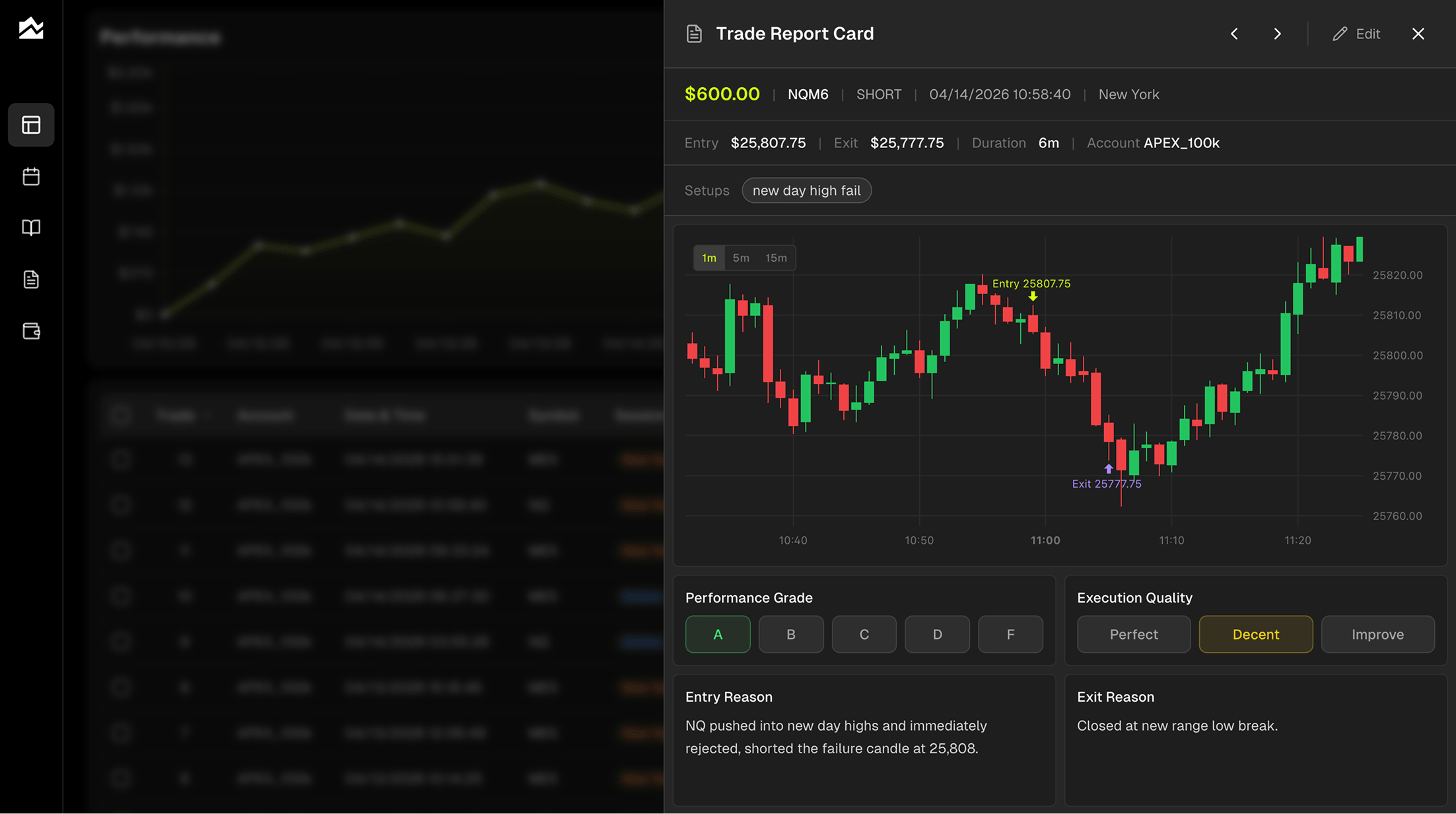
Every trade in Tanto can carry a full note, an A-through-F performance grade, and an execution quality rating of Perfect, Decent, or Needs Work. The grade system matters because P&L alone lies to you. An A-grade losing trade, a trade where you followed your plan exactly and the market didn't cooperate, tells you your process is working. A D-grade winner tells you to tighten up before you give the money back.
The note editor has fields for Entry Reason, Exit Reason, Emotional State, Market Conditions, and Next Time Improvement. Tag each trade with a setup name, then filter your Trade Reports by grade, setup, or side to see which plays actually produce and which you should retire.
Spot Patterns You'd Never See in a Spreadsheet
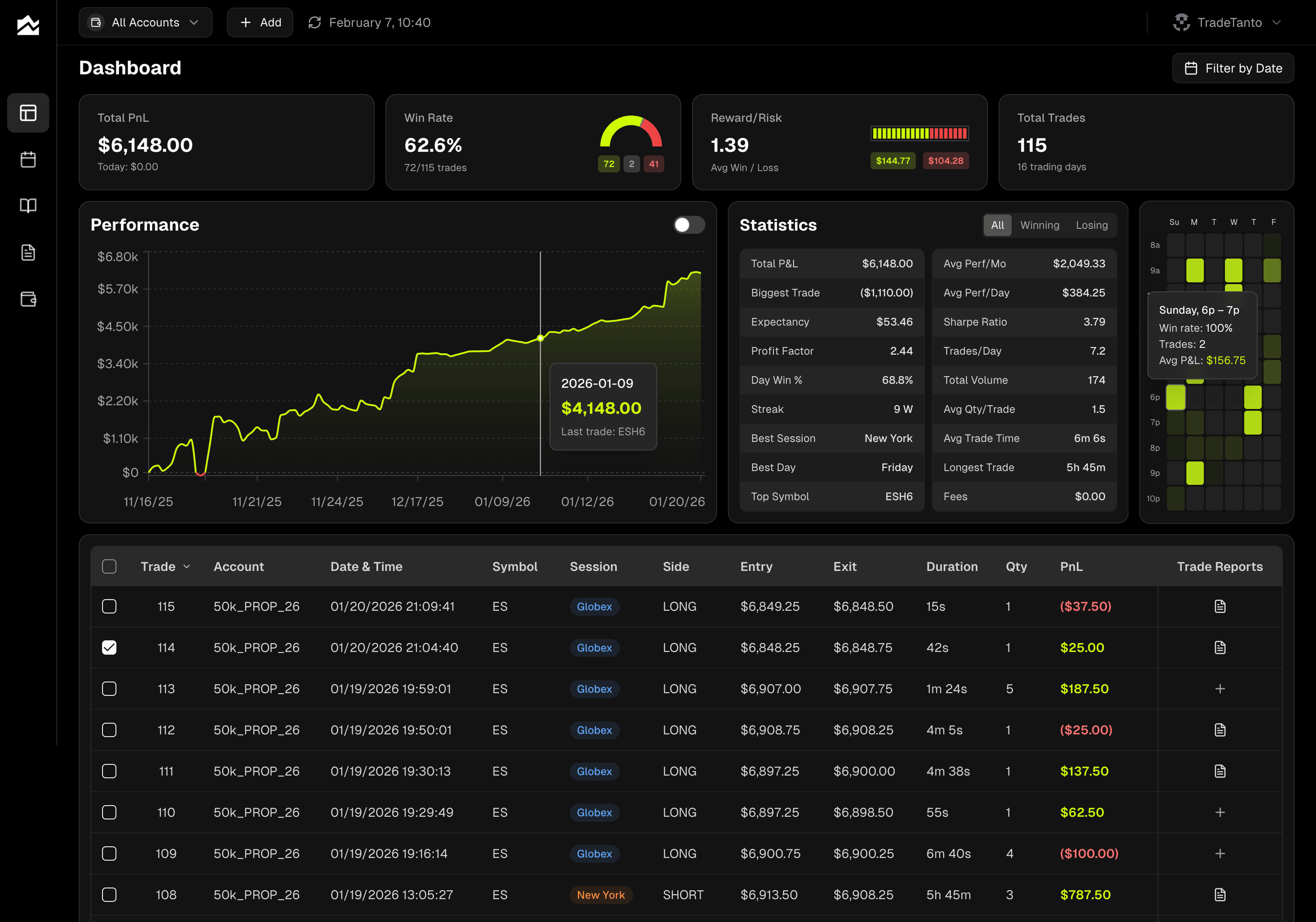
The Dashboard's trading heatmap plots your performance by hour of day and day of week. Brighter cells mean higher expectancy (win rate times average P&L). If Wednesday 10 to 11 a.m. lights up and Friday afternoon is a wasteland, now you know, and you can plan your week around it.
The Day Journal adds a Forecast and Actual split for up to three assets per day. You write your pre-market read on ES, NQ, CL, whatever you're trading. After the close, you fill in what actually happened. Over a few weeks, the gap between your forecasts and your actuals becomes its own dataset, and that's where most of the real improvement lives.
Track Multiple Accounts Without the Spreadsheet Tax
Running more than one account? Personal IBKR plus a joint. A Tradovate live account next to a demo. A Topstep combine alongside your funded account. Tanto treats each as its own account with its own commission settings. Per-order and per-contract both work, so if your prop firm charges a flat $4 round turn on your Apex account and your IBKR options fees come out to around $0.65 per contract, you set each one once and every P&L figure gets adjusted automatically, across the dashboard, calendar, trade grid, and reports.
The account selector in the top bar lets you view one account at a time or All Accounts at once. Running a combine and a funded account side by side? Switch between them in one click. Want to hide your test fills or trades from a blown combine so they don't pollute your funded account stats? Select the trades and hit Hide; they stay visible in the grid at 40% opacity but get excluded from every calculation.
Pricing and plan limits are on the pricing page. The full broker list and setup guides live at tradetanto.com/integrations.
Other Stonk Journal Alternatives Worth Knowing About
Tradezella. Probably the best-known paid journal in the space. Broker integrations across stocks, options, and futures, plus backtesting and their playbook feature for codifying setups. Basic is $29 per month and Premium is $49, with annual discounts. Auto-sync works with Topstep, TopstepX, and other prop firm platforms, so it's a reasonable fit for traders who want deep analytics and a mature product.
TraderSync. Long track record, broad broker support, and an AI assistant called Cypher that's included on every paid plan. The catch: proactive AI coaching (Cypher Coach) is Elite-only at $79.95 per month. They also ship a Market Replay simulator on every tier, though tick precision steps up from 1-minute on Pro to 250ms on Elite. Worth a look if AI-driven review is what you're after.
TradesViz. The analytics-forward option, with a strong free tier, solid charting, and broker coverage through CSV imports. Less polished than the paid tools above, but genuinely useful if you don't mind doing some CSV wrangling yourself.
Who Should Stay on Stonk Journal
Stonk Journal is still the right call if you match most of these:
You take a handful of trades per week, not per day
You want zero cost and no subscription, full stop
You care about staying anonymous (no email verification required)
You're fine entering trades manually because volume is low
You don't need broker sync, CSV import, or multi-account separation
You're not running a prop firm combine where every fill matters for your evaluation
If that's you, switching journals is mostly a waste. You'd pay for features you won't use, and you'd lose the clean, fast entry flow Stonk Journal is genuinely good at. The honest case against switching: if your current journal keeps up with how you trade and costs nothing, don't fix what isn't broken. Reach for a paid journal only when manual entry starts stealing time you'd rather spend trading or reviewing.
Migrating Away from Stonk Journal
Because Stonk Journal has no export feature that moves directly into another journal's format, migration is a manual job. Plan on 30 to 45 minutes for a moderate history. Here's the practical flow:
In Stonk Journal, open each account and record the trades you want to keep. You can copy them into a spreadsheet column by column: date, symbol, side, quantity, entry, exit, notes, tags.
Save the file as CSV or XLSX. Tanto's importer accepts both, and Excel files go straight through the same upload flow.
In Tanto, create a matching account (name it the same thing), set commissions, and use the import flow to bring the trades in.
For future trades, connect your broker directly so you're done with manual entry.
A few things won't transfer cleanly. Image attachments from Stonk Journal's notes don't come across automatically; you'll need to re-upload any screenshots you want to keep. Confidence meter scores don't map one-to-one to Tanto's A-F grading, so you'll decide during import whether to convert them or leave older trades ungraded. And Stonk Journal tags aren't exportable as a list; you'll recreate the ones you actively use.
If you'd rather start fresh and only sync going forward, that's faster. Connect your broker, let Tanto import your recent history, and treat the old Stonk Journal data as archival.
Bottom Line
If manual entry is turning into a tax on your time, it's probably time to move. Tanto is the Stonk Journal alternative to look at first whether you're on IBKR for stocks and options, trading futures through Tradovate, or running a Topstep or Apex account. Real-time futures sync, automatic IBKR imports every 10 minutes, and per-account commissions all do work that a manual journal can't. If you're a casual trader who values free and anonymous above all else, Stonk Journal is still a fair pick, and there's no shame in staying.
By Team Tanto · Published April, 2026