Best Trading Journal Software in 2026
13 min read
Picking a trading journal is less about finding the "best" one and more about finding the one that fits what you trade and how you review. This guide is built around six trader profiles, each with a recommendation, the reasoning behind it, and an alternative worth considering.
A note on bias: Tanto makes one of the journals reviewed here. We've organized the article by trader profile rather than by ranking, and Tanto only appears under the profile where it fits best. Sections on tools we don't make are written from primary sources, not from our marketing instincts.
If you're an active trader evaluating your first journal, or thinking about switching from one you've outgrown, this guide should help you narrow the list to one or two real candidates. We pull from current pricing on each vendor's site, not from third-party listicles, and we name specific tradeoffs instead of crowning one tool the universal winner.
How to Choose a Trading Journal
Before reading recommendations, answer six questions about your own setup. Your answers will rule out most of the journals on the market and leave you with two or three that are actually worth a free trial.
What do you trade? Asset class is the first filter. A futures trader and an equity options trader need very different things from a journal. Some tools cover everything; others are tuned for one or two asset classes. If you trade futures or contracts on prop firm accounts, you can immediately cross out journals built around US equities and CSV-only imports. Options traders should specifically check whether the journal merges multi-leg spreads correctly, since several otherwise capable tools treat each leg as a separate trade and break your strategy-level analytics.
What brokers or prop firms do you use? This is the question that quietly kills most "best of" picks. A journal is only as useful as its sync coverage for your specific platform. If you trade on Tradovate, NinjaTrader, cTrader, Rithmic, or TopstepX, your shortlist is shorter than the SERP suggests. Stock traders on Interactive Brokers, TD Ameritrade, Webull, or TradeStation have more options. Verify broker support on each candidate's integrations page before signing up. Many journals advertise large broker counts, but coverage often means CSV upload templates, not live auto-sync.
Do you want sync to be automatic or are you fine with CSV uploads? Automatic sync is a comfort feature when you trade once a week. It becomes essential when you make twenty trades a day and don't want to spend Sunday cleaning up exports. CSV-only journals work fine for low-volume traders and force friction at exactly the wrong time for everyone else. Sync reliability matters more than sync speed for most traders: a journal that syncs every ten minutes but never misses a trade is more useful than one that syncs in real time but drops fills after a network blip.
How many accounts do you run? A single account is simple. Funded prop firm accounts plus a personal account plus an IRA gets complicated fast. Look for a journal that combines accounts into one rolled-up view but also lets you isolate stats per account when you need them. Per-account commission tracking matters more for futures and prop firm traders than for equities, since round-turn commissions can swing the P&L on a small account meaningfully.
What's your review style? Some traders want post-trade analytics and a daily journal entry. Some want to replay every trade tick by tick. Some want emotional and behavioral tagging to fix discipline problems. The best tool for one style is overkill for another. The honest answer is usually "I don't know yet, I'm new to this," in which case start free or cheap, see what you actually open every day, and upgrade once your review habit is real.
What's your budget? Free tools exist and they work for the right trader. Mid-tier journals run roughly $15 to $30 per month. Premium tiers push toward $50 to $80. Paying more buys depth, not necessarily fit. A $14/month journal you open daily is more useful than a $60/month journal you open once a month.
With those answers in hand, here's how the major journals stack up by trader profile. This is a trading journal comparison organized around fit rather than a ranked list, because the top trading journals serve different audiences.
The Best Trading Journals by Trader Profile
For Futures and Prop Firm Traders: Tanto
If you trade Tradovate, NinjaTrader, cTrader, Rithmic, or TopstepX, the bottleneck for most journals is broker support. Tradervue, TradeZella, and TraderSync were built around US equity brokers, and their futures and prop firm coverage is uneven. Tanto was built specifically for this audience.
Sync is real-time and native for Tradovate, NinjaTrader, cTrader, and Rithmic, which covers Apex, Lucid, Tradeify, Bulenox, Earn2Trade, and other Rithmic-based prop firms. TopstepX is supported through ProjectX, also in real time. For Interactive Brokers, the IBKR sync runs every few minutes, the fastest IBKR sync available among trade journals. Trades show up on their own as they fill, so you stop spending Sunday afternoons reconciling CSVs.
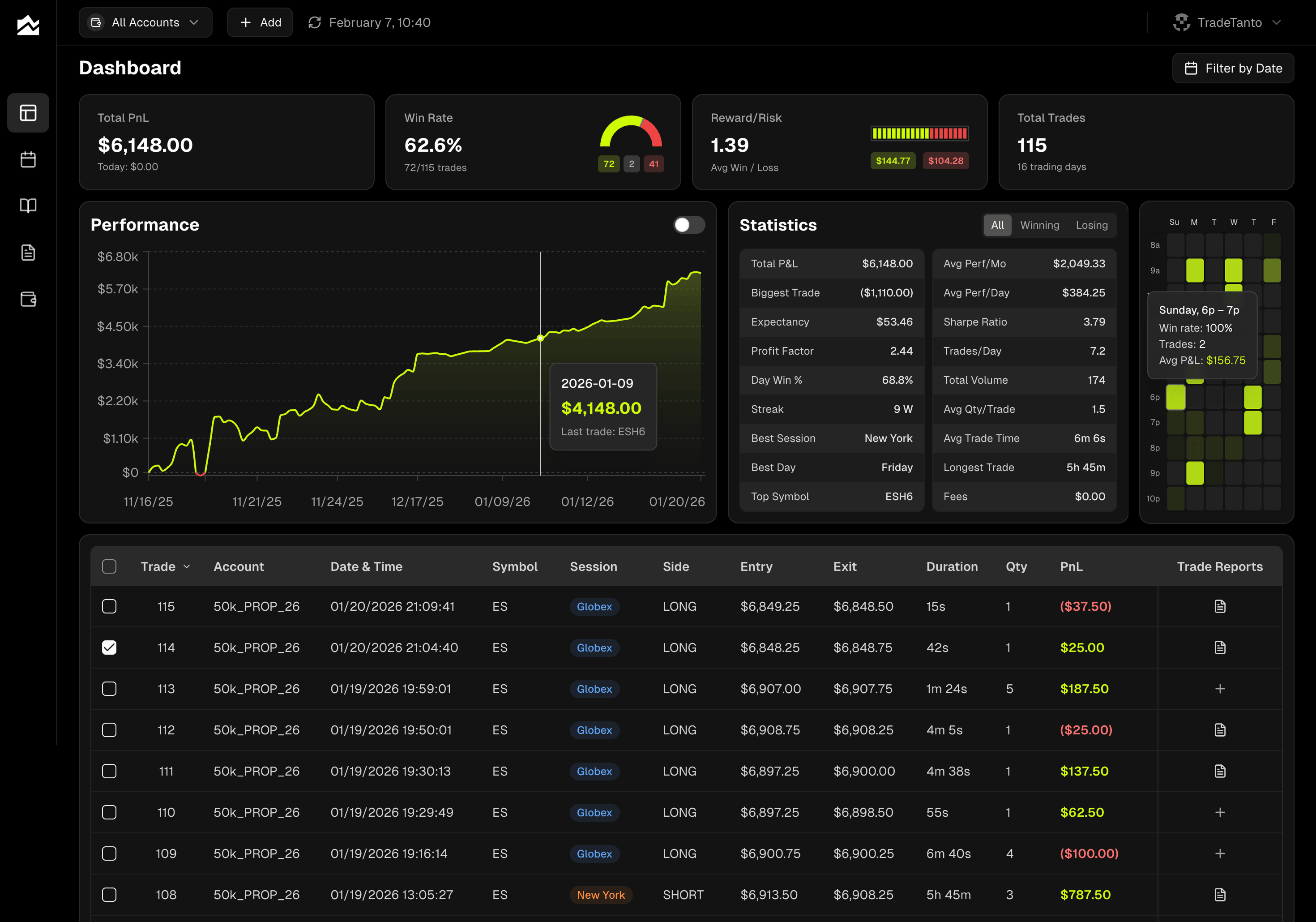
The features that matter for this profile are per-account stats with a multi-account roll-up, per-account commission tracking that handles per-order or per-contract round turn, and an A-F performance grade paired with a separate Perfect/Decent/Improve execution rating. The two grading scales let you separate outcome from process. An A-setup that lost money is still a good trade. Every trade also gets a candlestick chart with your entry and exit plotted on the price action, so you're reviewing actual fills rather than rows in a spreadsheet. The Day Journal pairs a forecast column with an actual column for each instrument you watch, and economic events for the day (CPI, FOMC, NFP) load alongside your notes so you remember what was moving tape on any given session. Pricing starts at $13.99/month on Starter; Professional at $24.99/month covers up to five accounts, which fits most traders running multiple funded accounts. See the Tanto product page, pricing, and supported platforms for current details.
If you trade futures alongside equities and need broader US equity broker coverage, TraderSync is the alternative worth considering. For a deeper look at journal options for funded traders, see our upcoming guide on the best trading journal for prop firm traders.
For Active US Equity Day Traders: Chartlog or Tradervue
If you day trade US stocks through Interactive Brokers, TD Ameritrade, Webull, TradeStation, DAS Trader, or thinkorswim, two journals come up consistently.
Chartlog plots every imported trade on a TradingView chart with entry and exit points marked. For traders who already think in TradingView, this is the cleanest visual review experience in the category at its price point. Pricing is $14.99/month for Lite (no strategy tagging), $29.99/month for Standard (adds strategy tracking), and $39.99/month for Pro (adds 15 years of historical data and full analytics). Auto-sync covers about ten broker platforms, all centered on US equities. There's no native mobile app and no trade replay; the strategy sample-set tool tests defined conditions against your historical trade data rather than running a forward simulation.
Tradervue has been around longer, supports 80+ brokers, and offers a free plan limited to 30 trades per month, which is useful for low-volume traders or for testing the platform before committing. Silver is $29.95/month and adds unlimited trades plus broker sync; Gold is $49.95/month and adds exit analysis, MAE/MFE statistics, and risk reporting. The interface feels older than newer competitors and there's no AI layer, but the analytics are stable and the free tier is the cheapest way to start journaling US equity trades.
Pick Chartlog if visual review and TradingView charts matter most. Pick Tradervue if broker coverage and the free tier matter more. Either way, see our Chartlog alternative and Tradervue alternative for the longer comparisons.
For Multi-Asset Traders: Trademetria or TraderSync
If you trade across stocks, options, futures, forex, and crypto and want one journal that handles all of them, two tools cover the most ground.
Trademetria supports stocks, options, futures, forex, crypto, and CFDs. Pricing is friendly: a free tier capped at 30 orders per month, Basic at $19.95/month, and Pro at $29.95/month with auto-sync from 140+ brokers. Options spread merging is a quiet strength here, and the platform tracks deposits, withdrawals, dividends, and splits at an accounting level that most journals skip. There's no trade replay and no native mobile app. The free plan is a usable starting point if you trade infrequently, but auto-sync is locked behind the Pro tier, so active traders will hit the upgrade pretty quickly.
TraderSync covers the same asset classes and offers broker auto-sync across hundreds of platforms, including most of the major US equity brokers, Interactive Brokers, and the common forex and crypto venues. Pro is $29.95/month, Premium $49.95/month, and Elite $79.95/month. The Cypher tool generates feedback summaries based on your trade history; the message cap is 5 per day on Pro, 15 on Premium, and 60 on Elite. Trade Replay is included on all paid plans, with 250-millisecond resolution on Elite. A 7-day free trial covers all paid tiers. The annual billing discount is steep, dropping Pro to roughly $19.46/month if you commit for a year.
Pick Trademetria if cost matters more than AI and replay features, and your broker is on the supported list. Pick TraderSync if broker coverage is your hardest constraint or if replay is part of your review process. See our Trademetria alternative and TraderSync alternative for more detail.
For Psychology and Behavior-Focused Review: Edgewonk
Some traders need analytics. Some need a discipline coach. Edgewonk is built for the second group.
The Tiltmeter tracks how often you break your defined rules and maps that against your equity curve, showing the correlation between execution discipline and results. Setup Checklists let you define entry conditions for each setup and mark which criteria were met on every trade, then report on how checklist adherence correlates with performance over time. The Edge Finder generates a weekly summary report from your trade data. Alternative Strategy Testing lets you ask what would have happened if you'd used different exit rules on your real historical trades, not on a generic backtest.
Pricing is one annual fee: $197/year (about $16/month) for everything. There are no tiers. A 14-day money-back guarantee replaces the more common free trial. The interface is more functional than polished, and broker integrations are limited compared to web-based competitors. Manual entry or CSV upload is common, which adds friction at higher trade volumes.
If discipline and behavioral patterns are the part of your trading you most want to fix, Edgewonk does that better than anything else at this price. If you'd describe your problem as "I know my edge, I just keep breaking my own rules," this is the tool. If your problem is "I don't know what my edge is yet," you need analytics depth more than psychology tracking, and TraderSync or TradesViz will serve you better.
For more, see our Edgewonk alternative.
For Trade Replay and Backtesting: TradeZella
If your review process depends on watching past trades play back tick by tick, TradeZella is the pick at its price point.
Trade Replay overlays your executions on the actual price chart and lets you scrub through the session at adjustable speed. Replay 2.0 added multi-trade replay, which shows an entire session with all trades visible at once. Backtesting is included on all plans with no usage cap. The platform tags trades with playbook, setup, emotion (confident, fearful, impulsive, neutral), and detailed notes, which forces structure into the review habit.
Pricing is Basic at $29/month ($24/month annual) and Premium at $49/month ($33/month annual). Trade replay requires Premium. There is no free trial and no refund policy, which is worth knowing before you subscribe. Broker auto-sync covers 500+ platforms. TradeZella has marketed an AI Insights feature; verify its current state on their pricing page before factoring it into your decision.
If your edge depends on replaying entries and exits, this is the journal. If you don't watch replays, you're paying for a feature you won't use, and Edgewonk or Tradervue may serve you better. See our TradeZella alternative for the longer comparison.
For DIY and Low-Volume Traders: Stonk Journal (and Notion or Excel as DIY)
Not every trader needs a paid journal. If you take a few trades a week and you're still figuring out whether journaling helps you at all, free is the right starting point.
Stonk Journal is donation-supported, ad-free, and runs in the browser. It includes a PnL calendar, tags, notes, image uploads, hold time tracking, and basic metrics like win rate and profit factor. The catch is manual entry: there's no broker sync and no CSV import. You enter every trade by hand, one at a time. For ten trades a week, that's tolerable. For ten trades a day, it's not.
Notion and Excel are the DIY options. They cost nothing if you already use them, they're infinitely customizable, and they teach you what you actually want to track. The downside is real: no automation, no charts unless you build them, and the discipline of manual entry collapses as soon as your trade volume rises. Notion has the edge for traders who already live in it; Excel wins for anyone who wants formulas and pivot tables. Both end up replaced eventually, usually around the time you hit 30+ trades a month and realize you're spending more time logging than reviewing. We have a longer guide on Notion as a trading journal coming soon.
For traders who want a structured template, our Stonk Journal alternative covers what to look for when you outgrow free tools.
Quick Comparison Table
This table covers the journals named above. Pricing is current as of May 2026; verify on each vendor's site before subscribing because prices and tiers change. The "Best For" column captures the profile the journal fits, not a feature ranking. A tool that's a good fit for one trader can be a poor fit for another at the same price.
Journal | Asset Classes | Auto-Sync Brokers | Pricing | Best For |
|---|---|---|---|---|
Tanto | Futures, equities | Tradovate, NinjaTrader, cTrader, Rithmic, TopstepX, IBKR + 35 firms | $13.99–$39.99/mo | Futures and prop firm traders |
Chartlog | US equities | ~10 US equity brokers | $14.99–$39.99/mo | Active US equity day traders |
Tradervue | Multi-asset | 80+ brokers (CSV-heavy) | Free (30 trades/mo); $29.95–$49.95/mo | Equity traders who want a free starting tier |
Trademetria | Multi-asset (incl. CFDs) | 140+ brokers | Free; $19.95–$29.95/mo | Multi-asset traders on a budget |
TraderSync | Multi-asset | Hundreds of platforms | $29.95–$79.95/mo | Multi-asset traders who need broad coverage |
Edgewonk | Multi-asset | Limited; CSV-heavy | $197/year | Psychology and discipline review |
TradeZella | Multi-asset | 500+ brokers | $29–$49/mo | Trade replay and backtesting |
Stonk Journal | Multi-asset | None (manual entry) | Free | DIY and low-volume traders |
Bottom Line
The right trading journal depends on what you trade, who you trade through, and how you actually review. Sync coverage is the constraint that quietly disqualifies most picks before features matter. Switching journals later has real friction, so pick once with care. The best trading journal software in 2026 is the one that matches your specific workflow, not the one that ranks highest on a list. A futures trader on Topstep and a swing trader on IBKR need fundamentally different tools, and any list that pretends otherwise is selling something.
By Team Tanto · Last updated: May, 2026