Tradervue Alternative with Instant Broker Sync for 2026
9 min read
If you're searching for a Tradervue alternative, the reason is usually one of three things: the interface feels like it hasn't been touched in a while, imports are slower than you want, or the planning and review tools don't match the way you actually work through a trading day. Tradervue has been around since 2011, but the category has moved. This guide looks at what Tradervue offers, what a strong Tradervue replacement needs to do in 2026, and where Tanto fits.
What Tradervue Offers (and Where It Stops)
Tradervue has a large user base and covers stocks, options, futures, and forex. Here's what the platform includes and where it falls short for active traders.
Reporting on a Mature Web Product
Tradervue's reporting covers MFE/MAE statistics and standard performance reports across stocks, options, futures, and forex. The Gold plan adds exit analysis, risk tracking and reporting, liquidity reports, and commission tracking for net P&L.
Sharing and Mentoring Features
Tradervue supports sharing trades with other users and a mentoring setup where a coach or mentor can privately review your trades and leave comments. Both mentor and mentee need a Silver or Gold subscription. If you're already in a mentorship or trading room that uses Tradervue, the collaboration setup is there.
Coverage for Stocks, Options, Futures, and Forex
Stocks, options, futures, and forex are supported, and Tradervue's platforms page lists 80+ brokers and trading platforms (per Tradervue's own marketing). Whether your broker actually syncs or requires manual file upload depends on the specific integration, which is covered below.
Where the Experience Starts to Show Its Age
Here's where the gap opens up for a lot of traders:
Interface. Tradervue's UI hasn't changed much in a long time. That's not a deal-breaker, but if you've used any modern SaaS product recently, it's noticeable.
No mobile app. Tradervue is web-only. Opening it on your phone between sessions works, but it's not a native experience.
Import speeds vary widely by broker. On their own broker integration pages, Tradervue describes Tradovate, NinjaTrader, and Rithmic imports as "file upload" workflows: you export a CSV from your broker, then upload it to Tradervue. On the NinjaTrader page, Tradervue notes that "fully automated and near-realtime trade importing is available using the third-party Journal Lync NinjaTrader plugin," an acknowledgment that native real-time sync isn't there. Their help docs describe broker sync as happening "often daily or in real-time" without specifying which broker gets which.
Planning tools are light. Tradervue supports daily notes and trade notes, but doesn't offer a pre-session forecast-versus-actual workflow. If daily planning is central to how you trade, you'll be building that flow yourself.
The category has room for something built around sync speed, design, and daily workflow.
What a Strong Tradervue Alternative Looks Like
If you're shopping for a Tradervue replacement, these are the criteria that matter:
Instant auto-sync from your broker. Trades should appear in your journal within seconds, not after you export a CSV.
A modern, readable interface. You're going to stare at this product every day. The design should earn that attention.
Real planning tools, not just review. A forecast-and-actual workflow, a calendar that surfaces patterns, and a day journal that pairs with your trades.
Honest per-trade grading. Something more useful than a single label, so you can tell good outcomes from good process.
Futures-aware P&L math. Correct multipliers for futures contracts and per-account commission tracking.
With that list in hand, here's what Tanto looks like.
Tanto: A Modern Tradervue Alternative
Tanto is a trading journal built around instant broker sync, thoughtful planning tools, and a design that doesn't get in your way. It's a fit for active traders across futures, equities (via IBKR), and prop firm accounts. Here's what that means in practice.
Trades Sync the Moment They Fill
Tanto auto-syncs with Tradovate, NinjaTrader, cTrader, Rithmic, Interactive Brokers, and TopstepX via ProjectX. You connect once, and trades show up on their own. No CSV exports, no end-of-day uploads, no copy-pasting from your broker's order history. By the time you close the position, it's already in your journal ready to grade.
Grade Every Trade With a Report Card That Shows the Chart
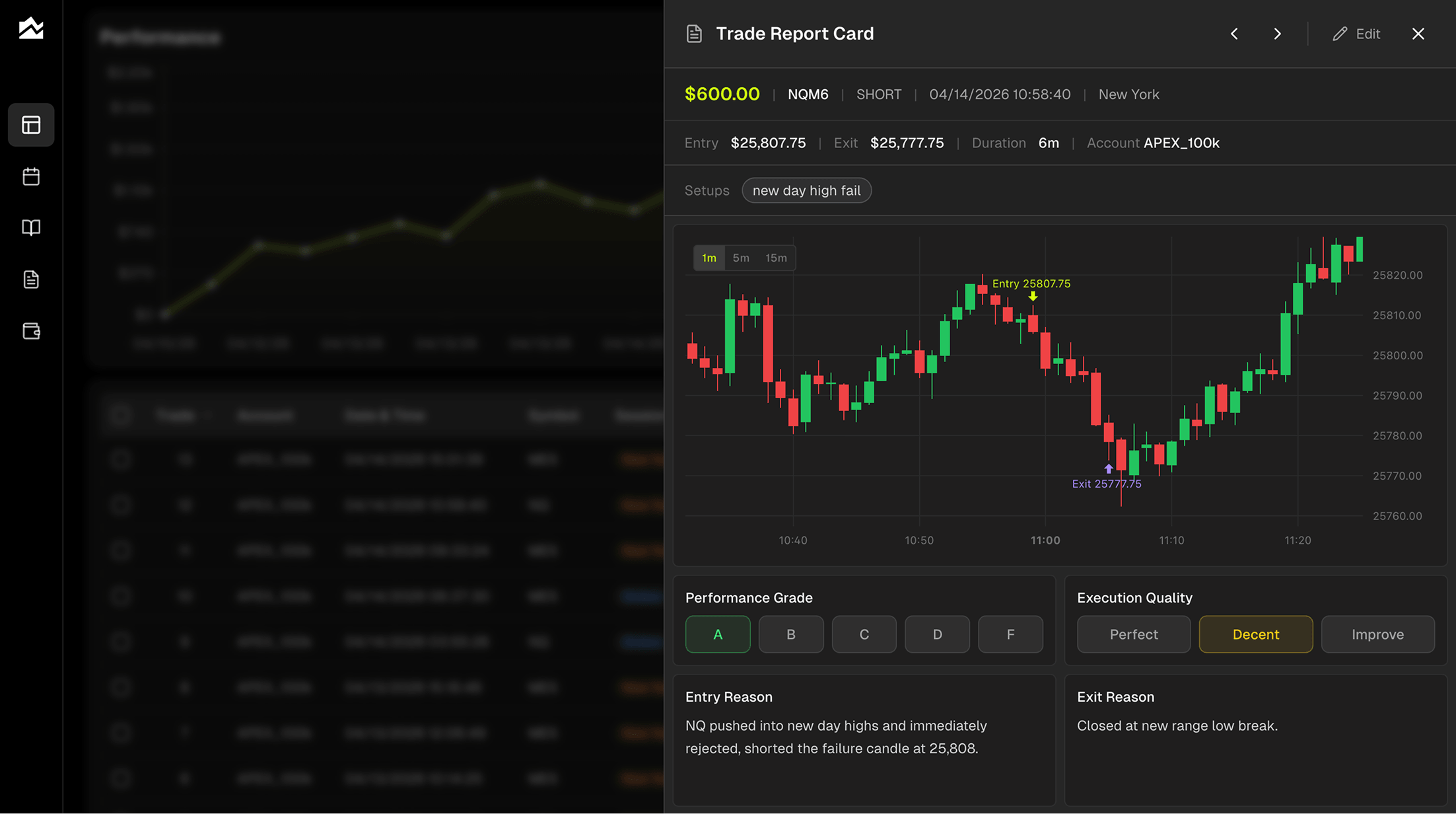
Every trade gets a Trade Report Card. You grade the outcome A through F and rate your execution separately (Perfect, Decent, or Improve). Those are two different questions, and treating them that way is the whole point. An A-grade result with a Decent execution means you got lucky. An F-grade result with a Perfect execution means the market moved against a clean read. Very different lessons, same scoreboard.
The report card plots your entry and exit right on the chart, so you're reviewing the actual price action you traded, not a row in a spreadsheet. You can jot down why you got in, why you got out, what you were feeling, and what you'd do differently, all on one screen.
Tag each trade by setup ("breakout," "news play," "mean reversion," whatever you run), then filter Trade Reports by tag, by grade, or by execution quality to see which setups actually earn their place in your book.
Plan the Day, Review the Day, Watch the Month
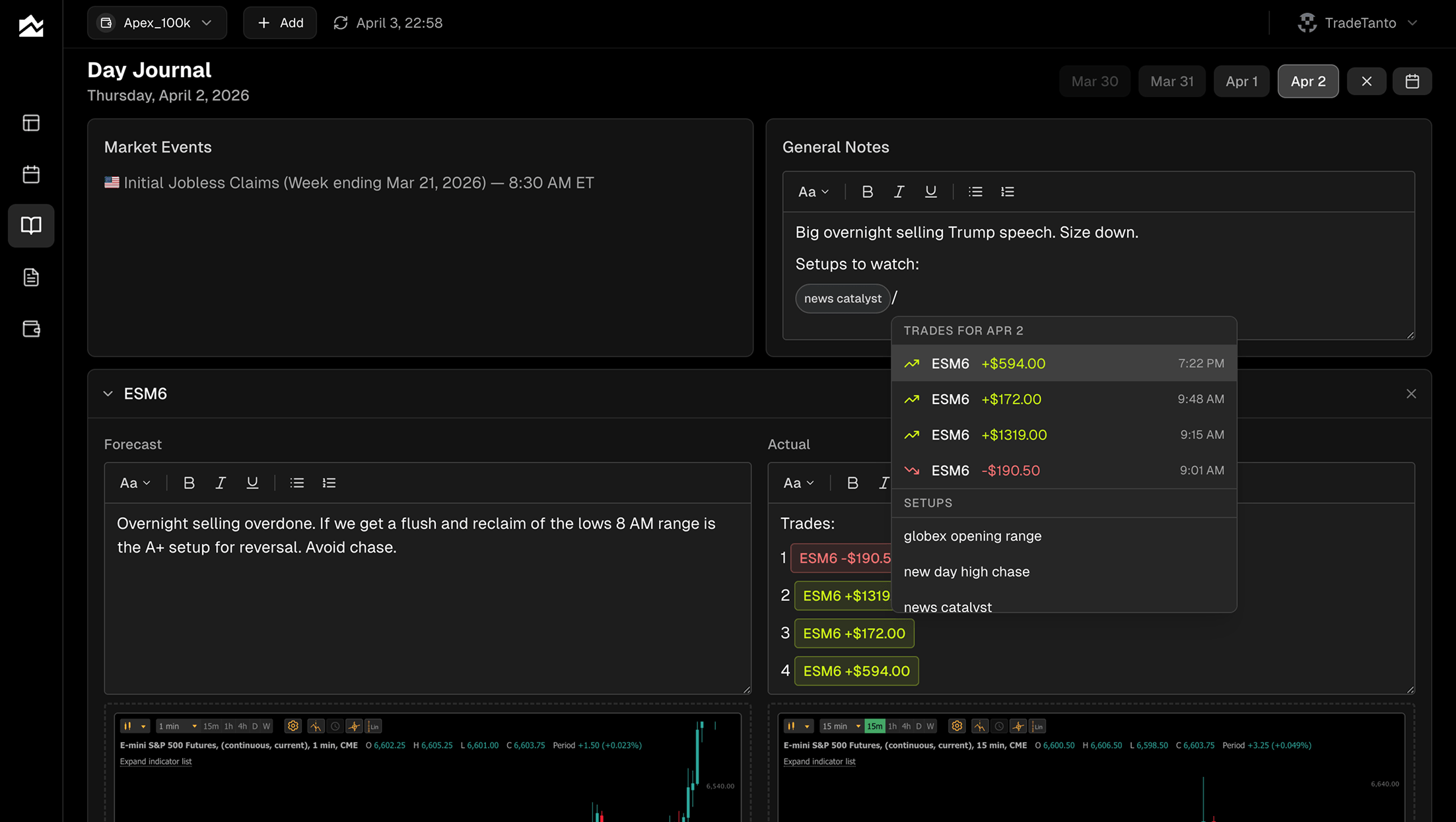
Tanto's Day Journal gives you a forecast column and an actual column side by side. Before the session, you write what you expect. After the close, you write what happened. Over a few weeks, the split shows you exactly where your read is sharp and where you're projecting. Economic events for the day show up alongside so you remember what was moving tape.
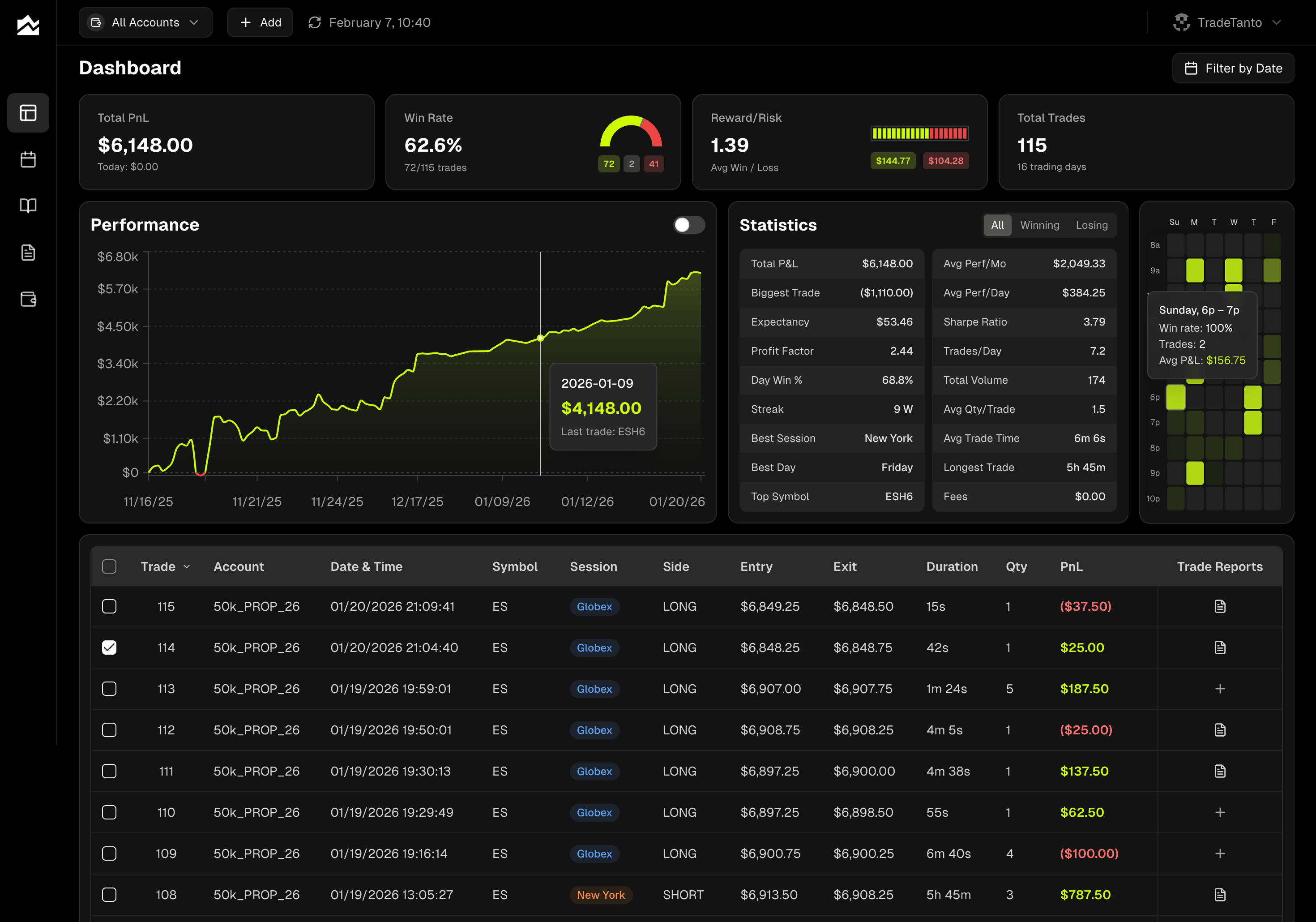
The monthly calendar gives you a bird's-eye view of how you've been trading, with a full breakdown when you click into any day or week. And the trading heatmap tells you when you actually make money, by hour and by day of week. Tuesdays might be quietly carrying you. Thursday afternoons might be quietly bleeding you out. The heatmap makes it obvious.
Accounts Built for the Way Traders Actually Work
Personal account plus a prop firm combine plus a funded account? Tanto treats each one separately, with its own P&L, its own commissions, and its own broker connection. One click in the account selector filters the whole app to just what you want to see, or pulls everything together for the bigger picture.
Hidden trades help when you want to exclude something without deleting it. Test trades, a blown combine, a day you're not ready to count. Hide them and they're gone from every stat, chart, and calendar. Unhide when you're ready.
Other Options Worth Knowing About
Tanto isn't the only Tradervue competitor worth considering. If it doesn't fit, here are two others.
Trademetria is strong for multi-asset traders who want back-office functionality alongside journaling. It merges multi-leg options spreads automatically (iron condors, verticals, butterflies track as single positions with full cost basis and roll P&L), covers stocks, options, futures, forex, crypto, and CFDs, and tracks dividends, deposits, withdrawals, and platform fees for the trading-as-a-business crowd. The catch is auto-sync coverage. Trademetria advertises 140+ brokers, but live auto-sync is mostly limited to equity and crypto brokers like Schwab, Fidelity, Webull, Robinhood, Moomoo, and Tastytrade. Rithmic, NinjaTrader, cTrader, and TopstepX are file-upload only.
Edgewonk is the pick for traders who want to define their own KPIs and run deep custom analysis. It's a one-time annual fee rather than a monthly subscription, and it has a loyal following in the forex community for its emotional and psychology-focused journaling. Edgewonk imports are CSV or spreadsheet-based, not live broker sync, so if you want the journal current during the session, it's not built for that.
Who Should Stay on Tradervue
Tradervue may be the right fit if:
You trade stocks or options primarily and use the Gold features (liquidity reports, exit efficiency, risk reporting)
You're already in a mentorship or trading room where your coach uses Tradervue
You want the trade-sharing and community features
You import from brokers like Schwab, Fidelity, Lightspeed, DAS Trader Pro, or Sterling
You have years of history in Tradervue and don't want to migrate
You're fine with web-only access and don't need a native mobile app
If those conditions describe your setup, switching probably isn't worth the friction. Everything else in this guide applies to traders who want something the current Tradervue product doesn't prioritize: instant sync, modern UI, and daily planning tools.
Migrating Away from Tradervue
If you decide to move, expect 30 to 45 minutes for the cutover:
In Tradervue, go to your trade list and export to Excel. Silver and Gold users both have export access. Download the file.
Sign up for Tanto and create an account for each broker or prop firm account you want to track.
For anything you trade going forward, connect it via AutoSync so new fills stream in automatically.
For historical data, upload the file you exported through Tanto's import flow. Tanto accepts Excel files directly through its import mapper for cTrader, and CSV for Tradovate and NinjaTrader formats.
Once the history is in, set your commissions per account so P&L reflects your actual take-home.
A few things that may not transfer cleanly: journal notes and tags from Tradervue don't map one-to-one to Tanto's note fields, so expect to re-grade trades you want on the record. Shared trades and mentor comments don't carry over, since Tanto isn't a social platform. If you had custom tags or a mentoring setup, those are Tradervue-specific and will stay there.
You can run both journals in parallel for a week or two while you get comfortable. Nothing breaks by doing that.
Bottom Line
Tanto is a Tradervue alternative for traders who want instant broker sync, a clean interface, and planning tools that pair with the review tools. If you're a stock or options trader who mainly cares about post-trade reporting and the community layer, Tradervue's current product may still fit your workflow. Pick based on what you need your journal to do today. Start with Tanto's pricing page or browse the full integrations list to see if your broker is covered.
By Team Tanto · Last updated: April, 2026