TradesViz Alternative: A Modern Journal for Prop Traders
9 min read
If you searched for a TradesViz alternative, you probably hit one of two walls. TradesViz auto-sync runs every 24 hours by default for most brokers, so trades you took this morning don't land in your journal until tomorrow. And Rithmic, the backend for Apex, Bulenox, MyFundedFutures, and other prop firms, requires a manual sync click each time. This guide is for futures and prop firm traders who want their fills in a journal in real time, not on a daily timer, and not behind a manual click.
What TradesViz Offers (and Where It Stops)
TradesViz is a feature-dense journal with three plans: Basic (free), Pro ($14.99/month annual, $19.99 monthly), and Platinum ($22.49/month annual, $29.99 monthly). It supports stocks, options, futures, forex, and crypto, and the analytics layer is the headline feature.
Pivot Grid, AI Q&A, and 600+ Statistics
TradesViz's Pivot+Grid charting lets you slice trade data across any combination of dimensions and chart the result. AI Q&A on the Platinum plan answers natural-language questions about your trades. 600+ statistics span MFE/MAE, exit analysis, drawdown profiles, and Monte Carlo simulations. If you live inside the analytics rather than during the session, TradesViz earns its place.
Auto-Sync Runs Daily for Most Brokers
Per TradesViz's own help documentation, default auto-sync connections run every 24 hours. NinjaTrader and SierraChart have a separate real-time sync that requires you to install a desktop indicator on your charting platform. Tradovate, Interactive Brokers, TradeStation, and the rest follow the daily cadence unless you click "sync" manually.
Where It Stops for Prop Firm Traders
The prop firm rails are where the friction shows up. Rithmic is documented as manual-trigger only, so each pull takes a click. The free Basic plan only imports stock trades, so a futures or prop firm trader has to start a paid plan or 7-day trial just to test-drive the platform with their actual data. And the daily auto-sync cadence on Tradovate and other supported brokers means a session you traded at 9:30 AM doesn't show up in your journal until the next day, unless you click the manual sync button each time.
Here's how the rails actually compare:
Connection | TradesViz | Tanto |
|---|---|---|
Tradovate | Daily auto-sync | Real-time |
Rithmic (Apex, Bulenox, Earn2Trade) | Manual-trigger only | Real-time |
TopstepX / ProjectX | Daily auto-sync | Real-time |
Interactive Brokers | Daily auto-sync | ~10 min via Flex Queries |
NinjaTrader | Real-time (desktop indicator) | Real-time |
What a Strong TradesViz Alternative Looks Like
If you're a futures or prop firm trader, these are the criteria worth checking before you sign up for any TradesViz alternative or anything that claims to be better than TradesViz:
Real-time sync that includes the prop firm rails. Rithmic for Apex, Earn2Trade, and Bulenox. ProjectX for TopstepX. Tradovate for Topstep's standard combines. Daily polling defeats the point of an intraday review loop.
Per-account stats with multi-account roll-up. A Combine, a funded account, and a personal account each need their own equity curve, win rate, and stat cards, then a switch to roll all of them up.
A way to hide trades without deleting them. Practice fills, fat fingers, accidental trades on the wrong account: out of stats, still on record.
Commission tracking that adjusts P&L everywhere. Per-contract round turn for futures, configurable per account, applied across every chart, calendar cell, and report.
Pricing that doesn't punish you for being a futures trader. No free tier locked to one asset class, no plan tier required just to import futures.
Why Tanto Works for Futures and Prop Firm Traders
Tanto is built around the brokers and prop firms futures traders actually use. The connections TradesViz puts behind a daily timer or a manual click are real-time on Tanto.
Trades Sync the Moment They Fill
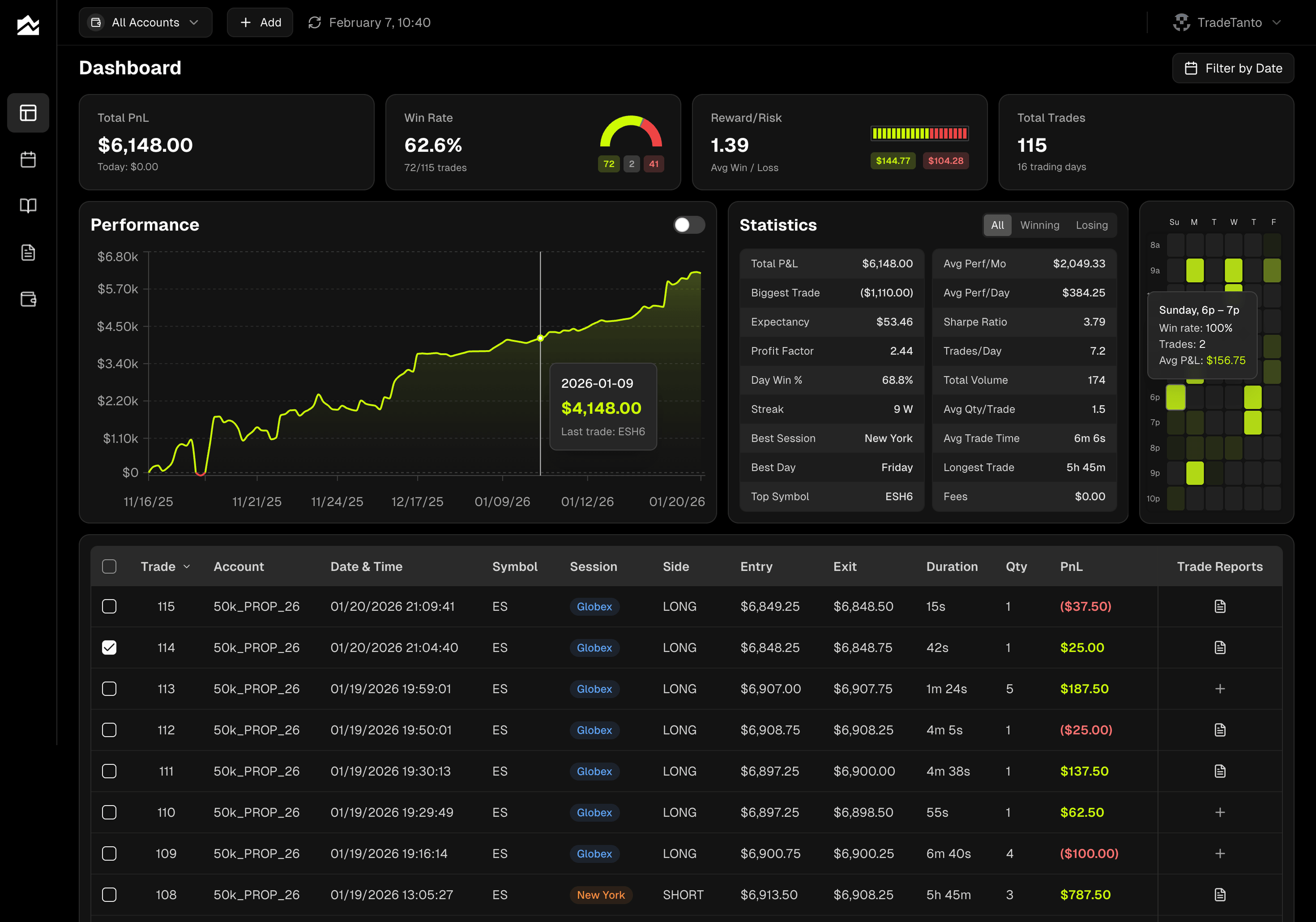
No daily timer, no manual click. Connect Tradovate, NinjaTrader, cTrader, or Rithmic once and your fills show up on their own, in real time. That includes Rithmic-based prop firms. When you connect Rithmic, you pick your firm from the dropdown (Apex, TopstepTrader, Earn2Trade, Bulenox, and others) and use the credentials your firm provided. TopstepX connects directly through ProjectX. Interactive Brokers syncs through Flex Queries roughly every 10 minutes, the fastest IBKR sync available among trading journals. The dashboard updates as trades arrive, so the equity curve and stat cards reflect what just happened, not what your last polling window happened to catch.
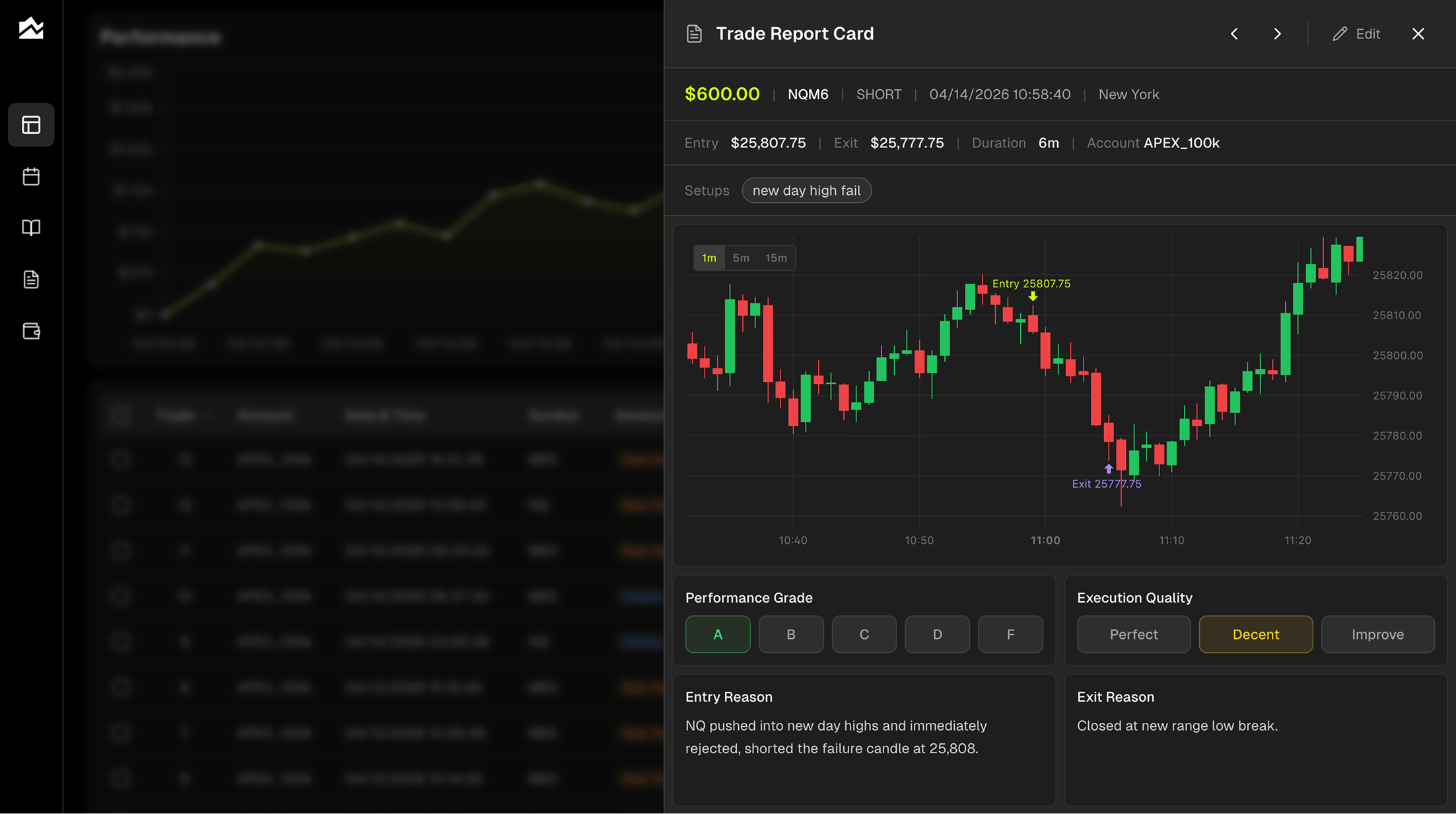
Grade Every Trade, Not Just Every Result
Every trade gets two scores. A performance grade (A through F) for the outcome, and an execution rating (Perfect, Decent, Needs Work) for whether you actually followed your plan. An A-grade losing trade is more useful than a D-grade winner, and separating the two is how you stop confusing process with luck. Tag setups, log emotional state, write what you'd do differently. Filter Trade Reports by grade or tag to find the patterns hiding in 200 trades.
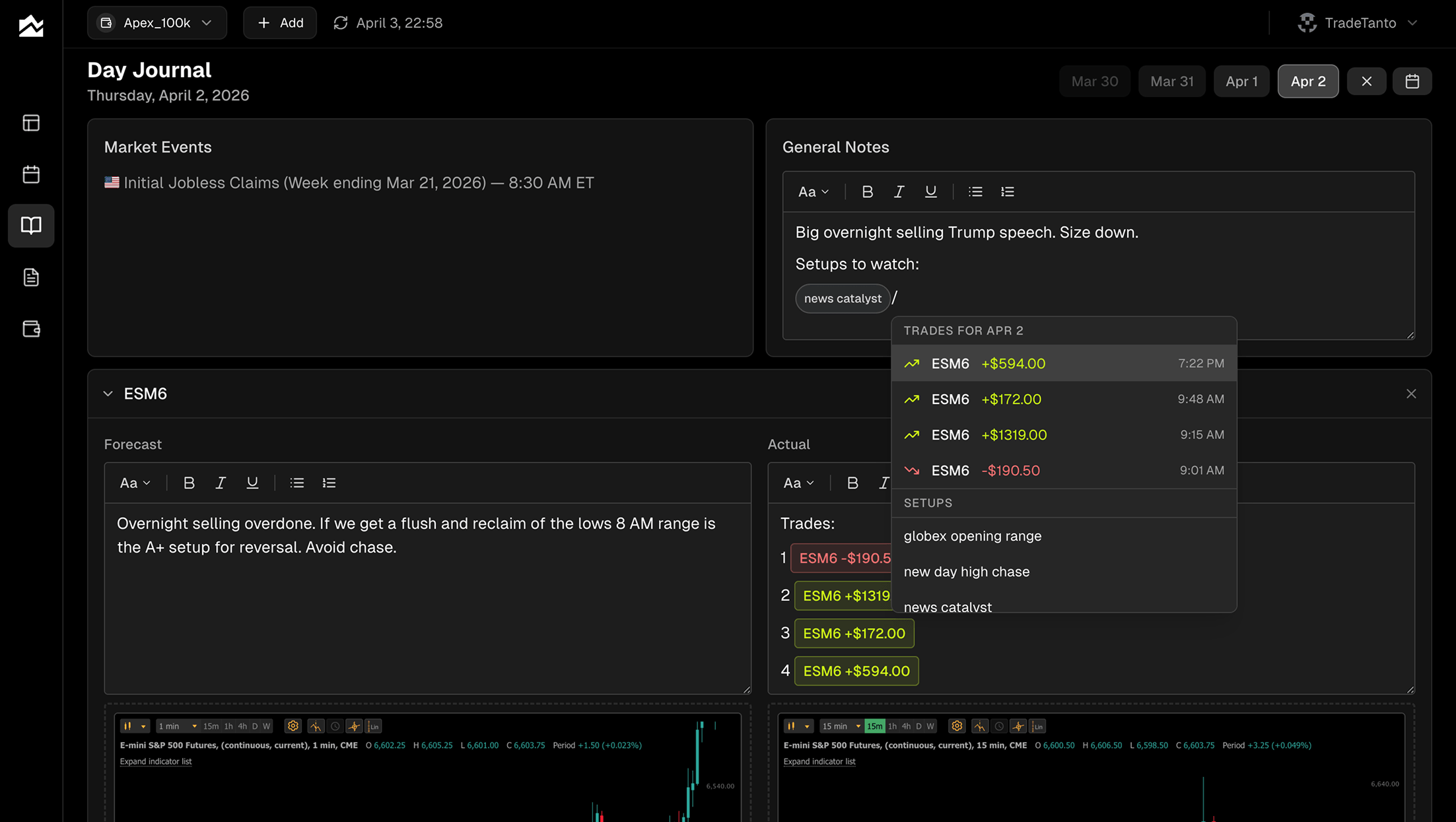
Plan the Day, Then Review What Actually Happened
The Day Journal pairs a forecast column with an actual column for each instrument you watch. Write your read before the open, then come back after the close and compare. Economic events for the day are listed alongside your notes, so you remember what was moving the market. Slash commands pull specific trades and setup tags into the entry. Paste charts inline. The forecast/actual split is one of the fastest ways to find the gap between what you planned and what you traded.
Multi-Account Workflows for Combines and Funded Accounts
The account selector in the top bar filters the entire app, dashboard, calendar, journal, reports, by a single account or All Accounts. Run three combines and a funded account at the same time? Each one gets its own stat cards, its own equity curve, its own win rate. Hidden trades stay out of stats without being deleted, useful when you want a clean view of your funded account separate from evaluation noise. Per-account commission tracking means a $1.40 round turn on one prop firm and a $0.85 round turn on another both compute correctly across every chart and report.
Other Options Worth Knowing About
A few TradesViz competitor options that solve different versions of the problem, depending on what you actually need:
TraderSync. Closest to TradesViz in shape, with broker auto-sync, AI-driven pattern reports through its Cypher engine, and trade simulation. Stocks and options traders looking for a TradesViz replacement with a free tier worth trying often land here.
Tradervue. One of the oldest journals, built around structured tagging and clean reporting rather than dashboard customization. If your day-to-day is equity scans, end-of-day review, and tagging by setup, Tradervue fits that pace and tends to be easier to set up than TradesViz.
Edgewonk. A one-time-payment journal with a focus on emotional review and rule-tracking. The gamification layer and milestone challenges target traders whose losses come from psychology rather than statistical edge issues, and the math gets cheaper than a TradesViz subscription somewhere around year two.
Who Should Stay on TradesViz
A TradesViz alternative isn't the right call for everyone. If most of these describe you, the switch isn't worth it:
You trade across multiple asset classes (stocks, options, futures, forex, crypto) and want one journal for all of it.
The Pivot+Grid analytics, AI Q&A on the Platinum plan, and 600+ statistics matter more to you than sync timing, and you actually use them.
You want options-specific tools like Greeks vs P&L analysis or auto-detection of multi-leg spreads.
You build your own custom dashboards and value the depth of customization.
You're a swing trader or position trader where daily sync is plenty.
The trading simulator and backtester on the Platinum plan are part of how you study setups.
If TradesViz is doing what you bought it for, switching is friction without payoff. There's no shortage of journals that look more modern, but most won't match the analytics depth, and starting over with 200 trades of tags and grades is real cost. Stay put.
Migrating Away from TradesViz
A clean migration takes about 30 to 45 minutes. The process is straightforward but a few things won't transfer perfectly.
Export your historical trades from your broker rather than from TradesViz, since broker exports are typically cleaner and apply regardless of which journal you came from. From Tradovate, NinjaTrader, cTrader, or Rithmic, pull a CSV or XLSX covering the date range you want to preserve. In Tanto, click the + button and select Upload CSV; the importer accepts Tradovate, NinjaTrader, and cTrader CSVs natively, plus Excel files through the same flow.
What might not transfer cleanly: trade tags, grading, and custom dashboards. Tags often live inside TradesViz's database in a format that doesn't translate directly, and any custom dashboards you built in TradesViz's Pivot Grid will need to be rebuilt. If grading specific historical trades matters, plan to spend an evening going through your top 50 most-traded setups and re-tagging in Tanto. After that, connect AutoSync for your live brokers and prop firms and the manual exports stop.
Bottom Line
If your trades land through a Rithmic-based prop firm, TopstepX, or any of the futures rails, a TradesViz alternative that treats those connections as first-class is going to feel like a different tool. Tanto fits the futures and prop firm trader who wants real-time sync and per-account stats without a daily timer between fill and review. TradesViz still fits the multi-asset trader who values the Pivot Grid, AI Q&A, and the simulator, and who trades on a cadence where daily sync is fine. Pick the one where the auto-sync map and your broker map actually overlap. Start with Tanto's pricing page or browse the full integrations list to see if your broker is covered.
By Team Tanto · Last updated: April, 2026