TraderSync Alternative with Real-Time Futures Sync
9 min read
If you trade futures on Tradovate, NinjaTrader, Rithmic-based prop firms, or TopstepX and you're searching for a TraderSync alternative, the issue is usually the same. TraderSync supports those platforms as CSV upload, not native sync. This guide is for traders who want trades to show up in their journal automatically, without exporting a CSV at the end of every session.
What TraderSync Offers (and Where It Stops)
TraderSync has been around since 2013 and lists over 700 brokers. Here's where the gap opens for futures and prop firm traders.
Pricing, Plans, and AI Features
Three tiers: Pro at $29.95 a month, Premium at $49.95, Elite at $79.95, with about 25% off on annual billing. The 7-day free trial gives full feature access. There's no free tier, and billing is all-sales-final. TraderSync covers stocks, equity options, futures, futures options, forex, crypto, indices, and CFDs on every plan. Cypher (the chat tool) is capped at 5, 15, or 60 messages a day. Cypher Coach, Trade Replay (250ms playback), Time & Sales, and Level II are gated to higher tiers, and order book features are stocks-only.
The Futures Stack Is CSV Upload, Not AutoSync
This is the part worth knowing before you subscribe. TraderSync's broker support page lists hundreds of integrations with a separate "Auto Sync" column. For the futures and prop firm stack most active futures traders use, AutoSync isn't checked. The broker-specific landing pages back this up: Tradovate's page describes the workflow as "uploader supports CSV files exported from Tradovate," and the NinjaTrader page describes importing your data through their parser.
For a stocks-and-options trader on a major retail broker, this isn't a problem. For a futures trader running multiple prop firm accounts, it means exporting a CSV from each account at the end of every session and uploading it before the journal is current. That's the gap a TraderSync alternative should close.
What a Strong TraderSync Alternative Looks Like
If you're shopping for a TraderSync replacement and you trade futures or run prop firm accounts, here's the shortlist:
Native sync with futures platforms and prop firms. Tradovate, NinjaTrader, cTrader, Rithmic, Interactive Brokers, and TopstepX should connect directly without manual uploads.
Per-account tracking that handles combine, funded, and personal accounts separately. P&L, commissions, and connection status should be isolated per account, with one-click filtering.
Futures-aware P&L math. Correct multipliers on every micro and full-size contract, with commission tracking that reflects per-contract round-turn fees.
Planning and review in the same tool. A forecast-and-actual workflow paired with a calendar, day journal, and grading system.
Pricing that matches actual usage. You shouldn't have to be on the top tier to get the journaling features that should be standard.
With those criteria laid out, here's what something better than TraderSync looks like for this audience.
Tanto: A Modern TraderSync Competitor
Tanto is a trading journal built around instant broker sync, planning tools, and a design that gets out of the way. It's a fit for active traders on futures, prop firm accounts, and equities through Interactive Brokers.
Trades Sync the Moment They Fill
Tanto auto-syncs natively with Tradovate, NinjaTrader, cTrader, Rithmic, Interactive Brokers, and TopstepX via ProjectX. Connect once, and trades show up on their own. No CSV exports, no end-of-day uploads. By the time you close the position, it's already in your journal ready to grade.
The Rithmic connection is what unlocks most of the prop firm world. Apex, Bulenox, Earn2Trade, Topstep, and other Rithmic-based firms appear in the dropdown when you connect, and you sync with the same credentials your firm gave you. TopstepX runs through ProjectX, with combines and funded accounts visible side by side. Interactive Brokers is the one exception worth flagging: trades appear in roughly 10 minutes, the fastest IBKR sync any trade journal offers.
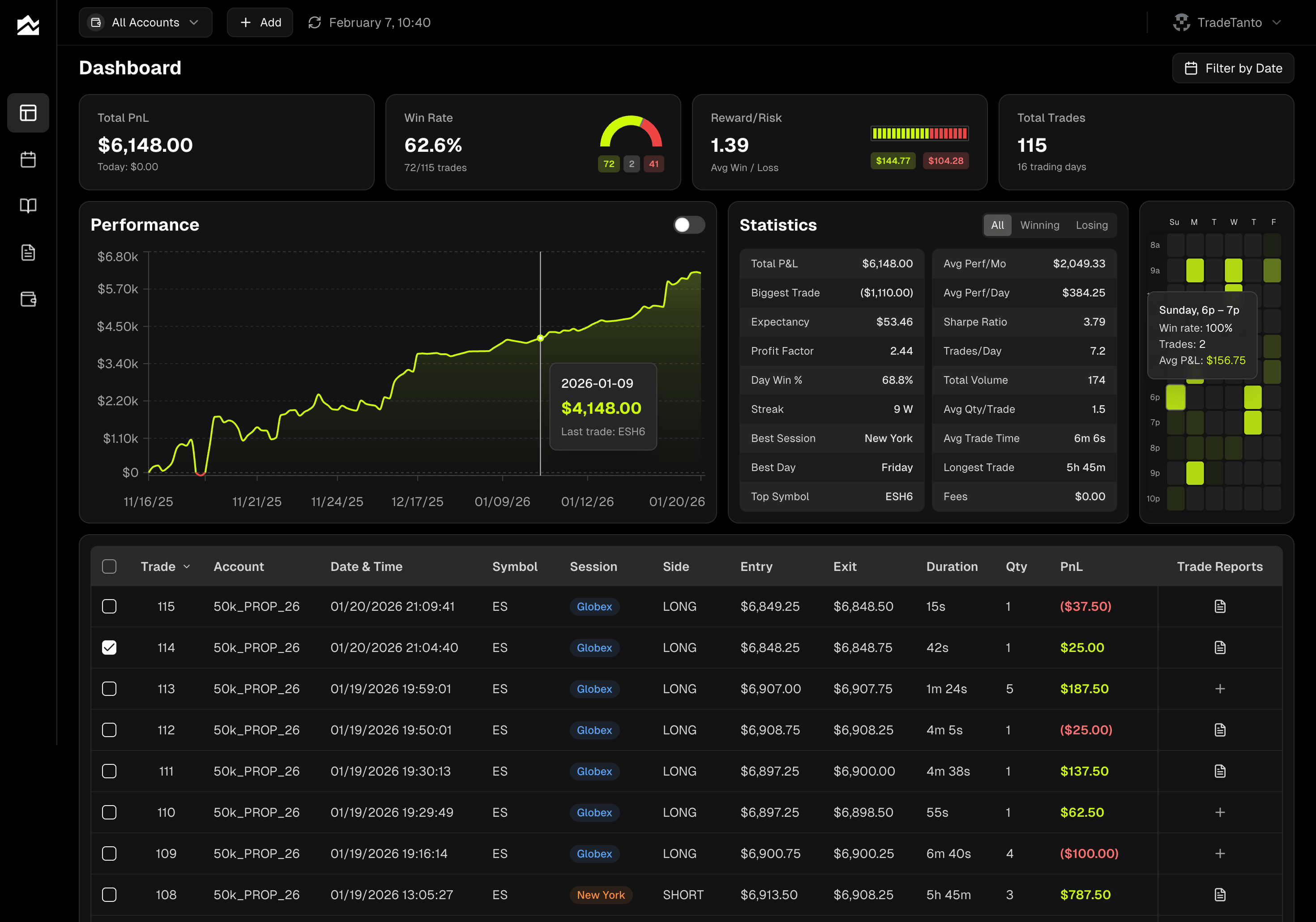
Grade Every Trade With a Report Card That Shows the Chart
Every trade gets a Trade Report Card. You grade the outcome A through F and rate execution separately as Perfect, Decent, or Improve. Those are two different questions, and treating them that way is the whole point. An A-grade result with a Decent execution means the market gave you a gift. An F-grade result with a Perfect execution means a clean read got run over. Different lessons, same scoreboard.
The report card plots your entry and exit on the chart, so you're reviewing actual price action rather than a row in a spreadsheet. Tag each trade by setup, then filter Trade Reports by tag, by grade, or by execution quality to see which setups carry their weight.
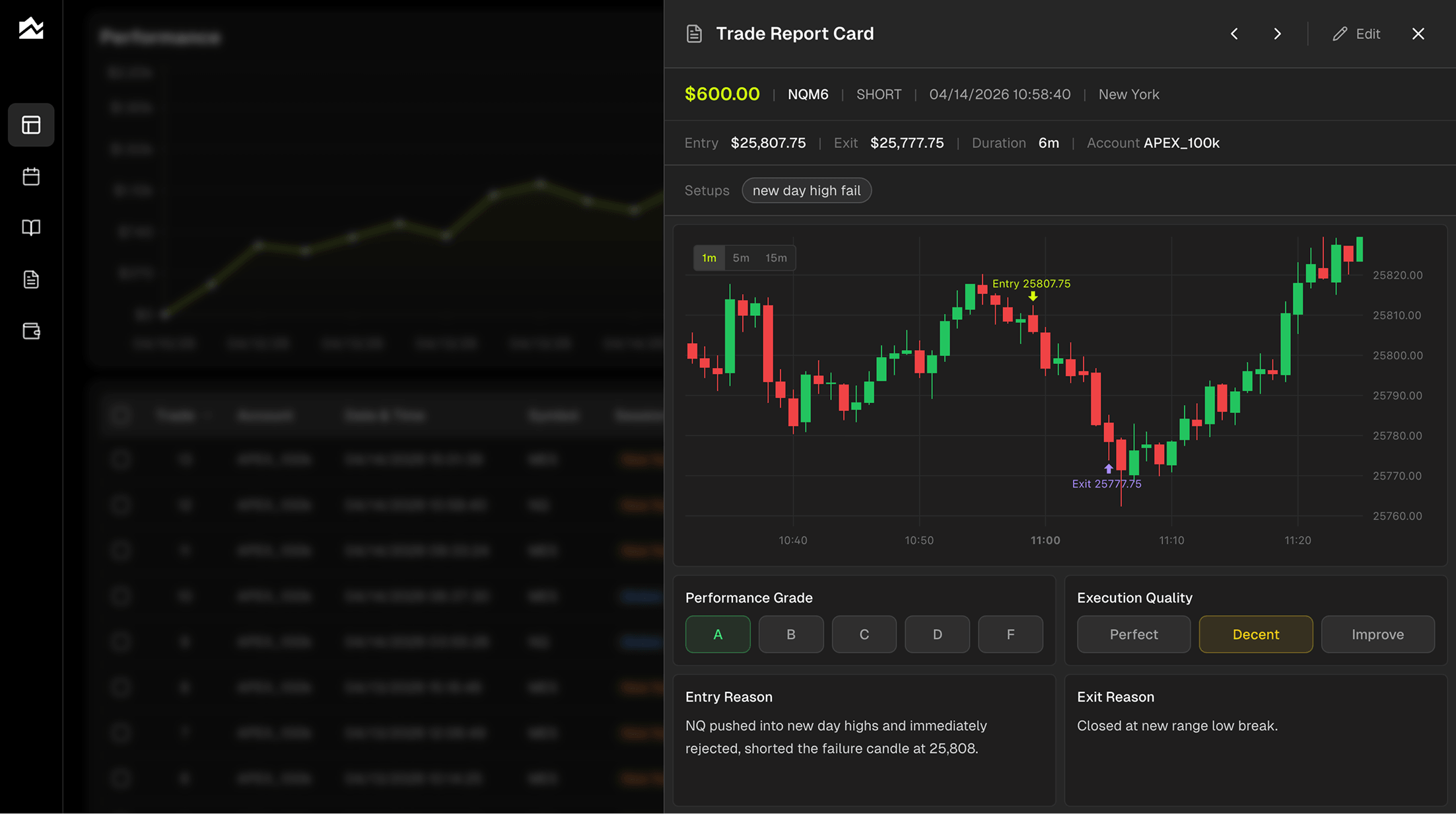
Plan the Day, Review the Day, Watch the Month
Tanto's Day Journal gives you a forecast column and an actual column side by side. Before the open, you write what you expect. After the close, you write what happened. Over a few weeks, the split shows you exactly where your read is sharp and where you're projecting. Economic events for the day appear in the same view, so you remember what was moving tape on any given session.
The monthly calendar gives you a bird's-eye view, with full breakdowns when you click into any day or week. The trading heatmap shows you when you actually make money, by hour and day of week. Tuesday mornings might be quietly carrying you. Thursday afternoons might be quietly bleeding you. The heatmap makes it obvious.
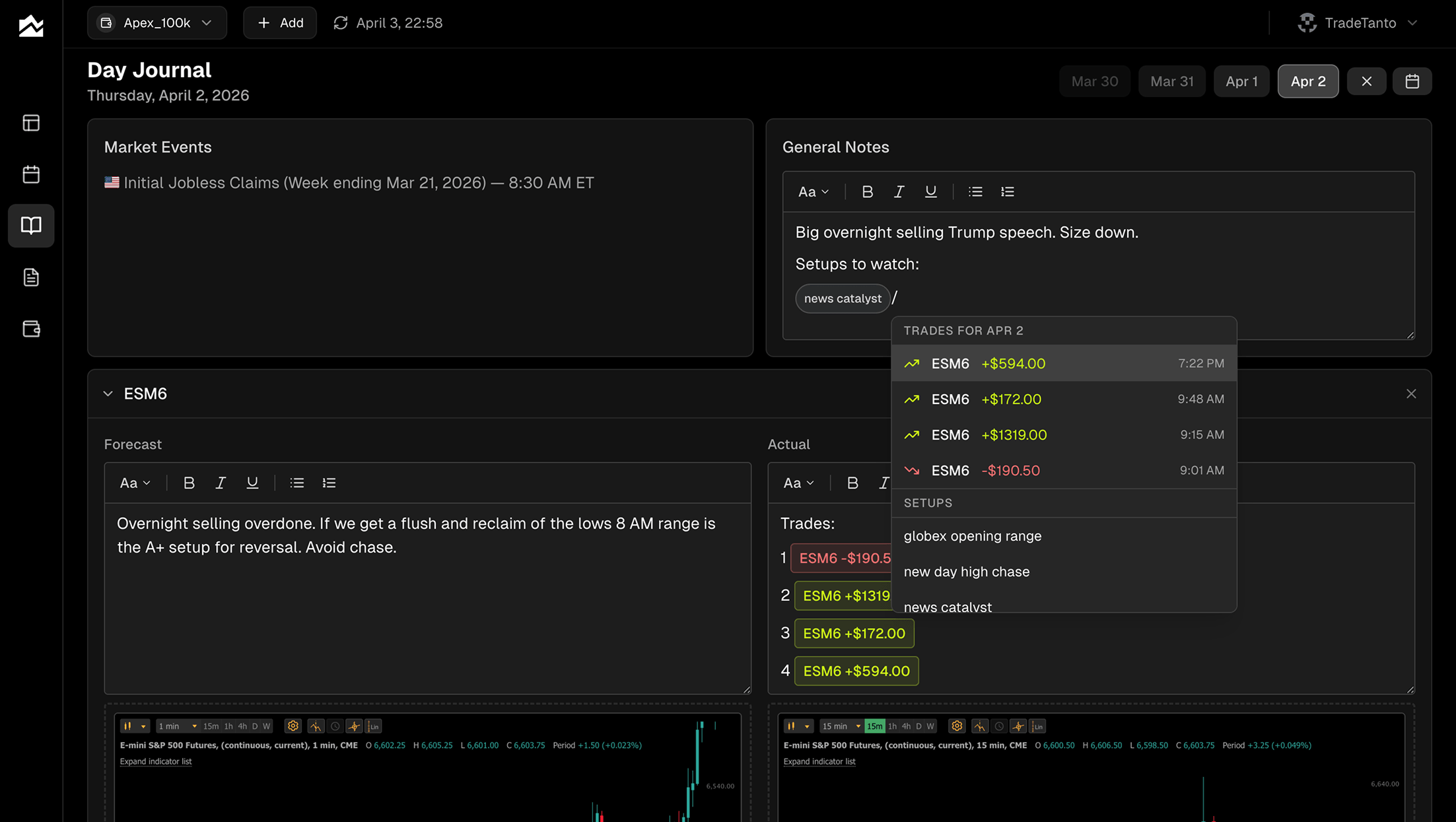
Accounts Built for the Way Prop Firm Traders Actually Work
Personal account plus a combine plus a funded account? Tanto treats each one separately, with its own P&L, its own commission rate, and its own broker connection. One click in the account selector filters the whole app to a single account, or rolls everything up to the portfolio view. A $5 round-turn on a personal Tradovate account and a $4.20 round-turn on an Apex combine show net P&L correctly.
Hidden trades help when you want to exclude something without deleting it. A blown combine, a test trade, a day you're not ready to count. Hide them and they're gone from every stat, chart, and calendar. Unhide whenever you're ready to put them back on the record.
Other Options Worth Knowing About
If Tanto doesn't fit, here are two other TraderSync alternatives worth considering.
Trademetria is a fit for multi-asset traders who want back-office reporting alongside journaling. It auto-merges multi-leg options spreads (iron condors, verticals, butterflies track as single positions), covers stocks, options, futures, forex, crypto, and CFDs, and tracks dividends, deposits, withdrawals, and platform fees for traders treating their account like a business. The catch is the same gap as TraderSync's: live auto-sync is mostly limited to equity and crypto brokers like Schwab, Fidelity, Webull, and Tastytrade. Rithmic, NinjaTrader, cTrader, and TopstepX route through CSV uploads.
Edgewonk is for traders who want to define their own KPIs and run deep custom analysis on a one-time annual fee instead of a monthly subscription. It has a following in the forex world and a flexible custom-metric system. Edgewonk imports are CSV or spreadsheet-based, not live broker sync, so if you want the journal current during the session, that's not what it's built for.
Who Should Stay on TraderSync
TraderSync may still be the right fit if:
You trade stocks or equity options as your main asset class, where TraderSync's AutoSync coverage is strongest
You use Trade Replay's 250ms playback with Level II as a daily review tool
You rely on Cypher Coach's automated summary observations on your trades (Elite only)
You trade six asset classes through one journal and need the breadth
You've banked years of TraderSync history and don't want to migrate
You use the strategy backtester or simulator and want them in the same product as your journal
If those describe your workflow, switching probably isn't worth the friction. The rest of this guide is for traders whose primary world is futures and prop firms and who want a journal that treats them that way, with native sync instead of CSV uploads.
Migrating Away from TraderSync
If you decide to switch, plan on 30 to 45 minutes for the cutover.
In TraderSync, export your trade history as a CSV from the trades view. Do this per account if you've been running multiple.
Sign up for Tanto and create an account for each broker or prop firm account you trade. Set commissions per account.
For anything you trade going forward, connect via AutoSync so new fills stream in automatically. This is the step that ends the daily CSV-export habit.
For historical data, upload your TraderSync export through Tanto's import flow. Tanto accepts Excel files directly through its CSV mapper for cTrader, and CSV for Tradovate and NinjaTrader formats.
Once history is loaded, double-check commission math on a few trades to confirm net P&L matches what you expected.
A few things won't transfer cleanly. TraderSync's setup tags, mistake tags, custom fields, and Cypher chat history are TraderSync-specific. Expect to re-grade trades you want on the record going forward, rather than trying to migrate every note. You can run both journals in parallel for a week while you settle in.
Bottom Line
If you're a futures or prop firm trader who has been doing the CSV-upload dance with TraderSync, Tanto is the alternative worth trying first. Native sync across Tradovate, NinjaTrader, cTrader, Rithmic, TopstepX, and IBKR closes the gap that TraderSync's broker pages openly describe as a file-upload workflow. If your primary world is stocks and options and TraderSync's AutoSync covers your broker, Trade Replay and Cypher Coach are tooling you won't find in the same form elsewhere. The right journal is the one that matches how you actually trade. The integrations page is the fastest way to confirm your platform is a native sync before you commit either way.
By Team Tanto · Last updated: May, 2026