Edgewonk Alternative for Futures and Prop Firm Traders
11 min read
If you're looking for an Edgewonk alternative, it's usually because the journal is solid for what it does but doesn't quite fit how you actually trade. Edgewonk's pitch is "most journals record what you did, Edgewonk tells you what to do next," and for the right trader the Edge Finder, Trade Management Optimizer, and Setup Checklists are genuinely useful tools. This guide is written for a different reader: futures traders and prop firm traders (Topstep, Apex, TopstepX, Bulenox, Earn2Trade) who want fast broker sync, multi-account tracking, and prop-firm-aware features the broader platforms don't prioritize.
What Edgewonk Does Well (and Where It Stops)
Edgewonk has been around for more than a decade and earned its audience. Before talking about alternatives, it's worth being fair about what the platform does well.
Edge Finder
Edgewonk's headline feature. The Edge Finder scans your trade history and surfaces summary statistics: most profitable setup, best instrument, highest-winrate entry, strongest times of day. For traders who'd rather receive a digest than build dashboards, it's useful.
Trade Management and Setup Checklists
The Trade Management Optimizer focuses on what happens inside a position: where you exited relative to the move, how often you deviated from your plan. Setup Checklists let you define criteria for each setup and track how rule adherence correlates with performance over time. Both are aimed at traders who want to separate process from outcome.
Psychology Lab
A mental journal for reflections, emotions, and session notes, attached to your trade data. For traders who treat journaling as a reflective practice, not just data logging, it's more tooling than most journals in the category offer.
Where It Falls Short for Futures and Prop Firm Traders
Here's where the Edgewonk replacement conversation starts for most people who search "better than Edgewonk." Edgewonk is a broad, multi-asset journal (Forex, stocks, Futures, CFD, crypto, options) with no prop-firm-specific workflow.
You can create unlimited journals to separate accounts, but there's no native concept of a combine versus a funded account, no per-account commission schedule tailored to prop firm fees, and no way to hide trades from a subset of your history without deleting them. If your weekly routine involves juggling multiple Topstep, Apex, or Bulenox accounts at different stages, you're building that workflow yourself on top of a journal designed for a different primary user.
What a Strong Edgewonk Alternative Looks Like
Before shopping around, it helps to know what you're looking for. If you're a futures or prop firm trader, these are the criteria that matter:
Direct broker connections for your actual platform. Tradovate, NinjaTrader, Rithmic, TopstepX, cTrader, and IBKR are the core set. The journal should pull fills automatically, fast, without you running exports.
Multi-account tracking that makes sense for prop firms. If you have a Topstep combine, an Apex funded account, and a personal Tradovate account, you need to view them separately or together with one click. Creating three disconnected journals and juggling logins isn't a solution.
Per-account commissions. Prop firm fees are different from retail fees, and they change based on the product. Your journal should reflect what you actually keep after fees, not gross P&L.
Pattern analysis that's useful, not just pretty. Heatmaps by hour and day, session breakdowns (New York vs. Globex for futures), win rate by setup, expectancy per trade. These are the views that change how you trade.
A journaling layer that doesn't feel bolted on. Notes, grading, a space to write a plan before the session and compare it to what actually happened. If the journaling side is just a text box, you won't use it.
Most journals hit two or three of these. The Edgewonk replacement worth looking at hits all five.
Tanto: Built for Futures and Prop Firm Traders
Tanto is a complete day trading journal. Sync your trades automatically. Study your performance. Find the setups that actually make you money. Every piece of the platform (dashboard, calendar, journal, reports) shares the same trade data and updates in real time, so there's no stale view and no manual logging.
Trades Sync the Moment They Fill
Connect once, sync forever. Tradovate, NinjaTrader, cTrader, and Rithmic stream fills in real time, whether you placed the order on desktop, web, or mobile. TopstepX syncs every few seconds through the ProjectX API. Interactive Brokers syncs roughly every 10 minutes, the fastest IBKR workflow any trade journal offers.
When your session ends, your journal is already current. No exports. No uploads. No waiting. All your prop accounts roll up into one view, and commissions are tracked automatically. The full broker list is on the integrations page.
Connections are read-only, so Tanto can see your fills but can't place trades or move money.
Grade Every Trade, See Every Entry and Exit
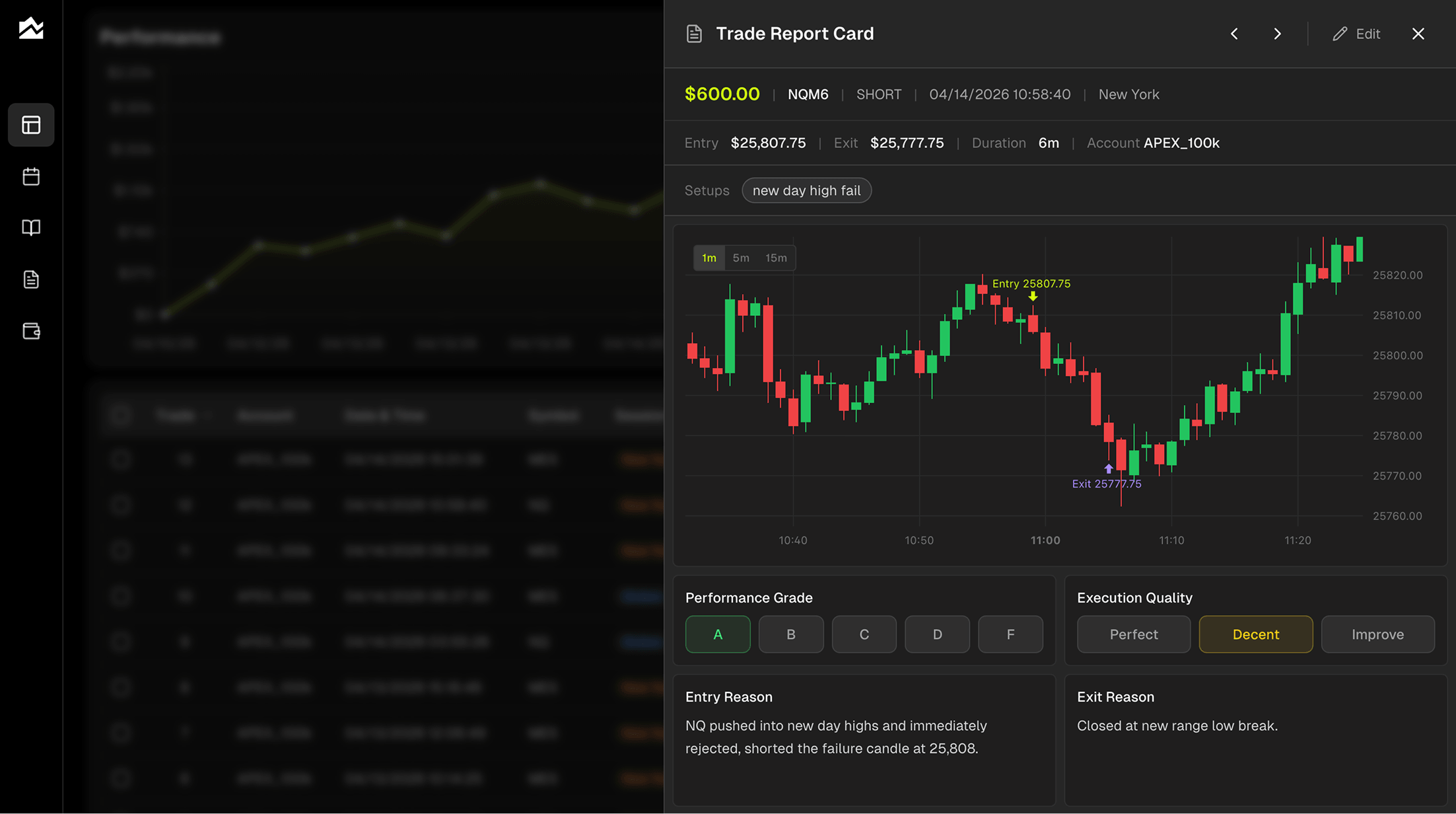
Open any trade and you get the full Trade Report Card. An interactive chart with your entry and exit marked at the exact bar, switchable between 1m, 5m, and 15m timeframes, so you can relive the context without opening a separate charting tool. Above it, the trade's symbol, side, duration, account, and setup tag. Below, two grading systems that do different jobs.
Performance Grade runs A through F and rates the outcome. Execution Quality is Perfect, Decent, or Improve and rates how closely you followed your plan. An A-setup that lost money is still a good trade. A D-grade trade with Perfect execution means the setup failed but your process was clean. A B-grade trade with Improve execution means you got lucky. P&L tells you what happened. Grading tells you why.
Tag by setup, add Entry Reason, Exit Reason, Emotional State, and Market Conditions, and filter Trade Reports by any of it. If your "new day high fail" setup runs a 65% win rate but your "news catalyst" setup sits at 40%, you'll see it clearly.
A Journal Built for Traders
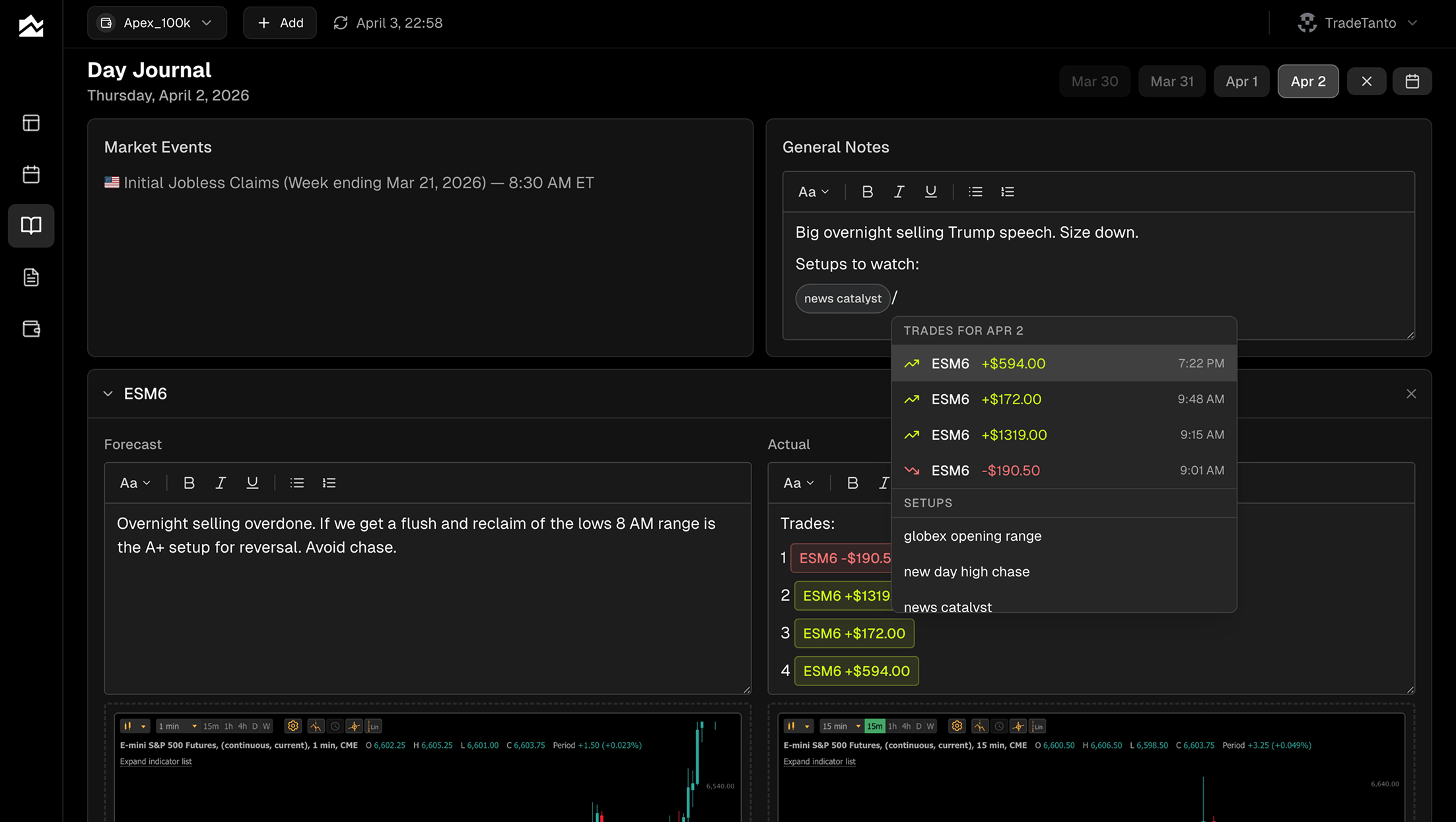
The Day Journal is where the whole platform connects. Rich text that feels like Notion, with one key difference: type a forward slash and a command menu pops up. Pull up any of today's trades and drop them directly into your notes as live chips that stay linked to the original trade. Search existing tags, mention an account, or pull up a setup, all inline. You don't leave the page to cross-reference anything.
Each day has a Forecast and Actual split. Prep before open: write the plan, name the setups to watch, size down if news is coming. Review after close: did the plan work, did you follow it, what did you miss? You can have up to three asset sections per day (ES, NQ, CL) with their own forecast and actual columns, so a day spent rotating between instruments doesn't collapse into one blob of notes.
Market events are built in. Initial Jobless Claims, CPI, FOMC, NFP, all displayed in Eastern Time alongside your notes. No extra tabs to pull context. Upload charts and screenshots with drag-and-drop. The whole thing auto-saves as you type.
Every session becomes a case study.
All Your Prop Accounts in One Place
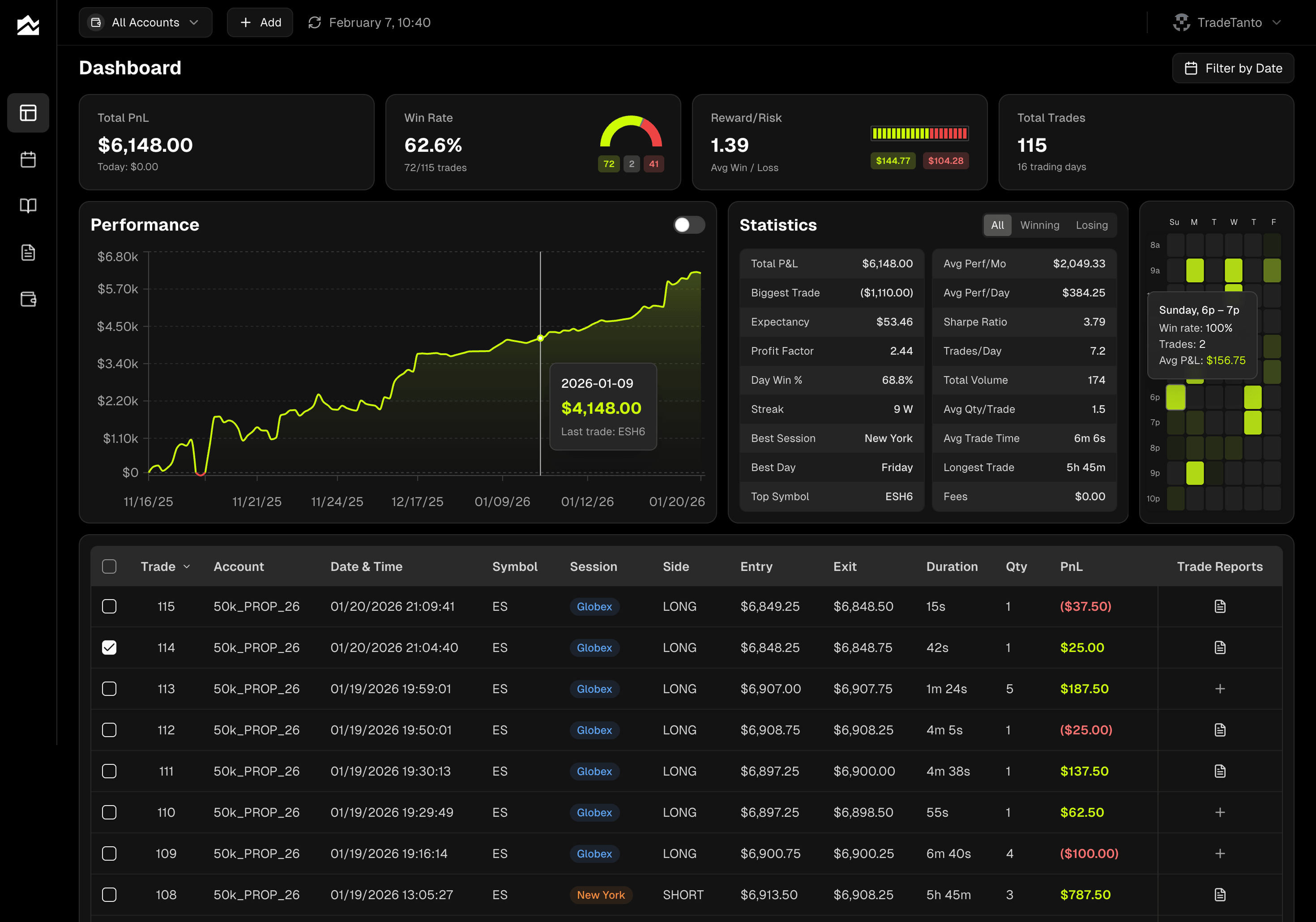
Each account gets tracked separately with its own commission schedule. A Topstep combine synced from TopstepX, an Apex account syncing from Rithmic, a Bulenox account, a personal Tradovate account, all in one login, all separated.
The account selector filters the whole app. Click "APEX 100k" and the dashboard, calendar, heatmap, and Trade Reports switch to that account only. Click "All Accounts" for the combined view. Pair it with the date range filter and you can drill into "Apex funded account, last 30 days" in two clicks.
Trades you don't want counted (a test trade, an accidental fill, a sim run alongside a funded account) can be hidden instead of deleted. Hidden trades stay in the grid at 40% opacity but drop out of every calculation: stats, charts, heatmap, reports, all of it. Unhide anytime. This is the feature that matters when you're running combines alongside funded accounts and don't want one polluting the other.
Commissions are per-account, per-order or per-contract. Every P&L figure across the app reflects what you actually keep. The stat panel surfaces a Fees row so you can see exactly what you're paying.
Spot Patterns You'd Never See
The trading heatmap shows your performance by hour of day and day of week. Brighter cells mean higher expectancy, win rate multiplied by average P&L. Dim cells mean lower expectancy. Empty cells mean you don't trade that hour. Hover any cell to see win rate, trade count, and average P&L for that slot.
Most traders have blind spots here. Profitable overall but losing money every Tuesday between 10 and 11 AM, never noticed because the weekly number looks fine. The heatmap surfaces it in three seconds.
Pair it with the stat panel's session breakdown (New York vs. Globex), best and worst day of the week, top and worst symbols, and longest winning and losing streaks, and you have a real picture of when your edge shows up. The calendar view adds another layer: daily and weekly P&L on a monthly grid, color-coded, so drawdowns and winning streaks jump out at a glance. Click any day to see the trades and journal entry behind it.
Pricing
Tanto uses a flat pricing structure with account limits that scale up per tier. See the current plans on the pricing page.
Other Edgewonk Alternatives to Consider
A fair alternatives article shouldn't act like there's only one good answer. Two more worth looking at depending on your setup:
TradesViz is a kitchen-sink journal aimed primarily at stock and options traders, with extensive support for Interactive Brokers, Schwab, Tastyworks, Webull, and other equity-focused brokers. It offers a large catalog of stats, custom dashboards, and an add-on trading simulator. Futures support exists but isn't the product focus, and the interface leans heavy: lots of features, lots to learn. If you're an options or equity trader who wants more metrics than you'll probably use and a simulator built in, it's a reasonable option. For futures and prop firm traders, the fit is thinner.
Tradervue is the oldest name in the category and still the simplest. It has a free tier, a clean interface, and a social/sharing layer where traders post trades and review each other's work. If you're stock or options focused, want something that works out of the box, and like public accountability, Tradervue holds up. Futures and prop firm features are lighter, so it's a weaker fit if that's your main workflow.
Who Should Stay on Edgewonk
Switching isn't always the right call. Edgewonk is the better choice if:
You trade across multiple asset classes (forex, stocks, options, crypto, futures) and want them all in one flat-priced journal
The Edge Finder's summary reports are the feature you rely on most
You use Setup Checklists to rate trades against a predefined rule set on every entry
The Trade Management Optimizer directly addresses a weakness in how you manage open positions
You're a long-time user with years of history already in the platform
You only run one or two accounts total and don't need prop-firm-specific workflow tools
The honest case against switching: if what you're doing works, there's no urgency. Edgewonk has a decade of product maturity behind it, and the Edge Finder plus Trade Management Optimizer combination is tooling you won't find in the same form elsewhere. For the trader who genuinely uses those features, it's still the right journal.
Migrating Away from Edgewonk
If you're switching, the process is straightforward and usually takes 30 to 45 minutes.
Export your historical trades from your broker to Excel or CSV using their export function.
Reconnect your broker directly to the new journal. In Tanto, that means using AutoSync for Tradovate, NinjaTrader, cTrader, Rithmic, TopstepX, or Interactive Brokers. Going forward, trades stream in automatically.
Import your historical file. Tanto's CSV upload accepts files from Tradovate, NinjaTrader Web, NinjaTrader Desktop, and cTrader XLSX exports directly. If your format isn't parsed natively, the team can help map it.
Rebuild your tags and setups. Tag conventions don't transfer cleanly across journals, so budget a few minutes to recreate the ones you use.
What might not transfer: Edgewonk-specific data like Edge Finder analysis, Setup Checklist criteria, discipline scores, screenshots on old entries, and Trade Management Optimizer output. Trade-level data (fills, prices, quantities, symbols, times) transfers cleanly. Journal notes usually come across as plain text.
Bottom Line
If you're a futures or prop firm trader who juggles combines, funded accounts, and personal capital and wants one journal that handles all of it cleanly, Tanto is the Edgewonk alternative worth trying. Real-time sync across Tradovate, NinjaTrader, cTrader, Rithmic, TopstepX, and IBKR, plus prop-firm-aware account tracking, grading, and per-account commissions, is exactly what a web based Edgewonk replacement should look like for that audience. If you're a multi-asset trader who wants Edgewonk's Edge Finder summaries and in-trade management analysis, Edgewonk is still the better fit. The right journal is the one that matches how you actually trade.
By Team Tanto · Last updated: April, 2026